What is production scheduling?
Production scheduling is the process of timing, sequencing, and precise resource allocation for each manufacturing operation. It’s where you decide exactly how to use available production capacity to meet the demand you established during production planning.
![]()
Production scheduling is at the heart of efficient manufacturing. When done right, it keeps machines, workers, and materials in sync, minimizing downtime and keeping production on track. When done poorly, purchasing and production fall out of step, production costs rise, lead times increase, on-time delivery suffers, and customer satisfaction takes a hit.
Production scheduling vs. production planning
Production planning and scheduling are two different parts of the overall production management process.
Production planning takes the longer-term view and asks, “Can we meet expected demand with planned capacity?” It compares demand against available resources (machine hours, labor, and materials) over weeks or months, aiming to confirm that customer demand, material availability, and production capacity align at a higher level, or to identify whether changes are needed, such as switching shifts, outsourcing work or materials, etc.
Production scheduling deals with the near-term and immediate practicalities – “How to use our production capacity day by day?” When planning confirms the overall capacity, manufacturing production scheduling determines which production orders run on which machine, in what sequence, and who’s assigned to them. The idea is to optimize the use of time, labor, equipment, and materials to manufacture efficiently.
A third process bridges the high-level demand and capacity planning of production planning with the low-level practicalities of production scheduling: master production scheduling (MPS). MPS systems specify which products need to be manufactured for an upcoming period, usually a quarter or half-year. It may include demand forecasting to assign planned quantities based on historical data. Its purpose is to align planned output for the period with purchases, inventory targets, and available capacity without going into individual manufacturing operations. The detailed production schedule then translates the targets into actual jobs, workstation assignments, and start and finish times.
Production scheduling example
A small furniture manufacturer’s master production schedule calls for 90 pieces of furniture this quarter, and capacity planning confirms the target is achievable. Among this week’s orders are a cabinet due Wednesday, a table due Thursday, and chairs due Friday.
The production scheduler now needs to turn these requirements into individual operations. All three products must go through CNC cutting, sanding, and assembly, but the workshop has only one CNC router and one sanding station. The production scheduler must arrange the operations so that no workstation is double-booked and each order is finished on time.
Here’s how the schedule could look:
- Cabinet: CNC cutting on Monday, sanding on Tuesday, and assembly on Wednesday.
- Table: CNC cutting on Tuesday, sanding on Wednesday, and assembly on Thursday.
- Chairs: CNC cutting on Wednesday, sanding on Thursday, and assembly on Friday.
This sequence in the production scheduling process allows the CNC router to cut parts for the next order while the previous one moves through sanding and assembly. Each workstation has a clear queue, and all three orders can meet their deadlines without competing for the same resources. If the cabinet’s cutting takes longer than expected, the scheduler must adjust the remaining operations to prevent the delay from affecting the table and chair orders.
This is the essence of production scheduling. Production planning confirms the manufacturer’s capacity to fulfill the orders. Production scheduling determines exactly how that capacity is used.
What is a production schedule?
A production schedule (also called a manufacturing schedule) is a flexible, working document that lays out everything needed to execute production for a given time period, typically the next few days or weeks.
A production schedule should cover:
- What’s being produced: the specific orders, products, and quantities scheduled for the period,
- Who’s doing the work: which employees or teams are assigned to each job.
- Where it’s happening: which machines, workstations, or production lines jobs run on.
- When each step happens: start and end times for every operation and the due date each one needs to hit.
The schedule should also detail the bills of materials (BOMs) for the products being produced, including the production routing instructions a job follows from raw materials to finished products, and the components and raw materials needed at each step of the routing.
What else to include in a production schedule?
Shop floors rarely go exactly to plan. Orders shift, materials arrive late, and machines go down, so a production schedule should be able to adjust as conditions change.
A good production schedule also factors in planned maintenance and downtime up front and includes contingency plans so that shop floors can respond to disruptions like delayed shipments or an unplanned breakdown.
Finally, a production schedule needs to consider the shop floor’s real constraints, including machine capacity, labor availability, and planned downtime and changeover times. A schedule that ignores constraints will limp both legs when put into practice.
Why is production scheduling important for SMEs?
Manufacturers of all sizes face the same basic challenge of matching demand with material availability and production capacity when it occurs. However, because staff and equipment are limited, a central production scheduling system might feel like unnecessary overhead for small manufacturers. The result is workers scheduling production on the go and slotting jobs in as they come up. This might feel easier, but it’s guaranteed to lead to inefficiencies, delays, and mistakes on the shop floor.
The schedule should give you a concrete plan to work from and make the production effort as efficient and consistent as possible. With a central scheduling system in place, you can schedule orders around when key materials will arrive, organize routings and workstations to cut down on waiting, and easily shift jobs based on last-minute changes without it breaking the production calendar.
Signs you need better production scheduling
Here’s what typically shows up across your operations without a real production schedule:
- Slipping delivery dates. This is one of the clearest signs. Orders are completed later than expected because production keeps taking longer than scheduled, critical resources get double-booked, or delays aren’t flagged and accounted for early enough.
- Bottlenecks go unnoticed. Without a clear schedule, it’s hard to compare planned vs. actual progress. A workstation can quietly fall behind for days before anyone catches it. You might only notice the delay because other orders are waiting.
- Materials arrive too late or too early. Poor scheduling also complicates inventory management. Without a system that ties work orders to procurement, it’s difficult to see how much to order and by when. Materials might sit in storage for weeks before they’re needed. Worse, a job might be ready to start while its components are still on order.
- Expediting becomes routine. Rush orders, last-minute schedule changes, and overtime become the standard way of meeting deadlines rather than exceptions. Instead of following a workable schedule, you’re constantly trying to catch up.
- Uneven use of labor and equipment. Without a strong schedule and calendars in place, it’s hard to track how work flows between workstations. Some machines or shifts will sit idle while workload piles up in others.
- Reactive day-to-day priorities. Most small manufacturers without poor scheduling practices end up shifting priority to whichever order feels most urgent that day, instead of setting priorities in advance based on due dates and capacity, and leaving flexibility for one-off rushes.
The 5 stages of production scheduling
1. Understand your production plan
Before you start building the actual schedule, look back at what you already settled on during planning:
- Which customer orders and forecasted production quantities need to be completed.
- When each order is due and which deadlines take priority.
- How much machine capacity, labor, and material availability you have to work with.
If you use a master production schedule, start by reviewing its planned output for the coming weeks and any changes in demand or capacity. These targets form the starting point for the detailed production schedule.
Then think about how much room your schedule needs to flex. If you’re making to stock, you can likely build a schedule and stick to it. Custom or make-to-order shops should expect to revise the schedule regularly and factor in more leeway. But build in some slack either way. Disruptions like rush orders, late shipments, and sick days happen to every manufacturer, no matter how solid the plan behind it is.
2. Confirm routings and BOMs
Before scheduling production, confirm your BOMs are accurate. A BOM lists the components and quantities needed to manufacture a product. If it’s outdated, it’ll throw off the whole schedule. When you order materials based on an old BOM version, components you actually need will never make it onto a purchase order.
Next, confirm the production routings. A routing defines the operations a product must go through, their sequence, the workstations involved, and the time required for each operation. Confirm that your routings reflect shop floor reality, not how you originally set them up. If a step at a CNC lathe can’t be completed because the workstation is in repair, you need to adjust the routing to reflect this.
This is also a good time to look for opportunities to reduce setup times. Scheduling jobs that require similar machine settings or materials back-to-back can eliminate unnecessary changeovers. Finally, identify backup workstations or alternative routings for critical operations. Having an alternative ready makes rescheduling much easier if a machine becomes unavailable.
3. Build the schedule
With the production plan, BOMs, and routings confirmed, you can start assigning actual dates and resources to individual operations. Whether you’re using a spreadsheet or dedicated software, building a schedule usually comes down to:
- Choosing a scheduling direction. Decide whether to schedule jobs forward from their earliest possible start to prioritize fast completion, or backward from their required completion date to produce just in time.
- Prioritize competing orders. Set clear rules for which jobs should take precedence based on due dates, customer commitments, material availability, or other operational priorities.
- Assign realistic lead times and resources. Allocate operations to workstations, estimate start and finish times, and assign the necessary workers. Take shift schedules and required skills into account, so machines and workers stay productive without being overloaded or left idle.
- Check material availability. This includes what’s on hand, already allocated, what still needs ordering, and when it will arrive (factoring in supplier lead times).
- Account for the entire production process. Build in time for quality checks, setup and changeover times, planned maintenance, and goods moving between stations.
- Leave room for disruptions. Especially around your most constrained resources and workstations. Also, add reasonable buffers for rush orders and unplanned downtime.
Before treating anything as final, check it against your due dates and resource limits. Look for overlapping jobs, overloaded workstations, missing materials, and operations that don’t have enough time allocated.
4. Dispatch and execute
Dispatching is getting the information in the production schedule to the people who actually need it. Everyone on the floor should know exactly what to run next, without having to track down a supervisor to find out. Workers also need access to the instructions, materials, and other information required to complete their tasks.
If you have a small shop, dispatching might mean posting each workstation’s job list for the day, or pushing updates through your scheduling software. Well-made standard operating procedures (SOPs) are the way to go, though, to keep processes consistent and systematic.
As work progresses, operators should also record what actually happens. At a minimum, this includes:
- When each operation starts and finishes.
- How many units are completed.
- Any downtime, scrap, or unexpected delays.
This is known as shop floor reporting, and it provides the information needed to track production progress against the schedule. Even a simple paper-based reporting system or lightweight manufacturing execution system (MES) can work for a small operation. However, production scheduling software with integrated shop floor reporting makes it easier to collect and share this information as jobs progress.
5. Monitor and improve
Production scheduling doesn’t end when work begins. Compare actual progress against the schedule and adjust when necessary. If an operation takes longer than expected, find out why. Was a machine unavailable? Did the operator run into a quality problem? Was the original estimate unrealistic?
Confirm whether it’s just a one-off problem or a recurring pattern. If it’s recurring, you need to adjust something. If welding a bracket assembly takes five hours instead of the three you scheduled, the routing’s time estimate is likely wrong and needs recalculation.
Use production reports and scheduling KPIs to identify these patterns, but don’t rely on numbers alone. Get feedback directly from the shop floor because operators often know exactly which jobs ran late and why. Regularly reviewing actual production performance and updating your routings, capacity estimates, and scheduling priorities creates a feedback loop that makes each new schedule more accurate.
Common production scheduling methods
There are several ways to approach production scheduling, depending on the type of manufacturing, order deadlines, and available resources.
The four main methods fall into two categories. Finite and infinite capacity scheduling determine whether resource limits are considered, while forward and backward scheduling determine which direction jobs are scheduled in time. These methods aren’t mutually exclusive. For example, a manufacturer can use finite capacity scheduling together with either forward or backward scheduling.
Infinite capacity scheduling
Infinite capacity scheduling assigns jobs based on their required timing without checking whether the necessary machines, workstations, or workers are actually available. Jobs are scheduled based on when they’re needed, without seeing whether the workstation, machine, or crew doing the work is booked or not.
It’s simpler to calculate but ignores the real limits of labor hours, machine availability, or shift length. So even if there are only a few jobs with simple routings and a lot of slack capacity, there’s still a risk of creating a schedule that hits constraints. In practice, infinite capacity scheduling can work for small shops. If you rarely have two jobs competing for the same machine or worker, checking resource availability before scheduling changes the outcome little. But resource conflicts must still be resolved before production begins.
Finite capacity scheduling
Finite capacity scheduling accounts for the actual availability of production resources. Resource availability and production capacity are checked to avoid scheduling more work than workstations can handle. For example, if a CNC router is available for eight hours a day, finite scheduling won’t allow assigning ten hours of work on it on the same day. Instead, the remaining operations are moved to the next available time slot.
This makes finite scheduling particularly useful for manufacturers running multiple orders across shared workstations, where every job needs to fit around existing commitments. The tradeoff is that it takes more work to set up and maintain, since it depends on keeping resource capacity, changeover times, and labor availability reasonably current.
Forward scheduling
Forward scheduling works to identify the earliest possible start time for each job, moving forward in time. Work starts as soon as there is capacity for it, rather than being timed according to a due date.
Forward scheduling tends to suit make-to-stock manufacturers who build to a sales forecast rather than to a specific customer order with a hard deadline. Since jobs start as soon as possible, manufacturers have a tightly packed schedule that keeps machines and people busy.
Backward scheduling
Backward scheduling works in the opposite direction. It starts with the date the job needs to be finished by, then schedules operations backward from that date. This allows manufacturers to find the latest possible time each step can start without missing their deadline.
Backward scheduling tends to suit make-to-order manufacturers working against firm delivery dates, particularly those following just-in-time principles. Because each operation is scheduled as late as possible without missing the due date, it keeps work-in-progress and finished-goods inventory to a minimum.
Advanced planning and scheduling methods
Manufacturers with more complex operations may benefit from additional approaches. Some examples include:
- Advanced planning and scheduling (APS): Uses optimization algorithms to coordinate multiple constraints, such as workstation capacity, labor, tooling, and delivery dates. It’s particularly useful for manufacturers dealing with many product variants, frequent changeovers, or competing production priorities.
- Takt-based scheduling: Organizes production around a target pace determined by customer demand. It works best in repetitive, high-volume environments where products move through a relatively consistent sequence of operations.
- Bottleneck-based scheduling: Builds the production schedule around the operation that limits overall output. For example, if a factory’s single heat-treatment oven is its main bottleneck, other operations are scheduled to keep it supplied with work without creating excessive queues.
Production scheduling KPIs to track
A schedule can look good on paper and still fall apart by Wednesday. To see where things went off track, compare when jobs were supposed to run, when they actually finished, and when the orders shipped.
- Schedule adherence tells you how often jobs start and finish when you scheduled them to. If the same operation keeps running over, check the time estimate in the routing. If jobs keep starting late, check whether materials and workstations are ready when the schedule says they should be.
- On-time production completion is the percentage of jobs finished by their production due date. Say a cabinet was scheduled to come off the CNC router on Monday. Cutting slips to Tuesday, but the cabinet still makes its Wednesday production deadline. The job finished on time even though one operation ran behind schedule.
- On-time shipment is the percentage of orders shipped by their promised ship date. If that cabinet is ready on Wednesday but misses its Thursday pickup, production hit its deadline. The next place to look is what happened between assembly and dispatch.
- Workstation utilization tells you how much of a workstation’s available time is used. If your CNC router is booked for nearly every available hour and jobs regularly queue up in front of it, a long setup or a rush order can push several jobs back.
You can start with the dates you already record. Have operators log when jobs start and finish, and compare those times with the schedule. Keep the production due date and promised ship date separate so you can see where the delay happened.
Check out more production planning KPIs on the MRPeasy manufacturing blog.
Choosing the best tools for production scheduling
Production schedules can be managed with anything from a basic spreadsheet to dedicated manufacturing ERP software. The right choice depends on how many jobs, workstations, and production constraints you need to coordinate, as well as how frequently the schedule changes.
Production scheduling using spreadsheets
Spreadsheets are a common starting point for production scheduling. For small manufacturers, tools like Excel can strike a pretty good balance between complexity and functionality.
Spreadsheets come with some advantages. Most people already know the basics, and spreadsheets can be shaped to match how a specific shop actually operates. AI interfaces simplify customization, too, and the flexibility to shape them to your needs can outweigh the cost and learning curve of dedicated production scheduling software, at least at first.
But spreadsheets do have fundamental flaws that manufacturers often run into as their businesses scale.
- Manual data entry errors: When spreadsheets are used for complex manufacturing processes, data entry errors are a real risk. And with the volume of data involved in production scheduling, small mistakes compound quickly.
- Files become too bulky: As more data, formulas, and macros get added, file sizes can get excessive. This slows down basic actions like opening or saving spreadsheets, and heightens the risk of crashes and data loss.
- Lack of real-time updates: A spreadsheet only updates when someone manually changes it. If purchasing makes a note indicating a delayed shipment, that change doesn’t automatically get flagged to other departments.
- No single source of truth: Different departments need visibility into the same production data, but spreadsheets have key limitations in providing it. Scheduling relies on accurate, timely data from both incoming orders (CRM), inventory & purchasing, and the shop floor, none of which sync automatically in spreadsheets.
Many small manufacturers start to run into limitations when the number of SKUs grows, customer demand increases, or operations become more complex overall. A good sign you’ve outgrown spreadsheet scheduling is when maintaining the schedule starts taking more time than actually planning production. If departments regularly work from conflicting information, operations get double-booked, or small changes require hours of manual rescheduling, it’s probably time for a more connected solution.
Manufacturing ERP with production scheduling functionality
Manufacturing ERP (enterprise resource planning) software centralizes operational data from all relevant departments in a single database. Sales orders, bills of materials, inventory levels, purchasing, routings, and production progress are all managed in the same system. This means the schedule is built using the same information that all departments rely on.
- Purchasing can see which incoming orders are tied to upcoming scheduled jobs, with automatic flags if a delayed shipment will affect a job’s start date.
- Production planners get a live view of the schedule itself. Manufacturing ERP software shows which jobs are assigned to which workstations, whether materials for each job are actually available, and where capacity is running tight.
- Sales teams can check real production capacity and current schedule load at the moment a new order is being quoted. Delivery dates promised to customers reflect what the floor can actually deliver.
- Shop floor workers can see the jobs assigned to a given workstation, their sequence, and any priority changes, without needing to track down a supervisor to find out what’s next.
Scheduling no longer happens in isolation. Changes in orders, material availability, and production progress are visible across the business, so departments can coordinate on the same production plan in real time.
Native production scheduling for manufacturing companies
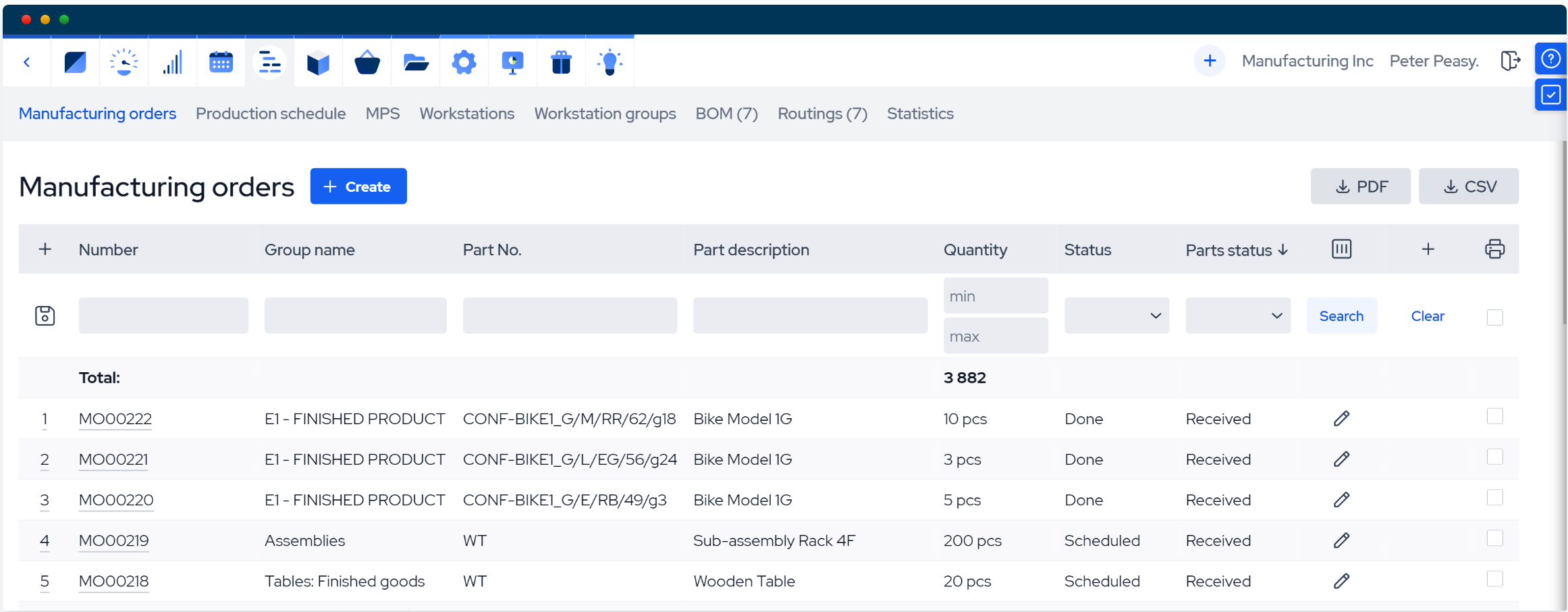
Production scheduling is a core function of manufacturing ERP systems like MRPeasy, which automates much of the scheduling process. Some of the key capabilities include:
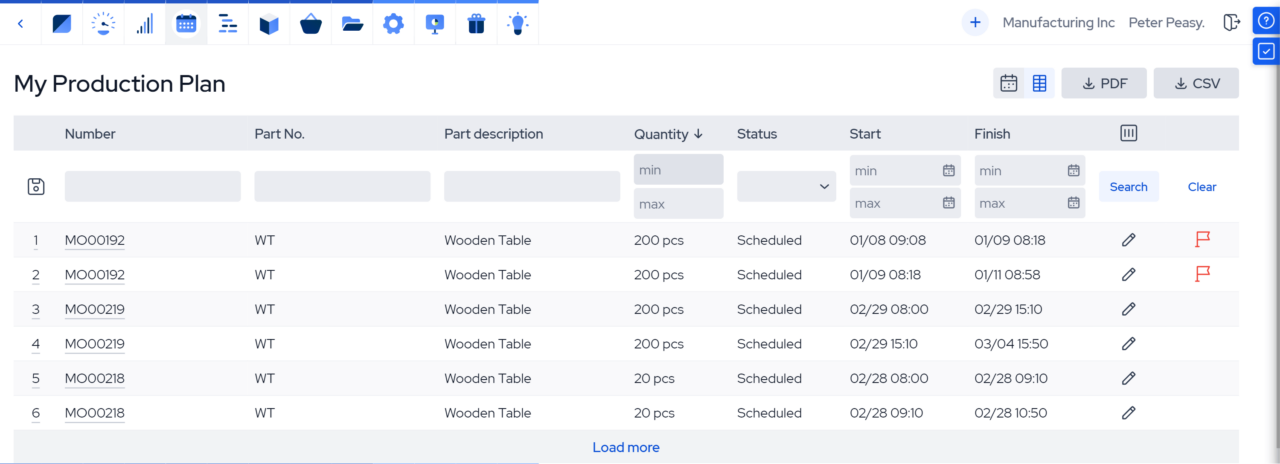
- Automatic, capacity-aware scheduling: MRPeasy calculates production schedules based on BOMs, routings, operation times, and available workstation capacity. Jobs are automatically assigned to available time slots, accounting for existing workloads and planned downtime. Forward scheduling is available by default, while backward scheduling can be used to work from a required completion date.
- Visual scheduling and easy rescheduling: Interactive Gantt charts and production calendars show manufacturing orders, individual operations, and workstation loads on a timeline. Drag-and-drop rescheduling makes it easy to move jobs or operations when priorities change, or delays occur.
- Integrated material planning: Through integrated material requirements planning (MRP), the system checks material requirements against available inventory, books components for manufacturing orders, and identifies shortages. Purchasing can see which materials are missing for upcoming jobs to arrange procurement accordingly.
- Real-time shop floor reporting: Workers can see their assigned jobs and report progress through dedicated shop floor interfaces. Operation times, completed quantities, quality issues, and material consumption can all be recorded in the system, giving production managers up-to-date visibility into what’s actually happening on the floor.
For small manufacturers, the biggest advantage isn’t simply having a digital production calendar. It’s being able to make scheduling decisions based on actual material availability, workstation capacity, and customer commitments without constantly reconciling information from different departments.
Manufacturing ERP systems like MRPeasy make this level of coordination accessible to smaller operations, without requiring a dedicated IT department or the complexity of an enterprise-scale implementation.
Frequently asked questions (FAQ)
How do production planning and scheduling work together? Production planning establishes what needs to be manufactured, how much, and by when, while production scheduling determines how to execute that plan. Planning takes a longer-term view, aligning customer demand with available materials, labor, and production capacity. Scheduling then translates these targets into specific shop floor operations, assigning jobs to machines, workers, and time slots. Together, they ensure production targets are realistic and that day-to-day operations are organized to meet delivery deadlines.
How to create a production schedule? Start by reviewing your production plan to establish what needs to be manufactured, by when, and with which resources. Next, confirm the BOMs and routings for each product, then assign operations to available workstations, workers, and time slots. Check material availability, account for capacity constraints and downtime, and dispatch the finished schedule to the shop floor. As production progresses, track actual performance against the schedule and use the results to improve future scheduling.
What are the 5 stages of the production process? The five stages are production planning, preparing BOMs and routings, production scheduling, dispatching and execution, and monitoring and improvement. Planning establishes what needs to be manufactured and the resources required, while BOMs and routings define the materials and operations involved. Scheduling then assigns jobs to specific workstations and time slots, after which production is carried out on the shop floor. Finally, monitoring helps identify delays, bottlenecks, and opportunities to improve future production runs.
What’s the difference between forward and backward scheduling? Forward scheduling starts production as early as possible, while backward scheduling works backward from a required completion date. Forward scheduling assigns operations to the earliest available time slots, making it useful for make-to-stock manufacturers looking to complete jobs quickly. Backward scheduling calculates the latest feasible start time for each operation, helping make-to-order manufacturers meet delivery deadlines while minimizing work-in-progress and finished goods inventory. Both methods can be combined with finite capacity scheduling to account for actual resource availability.
Do small manufacturers need ERP software for production scheduling? Small manufacturers don’t necessarily need ERP software to manage production scheduling. A workshop running a handful of jobs across a few workstations can often get by with a well-organized spreadsheet. However, as order volumes, product ranges, and production complexity grow, manually keeping schedules updated becomes increasingly difficult. Manufacturing ERP software helps automate scheduling, coordinate resources, and keep production information synchronized across departments.