Stocky by Shopify Sunset: What It Means and the Best Alternative for Manufacturers
Shopify’s inventory add-on Stocky will no longer be available after August 31, 2026. For merchants using it to manage inventory, purchasing, stocktakes, or replenishment, this means it’s time to decide whether Shopify’s built-in inventory tools are enough or whether it’s time to look at a more complete inventory system.

Stocky by Shopify is being discontinued after August 31, 2026. Shopify recommends moving inventory workflows into Shopify admin and Shopify POS. That’s viable for simple retail inventory, but if your business relies on forecasting, purchasing, assembly, manufacturing, or multi-location planning, you should evaluate a dedicated inventory or ERP system before the deadline.
What is Stocky by Shopify?
Stocky is Shopify’s inventory management app for Shopify POS Pro users. It helps merchants manage stock levels, forecast inventory needs, create and receive purchase orders, perform stock counts, and transfer inventory between locations.
For many Shopify retailers, Stocky has been a useful bridge between sales and inventory control. It’s helped teams understand what’s in stock, what needs to be reordered, and how inventory moves across stores, warehouses, and sales channels.
Why is Stocky sunsetting?
Shopify’s official guidance is that the Stocky app is being phased out because Shopify is bringing more inventory management features directly into its core platform, rather than keeping them in a separate add-on. So Stocky users are expected to move their inventory workflows into Shopify admin and Shopify POS.
That doesn’t mean inventory management is becoming less important – quite the opposite. Shopify is making inventory more integrated with the main selling environment. For businesses with simple retail inventory needs, this may be enough. But for merchants that also manufacture, assemble, kit, package, distribute, or manage more complex purchasing workflows, this change may be a good time to evaluate whether Shopify alone covers the full operation.
What does this change for Stocky users?
- Stocky stops being available after August 31, 2026. After this date, users will need to manage inventory in Shopify admin, Shopify POS, or another third-party inventory solution.
- Stocky has already been delisted from the Shopify App Store. New users can’t install it, and existing users should be careful about removing it before they’ve completed migration (more on that below).
- Daily workflows need to move elsewhere. Purchase orders, stocktakes, transfers, inventory adjustments, and replenishment planning need to be handled in Shopify or an external system.
- Historical records and supplier information need extra attention. Old purchase orders and stocktakes won’t automatically move into Shopify, and supplier records can’t be exported from Stocky. So save anything you’ll need before the deadline.
- Stocky APIs will stop working. Any tools or custom workflows connected to Stocky need to be reviewed and replaced.
- Some processes may work differently. Even when Shopify offers a similar feature, the workflow may not align with how your team worked with Stocky.
- Teams need time to adjust. Whether you stay inside Shopify or move to another system, test the new process before Stocky becomes unavailable.
Why inventory management matters for Shopify users
Ecommerce doesn’t forgive inventory mistakes. If Shopify shows that a product is available but the warehouse can’t fulfill it, the result is usually a delayed order, a refund, or a disappointed customer. This becomes even more important when the same stock is sold simultaneously through both Shopify, a POS, wholesale, or online marketplaces.
Inventory isn’t just finished goods. For many Shopify businesses, stock also includes raw materials, components, packaging, labels, subassemblies, and work-in-process. A cosmetics brand, for example, doesn’t only need to know how many finished products are available but also whether it has the ingredients, containers, caps, labels, and production capacity to meet demand.
Inventory tracking and inventory planning aren’t the same thing. Tracking tells you what you have in stock and where it is. Planning tells you what to reorder, what to produce, which materials are missing, which suppliers are needed, and when stock will be available for customers. For growing Shopify businesses, especially manufacturers and distributors, both sides of the coin need to be covered.
Is Shopify’s built-in inventory enough?
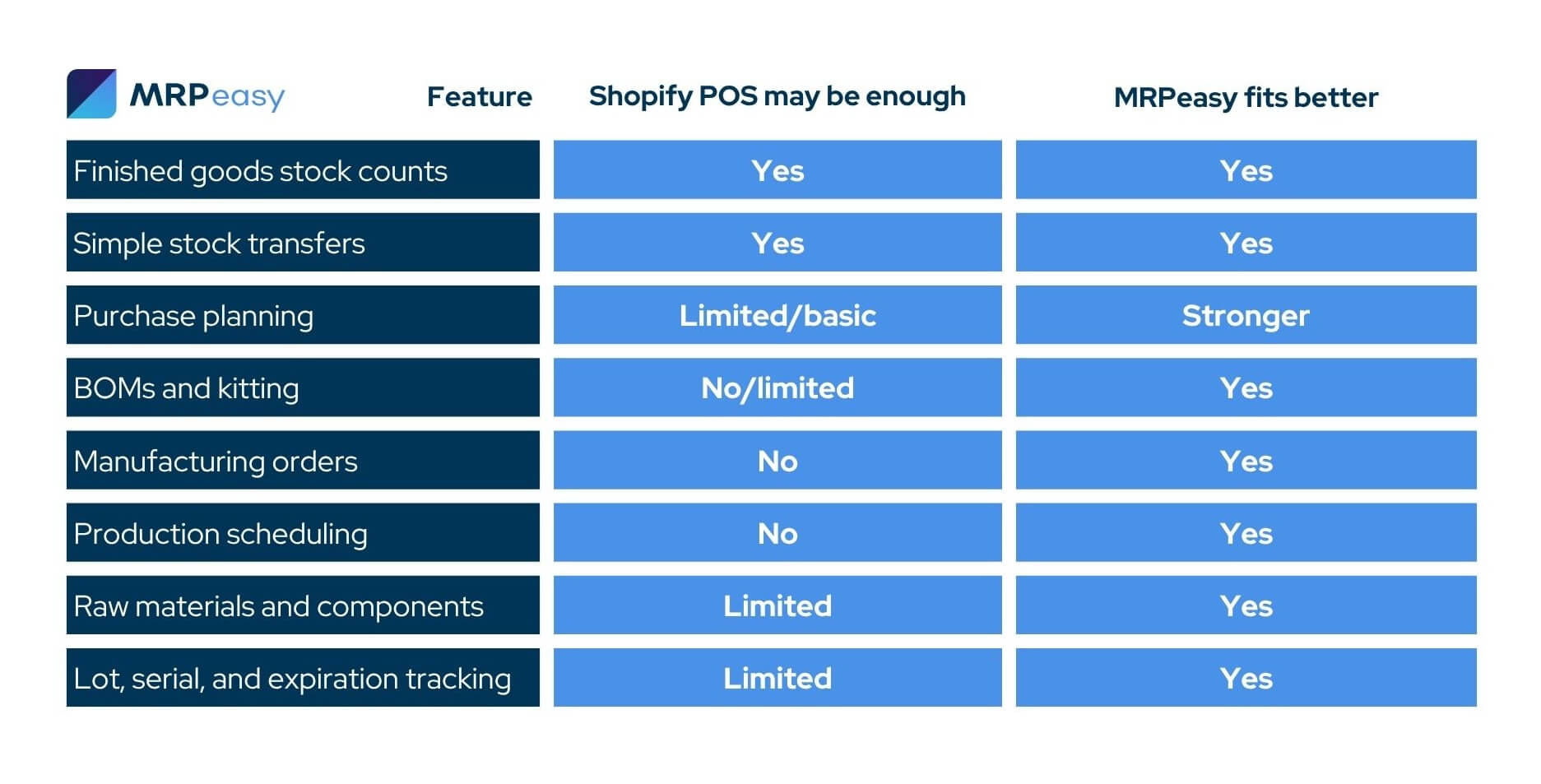
For some merchants, Shopify’s built-in inventory tools may be the most practical Stocky replacement. If your business mainly sells finished goods and only requires simple inventory counts, stock transfers, POS workflows, and basic visibility, such as low-stock alerts, staying within Shopify may cover your day-to-day needs.
A dedicated inventory system is probably a better long-term fit if your business depends on forecasting, has a structured purchasing workflow, does kitting or bundling, uses BOMs for stock logic, works with perishables, or has multi-location inventory tied to manufacturing. In that case, the question you should be asking is whether your inventory system can support the operational work behind every Shopify order.
Stocky migration checklist
Here’s a barebones look at your next steps.
1. Export the data you want to keep
Start by exporting important Stocky records before the deadline. This may include purchase orders, stocktakes, inventory reports, stock adjustments, and other records your team may need later for auditing, accounting, purchasing, or operational reference.
Don’t assume that historical Stocky information will be available in your next workflow. If the data matters, export it and store it in a structured, searchable format.
2. Document your current Stocky workflows
Before choosing a new solution, write down how your team currently uses Stocky. Include purchase orders, receiving, stock counts, barcode scanning, inventory transfers, supplier records, reporting, reorder decisions, and any connected tools.
This step helps you avoid choosing a system based only on a feature list. The right replacement should support the workflows your business actually relies on.
3. Decide what comes next for your business
For some Shopify merchants, moving to Shopify’s built-in inventory tools will be the most logical next step. If your business primarily handles finished goods, store transfers, stock counts, and basic purchasing, Shopify may meet most of your daily needs.
If your business manufactures, assembles, kits, distributes, or manages complex supply chains, you may need a more specialized inventory management software or manufacturing ERP system. This is especially true if your inventory availability depends on BOMs, materials, supplier lead times, production schedules, batch tracking, or multi-stage workflows.
4. Choose your migration path
If you opt for Shopify’s built-in inventory tools, start testing the relevant workflows early. Run test purchase orders, transfers, stock adjustments, barcode workflows, and reports. Make sure your team understands how the new process differs from Stocky.
If you opt for an external inventory solution, evaluate your options carefully. Look for systems that integrate with Shopify, support your operational workflows, and can scale with your business. You can start by comparing options in our guide to the best inventory management systems in 2026.
5. Avoid rebuilding Stocky in spreadsheets
While you might need to bootstrap your operation for a short period after the sunset, we strongly recommend not building your new system on spreadsheets.
They might work as a temporary export archive, but spreadsheets are risky and limited as a live inventory or production planning system. They don’t automatically update stock, reserve items for orders, calculate material shortages, sync with Shopify, or warn teams before purchasing and production problems appear.
What to look for in your next inventory solution
A good Stocky replacement should do more than help you count products. It should help prevent stockouts and support how your business buys, stores, sells, makes, and ships inventory.
For simple retail operations, the right solution should balance effort and gain, and focus on basic features like stock visibility, purchase orders, transfers, and barcode scanning. For manufacturers and distributors, the requirements are usually broader as inventory needs to connect with purchasing, production, demand, costs, suppliers, and customer orders.
- Shopify integration. Your next system should connect with Shopify so orders, stock levels, customer data, and fulfillment statuses can move between platforms without duplicate data entry.
- Multi-location inventory and stock reservations. If you sell from several warehouses, stores, or fulfillment locations, the system should show what’s available at each site and reserve stock for confirmed orders.
- Purchase order and supplier management. The system should help you create, send, receive, and track purchase orders while keeping supplier details, prices, lead times, and purchasing history easy to access.
- Reorder planning and demand forecasting. A good inventory solution should allow you to set reorder points and safety stock levels, and help you understand what needs to be bought, when it’s needed, and how much demand you’re likely to face.
- Barcode and warehouse workflows. Barcode scanner support can improve accuracy in receiving, picking, stock counts, and warehouse movements.
- Stock tracking: lot, serial, and expiration. If your products require traceability, warranty control, batch records, recalls and returns, or expiry management, basic SKU-level tracking won’t be enough.
- BOM, kitting, and production support. If you assemble or manufacture products, the system should understand how finished goods are made from components and materials.
- Accounting and business integrations. Inventory affects cost of goods sold, stock valuation, purchasing, and profitability, so your inventory system should fit into your accounting and reporting workflows.
MRPeasy – a natural solution for manufacturers and distributors
MRPeasy is a strong Stocky alternative for Shopify businesses that manufacture, assemble, kit, or distribute their products. It’s a cloud-based manufacturing ERP purpose-built for small and medium-sized businesses that need inventory management connected to purchasing, production, materials, and order fulfillment.
MRPeasy is designed for managing the operational side of e-commerce sales and other sales channels. With the systems natively integrating, Shopify handles the online storefront and customer orders, while MRPeasy manages inventory, procurement, production planning, manufacturing orders, and stock availability.
- Native Shopify and other integrations. MRPeasy’s built-in Shopify integration helps sync orders, inventory quantities, stock movements, and order statuses between Shopify and MRPeasy. It also connects with accounting, CRM, ecommerce, shipping, reporting, and automation tools commonly used by SMEs.
- Granular inventory tracking. MRPeasy helps teams manage products, materials, components, and finished goods across multiple locations. It supports reservations, reorder points, safety stock, lot, serial number & expiration tracking, and warehouse movements. It’s good for simplifying compliance requirements and audits, too.
- Purchases and suppliers tied to real demand. MRPeasy connects purchasing with customer orders, production needs, and material requirements. This helps teams see what needs to be bought and when, so shortages wouldn’t delay sales or production.
- Production features from BOMs to scheduling. MRPeasy sports a powerful production module complete with bills of materials, routings & workstations, manufacturing orders, production planning, scheduling, and shop floor reporting. For Shopify businesses that manufacture their own products, it’s a complete production system that connects inventory to how products are actually made.
- Demand forecasting. MRPeasy includes forecasting tools that help businesses plan purchasing and production around expected demand. This is useful when sales change due to seasonality, promotions, new product launches, or recurring customer patterns.
- Built for SMEs – affordable and easy to implement. Many Shopify businesses need more structure than a basic inventory app, but aren’t ready for a large enterprise ERP project. MRPeasy gives smaller manufacturers and distributors serious inventory, purchasing, and production planning tools in a format they can actually adopt.
Frequently asked questions (FAQ)
Yes. Shopify has announced that Stocky will no longer be available after August 31, 2026. After that date, Stocky users will need to manage inventory through Shopify admin, Shopify POS, or another inventory management system. If your team currently relies on Stocky for purchasing, stocktakes, forecasting, or supplier workflows, it’s worth planning the transition early.
Not necessarily. If your inventory needs are simple and mostly revolve around finished-goods stock counts, POS inventory, transfers, and basic visibility, Shopify’s built-in tools may be enough. But if you use Stocky for purchasing, forecasting, supplier management, multi-location planning, kitting, manufacturing, or distribution, you may need a more specialized Stocky alternative.
Shopify is retiring the Stocky app as it moves more inventory management workflows into Shopify admin and Shopify POS. The goal is to manage inventory more directly within the main Shopify platform rather than relying on a separate app. For some merchants, this creates a simpler setup. For others, especially with complex inventory or production workflows, it’s a good time to evaluate a dedicated inventory management or ERP/MRP system.
You might also like: 8 Signs Your Inventory System Is Holding Back Production
Get manufacturing know-how delivered to your inbox!