What Is a Master Production Schedule (MPS)? With Examples
The master production schedule (MPS) is a production planning tool that helps to figure out how much of a product needs to be manufactured at different periods. This simple schedule can be used as a basis for further planning and scheduling throughout the manufacturing business.
You can also listen to this article:
Key takeaways
- A Master Production Schedule (MPS) is a medium- to long-term production plan that specifies which finished products should be manufactured, in what quantities, and during which time periods. It provides a structured plan for meeting expected demand.
- The primary purpose of a Master Production Schedule is to balance expected demand with available inventory and planned production. This helps manufacturers avoid both shortages and unnecessary overproduction.
- Typical MPS inputs include beginning inventory, sales forecasts, confirmed customer orders, planned production quantities, safety stock requirements, and available capacity. These inputs help determine future finished-goods requirements.
- An MPS is a production planning tool rather than a detailed production schedule. The MPS defines what and how much should be produced, while detailed scheduling determines the specific timing, sequence, machines, and workers used to produce it.
- Master production scheduling is especially useful in make-to-stock manufacturing, but it can also support make-to-order and mixed-mode environments. It is most applicable where standard products or components need to be planned ahead of demand.
- A Master Production Schedule provides an important input for material requirements planning. Planned finished-goods quantities can be combined with bills of materials and inventory data to calculate future material requirements.
- Rough-cut capacity planning can be used alongside the MPS to determine whether sufficient labor and machine capacity exists to execute the plan. This helps prevent unrealistic production targets.
- MRP and ERP software can keep a Master Production Schedule synchronized with changing sales orders, manufacturing orders, purchase orders, inventory levels, and capacity information. This allows the production plan to reflect current operational data.
What is a master production schedule (MPS)?
The master production schedule (MPS) is a production planning tool that outlines which products need to be manufactured, in which quantity, and when. It combines customer orders, demand forecasts, beginning inventory, safety stock, and planned production to balance expected demand with available supply.
The MPS operates at the finished-product level. Material requirements planning (MRP) then uses the master production schedule, bills of materials, inventory records, and lead times to calculate which raw materials and components are required and when they must be available.
A standard master production schedule is a long-term plan developed separately for each product. It is created with a planning horizon ranging from a few months to several years, with a minimum time bucket (smallest specified timeframe) of 1 week. An MPS does not go into detail on production operations, sequencing, employee assignments, etc. Rather, it is like a contract between the sales and manufacturing departments that balances supply and demand by defining the necessary quantities to produce within specific timeframes.
Benefits of a master production schedule
There are multiple benefits to introducing an MPS to a manufacturing business:
- It provides a solid base for building, improving, and tracking the sales forecast.
- It helps determine and achieve the desired inventory levels, thereby avoiding shortages and overstocking.
- It is an input for calculating the quantities of parts, subcomponents, or raw materials to purchase or produce, as part of the next stage of Material Requirements Planning.
- It enables the calculation of the required amount of labor and shifts many months in advance.
- It allows for optimizing the installed capacity and balancing the load of the plant in advance, enabling companies to avoid bottlenecks.
- The manufacturing department can use the MPS to estimate production and maintenance costs associated with the work centers.
- The financial department of the company can derive expected revenues and expenses from the MPS and generate a cash flow forecast. Among other benefits, this will help build investment plans.
- The HR department can take advantage of the MPS to anticipate the requirements of hiring labor.
- Accurate MPS planning and execution can significantly improve customer service and satisfaction by ensuring the fulfillment of orders and maintaining the necessary service levels.
- The MPS defines visible, clear, and measurable objectives for the business operations, and a plan to achieve them.
The MPS should reflect the business plan as closely as possible. This requires constant updating by all departments of the company.
For example, if the marketing department plans a sales promotion, the increase in demand must be reflected in the MPS and the forecast. If the sales team discourages the sale of a product line in favor of another one, the MPS and the forecast need to be adjusted.
Where are master production schedules used?
Although master production schedules are most often associated with make-to-stock manufacturing workflows, they can also support production planning in make-to-order, assemble-to-order, batch production, and mass customization environments. Here is a glimpse into where MPS can be most effectively applied:
1. Make-to-stock (MTS). In MTS environments, where products are manufactured for stock based on demand forecasts, MPS is used to align production plans with expected demand. By predicting the quantity of products needed, manufacturers can prevent overproduction or stockouts, optimizing inventory levels and reducing waste.
2. Make-to-order (MTO). Even in MTO situations, where products are manufactured once a customer order is received, MPS can be useful. It allows manufacturers to plan their capacity and resources efficiently, ensuring they can fulfill orders within promised lead times.
3. Assemble-to-order (ATO). ATO manufacturers, who assemble products based on customer orders using pre-manufactured components, also benefit from MPS. The schedule helps plan for assembly operations, ensuring components are available when needed and final products are assembled in a timely manner.
4. Batch production. In environments where similar products are produced in groups or batches, MPS assists in determining the optimal batch size and sequencing the batches to maximize efficiency and minimize setup or changeover times.
5. Mass customization. Mass customization is a blend of MTS and MTO, where basic products are manufactured en masse and later customized according to customer needs. By coordinating the production of generic components with master production schedules and then customizing them according to specific orders, manufacturers can meet demand in a more efficient manner.
Inputs of a master production schedule
The basic inputs you need to create a viable master production schedule are the following:
1. Starting inventory. How many units of the SKU are already available in stock?
2. Sales forecast / demand plan. How many orders are expected for the period?
3. Current order portfolio. How many orders are already planned for the time period?
4. Quantity to produce. How many units need to be produced during the period to keep supply and demand in balance?
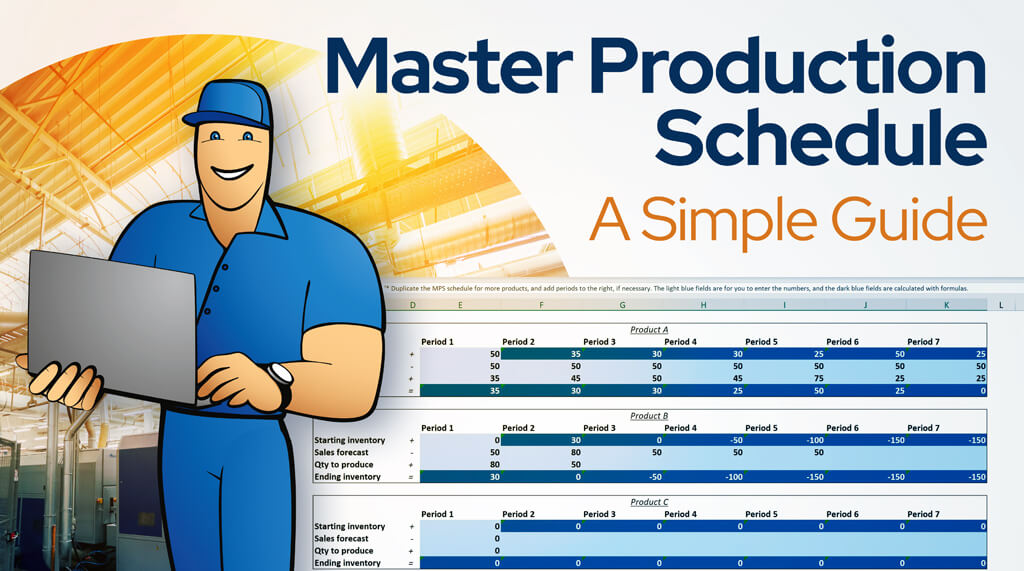
Download a free master production schedule template.
Example
Assume you produce wooden furniture such as chairs, dining tables, and coffee tables.
At the start of the period, you have 40 chairs in stock. Your sales forecast says that you will sell 200 of them. That means you will need to produce 160 chairs during that period in order to match the demand.
As a consequence, the beginning inventory of your next period will be 0. As business is steady, another 200 chair sales are forecasted. This means that now you will need to produce 200 chairs within a period in order to match demand.

Master production schedule and safety stock
Unless you have absolutely perfected the just-in-time manufacturing model, you would always want to keep a certain amount of units for backup in case there is an unforeseeable spike in demand. That is why we can complement the master production schedule with:
5. Safety stock. How many units do you want to keep in inventory in case there are spikes in demand?
In the master production schedule, safety stock will be expressed as part of the period’s ending inventory that will be transferred to the next time period as beginning inventory.
Example cont.
Now, continuing with the previous example, imagine that you always want to keep 40 chairs as safety stock. Therefore, 160 chairs will not be enough to meet demand and replenish your safety stock during the first period. This means that you will need to produce 200 chairs altogether to satisfy your customers and maintain the required buffer.

Learn more about Safety Stock and How to Calculate It.
Master production scheduling and rough-cut capacity planning
When planning production, you always need to keep in mind exactly how much you can produce in a given period. If you take on orders that require you to produce 1,000 chairs in a month but you only have the capacity to produce 500, you will let down your customers and your company. That is why you would always want to account for:
6. Production capacity. How many products would you be able to produce during the period, assuming everything runs smoothly?
Rough-cut capacity planning is an important tool to use alongside the master production schedule. To calculate your production capacity, you will need to know your products’ throughput time and the total productive hours of your shop floor.
Once you have created your initial master production schedule, you can test its viability by creating a rough-cut capacity plan according to the MPS. If the capacity plan shows that your production capacity cannot accommodate the production levels in any period set in the MPS, you will need to find ways to increase capacity or modify the MPS.
Master production scheduling and rough-cut capacity planning is a back-and-forth process. That means any change in either of them requires reviewing the other.
Learn more about production capacity and rough-cut capacity planning.
Additional considerations regarding MPS
Master Production Schedule freezing
Freezing the MPS means locking the first couple of periods a certain amount of time, e.g. a week or two, before production starts according to the schedule. This is done to prevent last-minute changes that may slow down production and, ultimately, ruin your plans.
Available to Promise
Available to promise is the number of units that you can additionally promise to deliver to customers (as firm orders) in the period at hand. It is calculated according to the master production schedule. It takes into account all the firm orders and the planned quantities across the MPS horizon. ATP plays an important role in supply chain management.
Batch criteria
When drawing up a master production schedule, you should always consider your batch sizes, i.e. how many products do you make in one run. That will determine the step of your quantities. For example, if you manufacture in batches of 25 products then your quantity to produce cannot be 240, it needs to be 250 or 225.
Maximum inventory
The MPS is a great tool for planning and preparing early for surges in demand. However, there are physical and practical limitations to the quantities you can store in stock. Even if you had the production capacity, it may not be possible to utilize it if your stock is full. Or beyond a certain inventory level, too much cash may be tied up in inventory.
6 tips for managing a master production schedule
Mastering the Master Production Schedule is vital for efficient production planning and optimized manufacturing processes. Here are six key tips to help manage an MPS effectively:
1. Balance demand and supply. An effective MPS balances customer demand with production capacity. While it’s crucial to meet customer orders on time, overloading your production line can lead to increased costs and inefficiencies. On the other hand, underutilizing capacity can lead to lost sales and reduced profitability. Find the right balance based on your business strategy and market conditions.
2. Align MPS with business goals. Your MPS should align with your overall business objectives. If your goal is to reduce inventory holding costs, for instance, your MPS should be designed to produce just in time to meet demand. If your goal is high service levels, your MPS might need to include safety stock or be geared towards fast response times.
3. Regularly review and update. In the ever-changing landscape of supply and demand, a static MPS can quickly become obsolete. Regularly review and adjust your MPS based on real-time sales data, customer orders, inventory levels, and supply chain conditions to ensure its accuracy and effectiveness. A rule of thumb is that an MPS should be reviewed weekly.
4. Collaborate across departments. An MPS impacts multiple departments in a company, from production to sales to procurement. Ensure that all relevant parties are involved in its creation and review. This collaborative approach can improve forecast accuracy, resource allocation, and overall effectiveness of the MPS.
5. Use appropriate technology. Utilize a manufacturing ERP system that can automate much of the MPS and manufacturing planning process. These systems can provide real-time data, helping to streamline the process, reduce errors, and improve responsiveness to changes in demand or supply.
6. Track metrics and improve continuously. There are many KPIs you can keep an eye on in order to assess the accuracy and usefulness of an MPS. These include schedule adherence and attainment, inventory levels, capacity utilization rate, OTIF, etc. Measuring your MPS performance and comparing against historical data allows you to understand when some aspect of the planning process needs to be improved. Remember, an MPS is not a set-it-and-forget-it tool. It requires continuous management and adjustment to reflect current realities and drive optimal production performance.

Master Production Scheduling vs. Manufacturing Resource Planning
The master production schedule is one of the jumping-off points for material requirements planning (MRP I) and manufacturing resource planning (MRP II). In addition to the MPS, however, MRP uses inputs such as inventory statuses, BOMs, routings, material requirements and costs, financial records, staffing and machine capacity, etc. to create a highly detailed plan for all of the different resources related to production and provide you with a real-time overview of your business, enhancing overall operations management rather than just production planning.
Unlike creating a master production schedule, manufacturing resource planning is too complex to do manually. Today, there are many software providers offering MRP systems, but many have grown out of accounting or inventory management software and are limited in their manufacturing resource planning capabilities. Using proper MRP software, however, is becoming increasingly important for staying competitive in the manufacturing business.
Read about MRPeasy’s master production schedule (MPS) software functionality.
How manufacturing software turns an MPS into an executable plan
Although you can use Excel to create a simple master production schedule, modern manufacturing MRP/ERP systems (or at least the ones with an MPS functionality) make using the master production schedule as a basis for more advanced planning and scheduling exceedingly simple. Here’s how an MRP system uses the MPS:
1. Automated data input. MRP software automatically fills several inputs based on the data it has: firm sales orders, already scheduled manufacturing orders, purchase orders, and starting inventory. When any of these values changes, the MPS is automatically updated, giving the sales, production, and procurement teams real-time information and enabling them to take the necessary action, e.g. by changing the MPS, increasing capacity, or ordering extra materials.
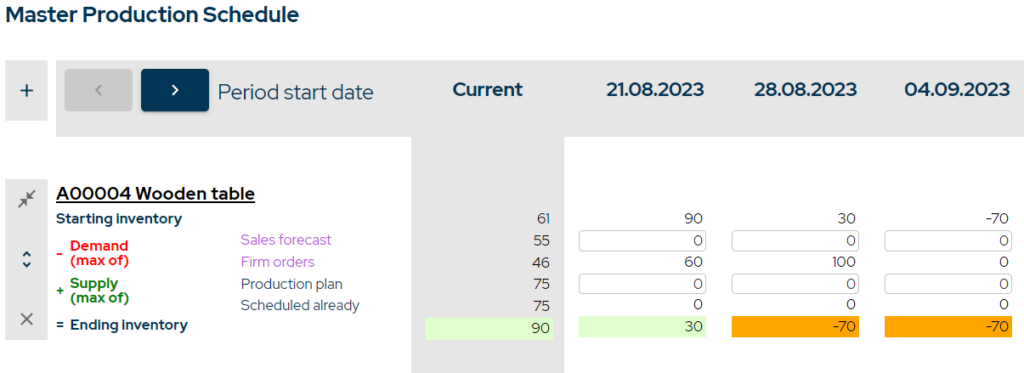
2. Demand planning. The sales team uses historical data and trends to forecast demand for the coming periods. After putting in the firm sales orders and forecasted demand, the system compares it to current inventory levels to determine the quantities required to produce during the period. This is the basic master production schedule.
It is important to note that the demand forecast is only valid until firm order quantities do not exceed the forecasted demand.
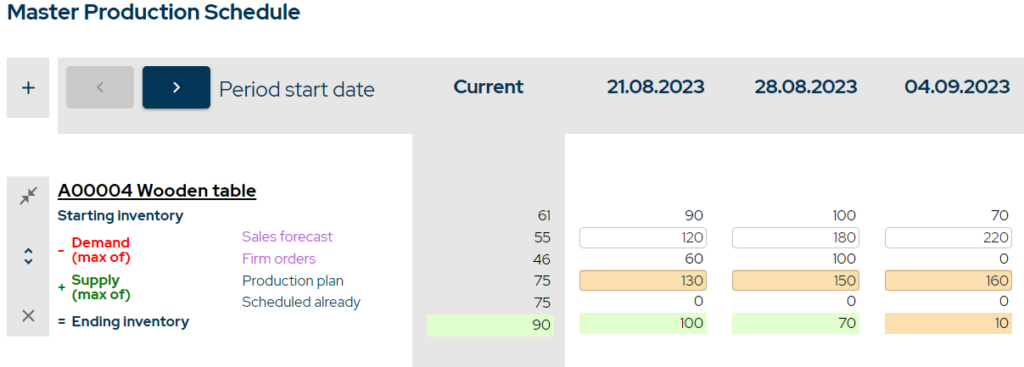
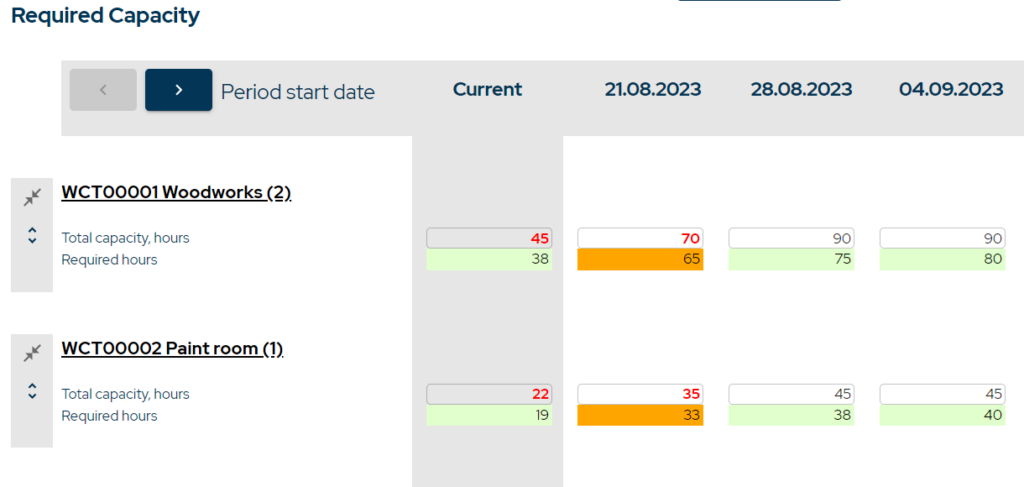
3. Capacity planning. After the basic MPS has been created, the production planner steps in. The MRP system uses the MPS to perform Rough Cut Capacity Planning (RCCP). This involves checking whether there is sufficient capacity available (in terms of machinery and labor) to meet the production schedule outlined in the MPS. If the available capacity does not meet the capacity requirements, the production planner needs to adjust the MPS or increase production capacity, e.g. by adding a shift.
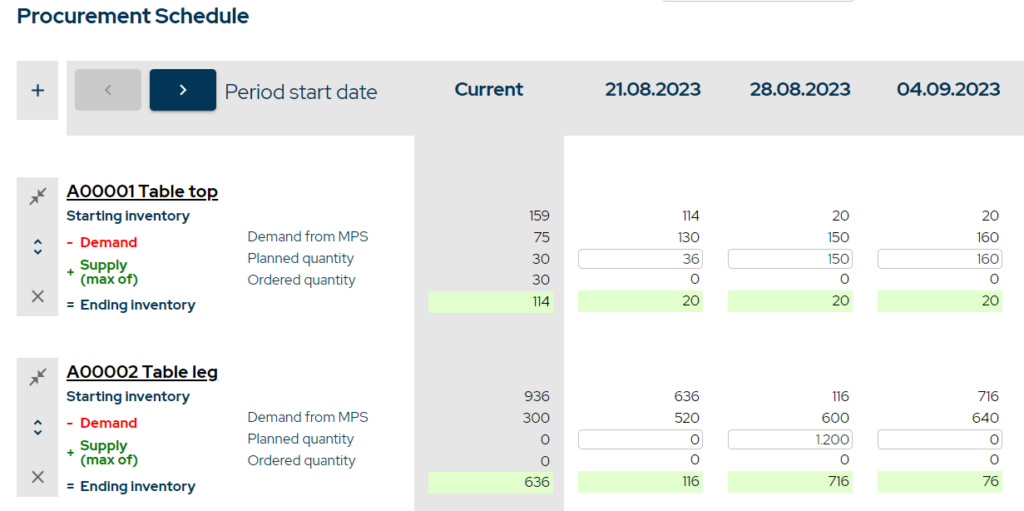
4. Procurement planning. Once the MPS is established, the system uses it as an input for calculating the material requirements for each period. MRP software takes the master production schedule and the bill of materials (BOM) for each product, as well as the current raw material inventory, and calculates the quantities of each material or component required and when they are needed. The procurement team can then use this plan to ensure that the necessary materials are procured in time for production and inventory levels are optimized.
5. Production scheduling. An MRP system can be used to convert customer orders into manufacturing orders and automatically schedule them according to available resources or the order’s due date. Alternatively, production planners can manually create manufacturing orders (which are then scheduled automatically) to align production with the MPS.
6. Real-time adjustments. As mentioned above, MRP/ERP systems can be used to adjust the MPS and subsequent plans in real time as conditions change, such as a surge in demand or a delay in receiving raw materials. This agility allows manufacturers to respond quickly to changes in the business environment, reducing risks and potential losses, and keeping each party informed and involved in the process. It also facilitates what-if scenario analysis, enabling manufacturers to be better prepared for a variety of possible situations.
By integrating the MPS into an MRP system, manufacturers can automate and optimize their production planning process, improving production efficiency, reducing costs, and enhancing their ability to meet customer demand.
Frequently asked questions
The Master Production Schedule (MPS) outlines what products need to be produced, in what quantities, and when, serving as a bridge between sales forecasts and manufacturing. Production scheduling, on the other hand, is a more detailed process that determines the specific sequence of work for each product or job on the production floor, including start and finish times for each task, resource allocation, and the assignment of specific tasks to workers or machines. While the MPS provides a high-level plan, production scheduling deals with the day-to-day operations and logistics necessary to execute the plan.
Manufacturers can adjust the MPS by conducting regular review sessions to compare actual production outcomes with planned schedules, identify variances, and determine their causes. Based on this analysis, they can update the MPS to reflect realistic production capabilities, changing demand patterns, or supply chain disruptions, ensuring it remains a dynamic and responsive tool.
MPS can be integrated with lean manufacturing principles by using it to streamline production processes, minimize waste, and ensure just-in-time delivery of products. This involves aligning MPS closely with demand forecasts, reducing excess inventory, and facilitating continuous improvement in production planning and execution.
Advanced techniques for optimizing an MPS include leveraging artificial intelligence (AI) and machine learning (ML) to enhance forecast accuracy, automate dynamic scheduling, and facilitate real-time adjustments. These technologies can help manufacturers anticipate market changes, improve resource allocation, and reduce production inefficiencies, leading to more effective and flexible production planning.
You may also like: What Is the Difference Between Production Planning and Scheduling?
Get manufacturing know-how delivered to your inbox!