The Biggest Mistakes Manufacturers Make When Choosing Inventory Software
Choosing inventory software sounds simple enough: find a system that handles inventory tracking, prevents shortages, and helps the team move away from spreadsheets. But for manufacturers, true inventory control is tied to almost every part of the business, from purchasing and production planning to costing and delivery dates.

The risk with choosing an inventory software that’s not designed to handle manufacturing workflows isn’t simply that you need to replace it and go through implementation again too soon. The real risk is that the business may outgrow the software’s capacity long before anyone notices it’s killing your growth.
Inventory software is not one-size-fits-all
“Inventory software” can sound as if all businesses need the same basic thing – a clean list of items with quantities, locations, and reorder points. But different types of businesses have very different needs for their inventory, depending on how it moves, who it comes from, what it’s used for, who it’s intended for, etc. For businesses like retailers or simple distributors, whose workflow involves buying finished goods, storing them for a while, and selling them on, a basic tool can often suffice. But manufacturing inventory management is a more complicated story, because stock changes both in form and value every time it moves through the pipeline.
A manufacturer may need to simultaneously track and manage raw materials, components, subassemblies, work-in-progress, finished goods, scrap, rework, and by-products or co-products. A component may be available in the warehouse today, allocated to a production order tomorrow, consumed into WIP the day after, and then become part of a finished product that still needs to be packaged or bundled. Every step in this chain needs to be clearly reflected in the system so that purchasing, production, sales, and accounting can act on it in real time and trust the data.
This is where many small manufacturers get caught out. They choose software to solve a visible stock problem, like messy spreadsheets or inaccurate counts, but overlook the production logic behind their inventory. The result is a system that seems to improve inventory accuracy on paper but can leave the business operation dependent on workarounds.
10 mistakes small manufacturers make when choosing inventory software
Most inventory software mistakes happen for understandable reasons. Small manufacturers are usually trying to fix immediate problems: too many manual updates, poor stock visibility, late purchasing, or unreliable spreadsheets. The danger is choosing a system that solves one of those problems while creating new gaps elsewhere.
The following mistakes are not just technical buying errors; they impact the broader supply chain management by affecting how well a company can plan production, purchase materials, quote accurately, and deliver on time. In other words, the wrong inventory system does not stay an inventory problem for long.
1. Choosing generic inventory software instead of manufacturing inventory software
Probably the most common mistake is choosing software built for general stock control or other workflows rather than manufacturing. While many inventory systems can track items, quantities, warehouses, suppliers, and sales orders, it doesn’t mean they can genuinely integrate with your production process.
This mistake often occurs when a manufacturer compares tools based on surface-level features. Barcode scanning, reorder alerts, stock counts, and warehouse locations can all look useful in a demo. But if the software cannot connect inventory to bills of materials (BOMs), production orders, WIP, purchasing, and costing, it may only cover a small part of your actual needs.
What makes it worse is that the true cost of this mistake becomes clearer in time, as the company grows. You’ll notice production planners still using spreadsheets to calculate material needs, buyers still manually checking requirements for upcoming jobs, or sales circling back again and again to production to check whether an order can be fulfilled on time. In short, the company has set up an inventory system, but many crucial manufacturing decisions are still happening outside it.
2. Limiting focus only on current needs and ignoring scalability
Many SMEs tend to choose software based on the problems they need to solve today. Maybe stock counts are unreliable, spreadsheets are getting out of hand, or purchasing depends too much on staff memory. Solving those issues foremost makes sense, but the new system also needs to support where the business is going.
This tends to happen especially when the company is still relatively small. If your team is still wearing many hats and you’re working with a small SKU count, a simple tool may feel perfectly sufficient. But when more customers, product variants, suppliers, and production orders happen, that basic system can quickly become a bottleneck.
Not-so-distant-future requirements often include:
- More complex BOMs.
- More SKUs and product variants.
- Multiple warehouses or production locations.
- Lot or serial traceability.
- Accounting, ecommerce, or CRM integrations.
- Better reporting and cost visibility.
The risk isn’t simply having to replace the system and go through implementation again – it’s that the business may outgrow the software’s capacity long before anyone notices it’s killing growth potential. The right system should solve today’s inventory problems without creating tomorrow’s production planning problems.
3. Underestimating BOM complexity
For any manufacturer, the bill of materials is one of the most important pieces of data. If your inventory system doesn’t handle BOMs well, stock accuracy can only go so far. A company may have simple BOMs at first, but product structures and use cases rarely stay very basic. For example, you might get a few multi-level BOMs down the line, or need to start tracking alternative materials, packaging components, revisions, or different versions of the same item for different customers.
When BOM complexity is underestimated, material planning becomes messy. The system may show that stock exists, but not whether the right components are available in the right quantities for a specific production order. Buyers may purchase too much of one component and too little of another. In the worst case, production stops because a small but essential part was never planned for.
4. Confusing stock levels with real inventory availability
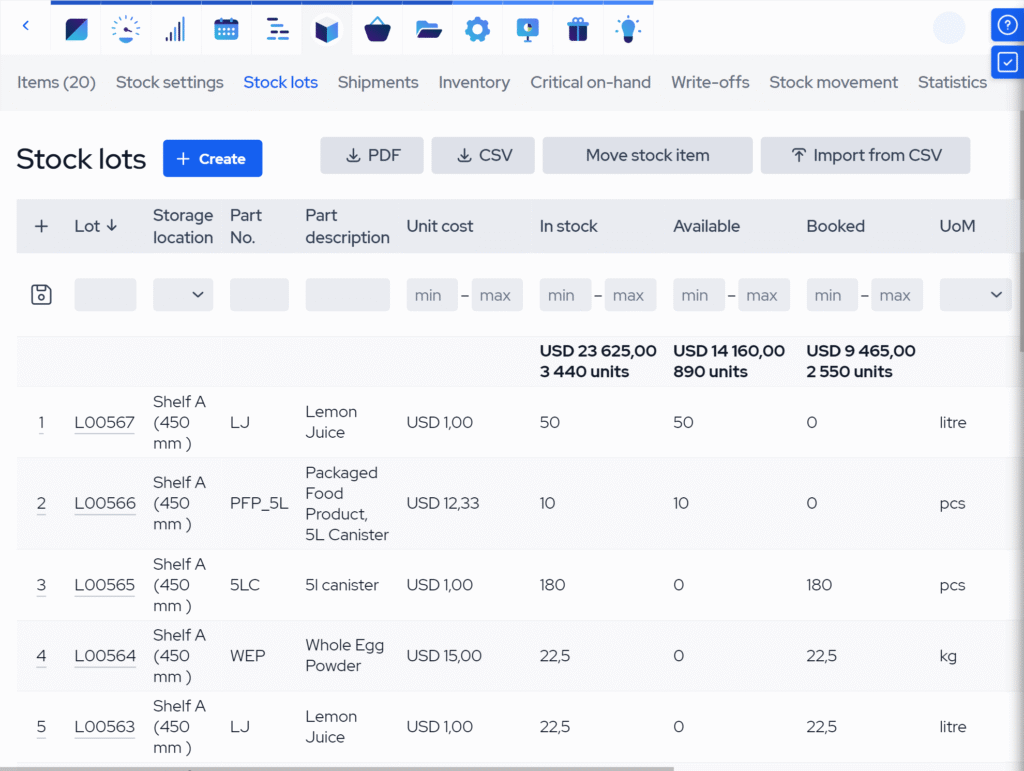
A basic inventory system may not distinguish between how much stock is physically on hand and how much is actually available. A component sitting in the warehouse can already be allocated to another job, reserved for a sales order, waiting for inspection, etc. If the inventory system is incapable of distinguishing between these statuses, it might say there’s enough material, resulting in a cascade of trouble.
For example, a planner issues a job to production because the stock count looks healthy, only to find that the material has already been promised elsewhere. The production schedule is now out of sync, and you’d better hope sales didn’t promise a lead time before you found out. Another example is a buyer delaying a purchase because the system shows stock on hand, even though the available quantity is actually much lower, resulting in stockouts down the line.
The same issue appears during production, with work-in-progress inventory. If the software only tracks stock before and after production, the company loses vital visibility in the middle. The real production progress then lives on whiteboards, verbal updates, or side spreadsheets.
If the software can’t differentiate between these, people stop trusting the numbers, and the inventory system that’s dishing them out:
- On-hand stock: Physically present somewhere in the business.
- Available stock: Free to use for a new order or production job.
- Allocated stock: Already reserved for another order or job.
- Pipeline stock: ordered but not yet received.
- WIP inventory: Already issued to production or partly processed.
- Quarantined stock: Present, but not approved for use.
5. Underestimating purchasing complexities
Save for simple make-to-stock operations, purchasing in manufacturing ops is rarely just a matter of reordering low stock items. Simple reorder points don’t accurately reflect the materials needed for upcoming production orders, sales orders, forecasts, or make-to-order jobs.
If the inventory software treats all purchasing as simple stock replenishment, it can fail in live production scenarios where demand is fluid. You may have enough stock today, yet still face a shortage when several planned jobs suddenly require the same component.
In manufacturing, purchasing must integrate with material planning, account for supplier lead times and minimum order quantities, support supplier management, and address late deliveries. If the system can’t connect purchase orders to real production demand, managers are left doing the real planning manually. The result is reactive purchasing – spending time checking spreadsheets, reading production plans, and paying extra for expedited shipping and last-minute supplier changes.
6. Treating traceability as a “later” problem
Traceability often seems unimportant until it suddenly becomes urgent. A small manufacturer may not need strict lot or serial tracking at the beginning, especially if customers are flexible and products are simple. This changes when the company enters a regulated market, wins larger customers, starts exporting, or faces a sudden quality issue.
Traceability is, in a real sense, one of the main differentiators between basic and manufacturing inventory software. Lot, batch, and serial numbers, expiration tracking, quality checks, and finished product history are basically must-have features for a manufacturer, even if you don’t need them daily or maybe not at all until you suddenly do. Then it becomes a must-have in hindsight, as it captures and stores the data in the background during normal operation, without having to reconstruct anything from invoices, delivery notes, spreadsheets, or memory.
Poor traceability becomes a headache in several ways, and often at once:
- Compliance audits are way more stressful.
- Recalls may need to cover more batches than necessary.
- Customer complaints take longer to investigate.
- Warranty claims are harder to verify, and returns are more difficult to process.
Even if it’s not your main buying reason today, think carefully before choosing a system that leaves little room for traceability. It may feel like an advanced feature now, but chances are it’s a basic customer requirement tomorrow.
7. Overlooking exceptions: returns, quality holds, and write-offs
It’s supposed to, but inventory doesn’t always move neatly from purchasing to storage to production to shipping. In real manufacturing plants, materials fail inspection, goods are returned, components get damaged, and stock will need to be scrapped, reworked, quarantined, or written off from time to time.
This is easy to overlook when choosing software because the ability to handle these can feel like a nice-to-have at the start. You might be focused on getting stock counts, purchasing, and production under control first, which you should. But as order volumes grow, exceptions become more common and more important to manage properly.
Look for exception-handling features like:
- Quality holds or quarantine stock.
- Returns management and RMA workflows.
- Scrap and write-offs.
- Stock adjustments with clear reasons.
Without these features, exceptions will disappear into manual notes or your stockkeeper’s head. That can distort stock availability, hide quality problems, and muddy costing accuracy.
8. Forgetting that inventory data affects costing
Inventory isn’t only about quantities and movements. It’s almost always your largest current asset, and understanding how it affects costing should not be an afterthought. If material usage, WIP, scrap, subcontracting, labor, and finished goods values are not recorded properly, costing becomes unreliable.
This mistake often happens when the buying decision is led by ‘the warehouse problem’ rather than the business problem. You want better stock control, so you choose a system that excels at tracking movements and quantities and offers warehouse management tools, right? But if the software doesn’t connect inventory valuation with production and accounting, managers can still be left struggling to answer basic questions about margins.
This can become a serious problem. Products can be priced using outdated material costs. Scrap and rework may be hidden. Job profitability may be estimated rather than known. All this affects your pricing strategy and reputation. A company can appear busy and still be losing margin simply because it can’t see the real cost of production.
9. Creating another disconnected system
Many small manufacturers suffer from disconnected tools. Sales orders are in one system, purchasing in another, accounting lives somewhere else, and production planning in spreadsheets. Choosing inventory software that doesn’t integrate well can simply add one more data silo. Inventory data should be unified across departments, as it directly affects each of them.
A stock system that improves records but still relies on manual processes to manage aspects of accounting, order fulfillment, returns, or production still creates room for errors, delays, and duplicate work. The bigger problem is that departments start working from different versions of the truth – sales sees one delivery promise, production works from a different schedule, and accounting may receive inventory values after the fact. When something changes, the update doesn’t automatically flow through the business.
10. Underestimating the total cost of ownership (TCO)
The monthly subscription is only one part of the real cost of inventory management software. That includes time and effort lost to implementation, data migration, user training, potential external consultants, accounting integration, and more. If you underestimate these from the get-go, a seemingly well-priced system can become a considerable cost headache.
What’s more, an affordable system can become expensive if it needs constant workarounds and manual data entry, and you end up needing to replace it in a year. Conversely, a fancy system can turn into a budget nightmare if it fails to deliver return on investment (ROI), is too complex to implement properly, or is full of features that hinder ease of use and that no one really needs.
Finally, also consider the underlying cost of poor fit. Overstocking, stockouts, late orders, inaccurate costing, and manual admin all have a price. The cheap tool on paper is not always the lowest-cost option in practice. The right question isn’t just “What does the software cost?” but “What will it cost us if this system doesn’t support the way we manufacture?”
What to look for in inventory software that actually supports manufacturing
A manufacturing inventory software should help you understand what’s available, what’s needed, what’s already committed, what’s in production, what needs attention, and what everything costs. It should help you avoid common inventory management mistakes before they start costing time and money. It should enable data-driven decision-making in place of manual entry and department reconciliation.
Manufacturing-specific inventory tools should enable:
- BOM-based inventory planning. Connect materials, components, subassemblies, and finished goods directly to the products you make.
- Production order integration. Reserve materials for jobs, issue stock to production, track WIP, and receive finished goods back into inventory.
- Real availability tracking. Distinguish between on-hand, available, allocated, incoming, quarantined, and WIP inventory.
- Purchasing and replenishment. Generate purchase requirements from real production demand, supplier lead times, reorder points, and safety stock.
- Lot and serial traceability. Track materials and finished goods by lot, batch, serial number, expiry date, supplier, and customer order.
- Quality and exception handling. Manage inspections, quality holds, RMAs & returns, scrap, rework, write-offs, and stock adjustments with clear reasons.
- Multi-location stock control. Track inventory across warehouses, shop-floor locations, consignment inventory, or other storage areas.
- Cost and valuation visibility. Connect inventory movements to material costs, WIP, finished goods value, COGS, scrap, and production costs.
- Accounting synchronization. Keep inventory, purchasing, production, and sales data aligned with accounting requirements without duplicate manual entry.
- eCommerce, CRM, and shipping integration. Integrate natively with eCommerce, CRM, and fulfillment platforms to unify sales and distribution.
These capabilities matter because manufacturing inventory is not static. Stock is constantly on the move and changing form. The system needs to accurately reflect the entire journey, or teams are still forced to fill gaps manually. This doesn’t mean every small manufacturer needs every advanced feature from day one. But it does mean your next inventory system should be able to support your operation’s current and upcoming requirements without compromise.

Key takeaways
- Inventory software for manufacturers needs to do more than track stock counts. It should reflect how materials move, change form, gain value, and affect production, purchasing, costing, and delivery.
- Generic inventory tools often fall short in manufacturing. Look for platforms that connect inventory with BOMs, production orders, WIP, purchasing, and accounting.
- Choosing software only for today’s problems can create bigger issues later. A system should support future growth, including more SKUs, more complex BOMs, more locations, traceability, integrations, and better reporting.
- Accurate stock levels are not the same as real inventory availability. Manufacturers need to distinguish between on-hand, available, allocated, incoming, quarantined, and WIP inventory to avoid planning and purchasing mistakes.
- Traceability, returns, quality holds, write-offs, and other exception-handling features may not seem urgent at first. But they become important when quality issues, audits, recalls, customer complaints, or growth make manual tracking unreliable.
- The cheapest inventory system is not always the lowest-cost option. SMEs should consider total cost of ownership, including implementation, training, workarounds, poor fit, inaccurate costing, stockouts, excess inventory, and eventual replacement.
Frequently asked questions (FAQ)
The biggest inventory management mistakes include relying on manual methods and generic stock tools, confusing on-hand stock with available stock, underestimating BOM and purchasing complexity, and failing to connect inventory with all departments that rely on it. For manufacturers, these mistakes can lead to stockouts, excess inventory, poor planning, inaccurate costing, and late deliveries.
Choose inventory management software based on how your business actually buys, makes, stores, moves, costs, and ships products. Manufacturers should look for BOM-based planning, production order integration, real availability tracking, purchasing tools, traceability, quality controls, costing, and accounting synchronization. The right system should solve current inventory problems while also supporting future growth.
The ROI of manufacturing inventory software comes from reducing manual work, preventing stockouts and overstocking, improving purchasing decisions, increasing inventory accuracy, and giving teams better cost visibility. MRPeasy also connects inventory with BOMs, production orders, purchasing, sales, and accounting in one workflow. The exact return depends on the company’s size, current processes, data quality, and how well the system is implemented.
Real-time inventory tracking helps manufacturers make decisions using current stock data instead of outdated spreadsheets or manual checks. It shows what’s available, what’s allocated, what’s in production, what’s incoming, and what may be blocked by quality issues. This helps your team plan production more effectively, purchase materials, promise delivery dates, and avoid costly surprises.
You might also like: The best manufacturing enterprise resource planning (ERP) solutions for SMEs in 2026
Get manufacturing know-how delivered to your inbox!