The 8 Best Manufacturing ERP Software for SMBs in 2026: In-Depth Review
Many manufacturing enterprise resource planning (ERP) tools are built for companies with a six-figure budget and an IT department to match. But small and midsized manufacturers also need production planning, inventory, and traceability in one system, without a five-figure consultant bill for implementing it.
Below, we compare the top eight manufacturing ERP systems for SMBs. We will evaluate price, implementation cost and time, core manufacturing features, and best-fit use case.
We compared manufacturing ERP systems on what matters to a small or midsized manufacturer: who it’s best for, starting price, deployment, and whether you can get running on your own or need an implementation partner
Best manufacturing ERP systems compared
| ERP system | Best for | Starting price | Deployment | Setup | G2 rating |
|---|---|---|---|---|---|
| Acumatica | Multi-location operations | Consumption-based | Cloud or on-premise | Partner-led | 4.4 (2,014 reviews) |
| MRPeasy | Growing small & mid-sized manufacturers | From $49/user/month | Cloud | Self-service (free trial) | 4.6 (55 reviews) |
| Microsoft Dynamics 365 Business Central | Microsoft-native SMBs | $80/user/month ($110 for manufacturing) | Cloud | Partner-led | 4.0 (905 reviews) |
| Cin7 Core | Omnichannel inventory | From $349/month | Cloud | Paid onboarding | 4.2 (336 reviews) |
| Aptean | Industry-specific requirements | Quote-based | Cloud or on-premise | Partner-led | 3.6 (75 reviews) |
| SAP Business One | On-premise manufacturing | Quote-based | Cloud or on-premise | Partner-led | 4.3 (541 reviews) |
| Epicor Kinetic | Complex, mixed-mode manufacturing | Quote-based | Cloud, on-premise, hybrid | Partner-led | 3.9 (735 reviews) |
| Odoo | Budget-conscious, modular needs | From $24.90/user/month (free tier available) | Cloud; on-premise on higher tiers | Self-service or partner-led | 4.2 (349 reviews) |
Pricing and G2 ratings were checked in August 2026 and may change. Visit each provider’s website and linked G2 profile for the latest information.
The top 8 manufacturing ERP systems for small and growing businesses
The ERP market has hugely expanded in the past ten years. Today, literally hundreds of service providers are available that cater to diverse business needs, company sizes, and industries.
Here are the top eight manufacturing ERP systems for small and medium-sized businesses in 2026 by category.
1. Acumatica Cloud ERP: Best for multi-location operations
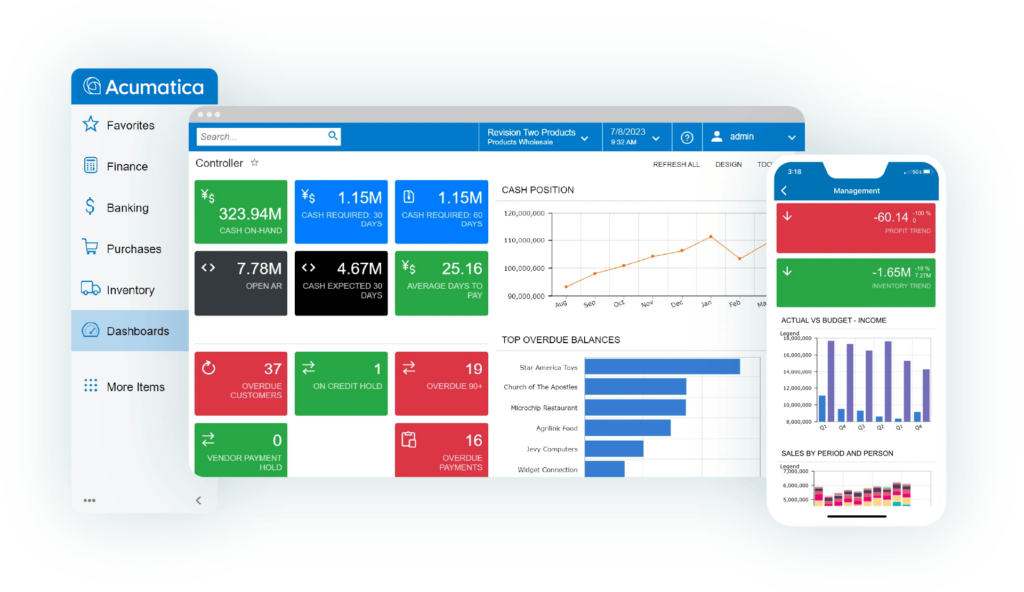
Acumatica’s solution for small-to-mid-market companies stands out for its consumption-based licensing; you pay for the computing resources and modules you use rather than per user. This can make it cost-effective for organizations with many departments, locations, or light users.
It’s highly adaptable, with a strong API and low-code customization, and offers a dedicated manufacturing solution.
The trade-off is complexity; Acumatica has no public pricing, and it’s sold through partners, which means it requires lengthy partner-led implementation.
Key features
- Inventory and warehouse management: Oversee multi-warehouse stock control, replenishment, and order management across locations.
- Financial management: Centralize multi-entity and multi-currency accounting, reporting, and cost control.
- Manufacturing edition: Handle MRP, multi-level bill of materials (BOMs), production orders, scheduling, and engineering change management.
- Project accounting: Manage project costing, billing, and time and expense tracking.
- Open API and low-code customization: Access extensive integrations and workflow tailoring.
Integrations include:
- Avalara
- Microsoft Outlook
- Salesforce
- Shopify
- StarShip
Pricing (consumption-based):
Running costs depend on the chosen modules, scale of business, and type of license. A typical implementation will cost a small or medium-sized company around $50,000 and up, with yearly costs also mostly landing in the five digits.
What customers say
👍 “I really appreciate Acumatica’s automation capabilities and the ability to view data just the way we need to see it… After rolling out Manufacturing, we created dashboards that show our line efficiency, allowing us to review our BOMs and evaluate accuracy in labor, which helps us decide on necessary changes.” — Christina S.
👍 “I find Acumatica incredibly valuable for modernizing our processes, especially in the manufacturing space where we use it for MRP and finance. The ease of use stands out to me, along with the AI capabilities.” — Nauman C.
👎 “Acumatica is a little complex and sometimes overwhelming when getting started for some user. Navigating the vast availability of customizations is heavy for some.” — Alex G.
2. MRPeasy: Best for growing small manufacturers
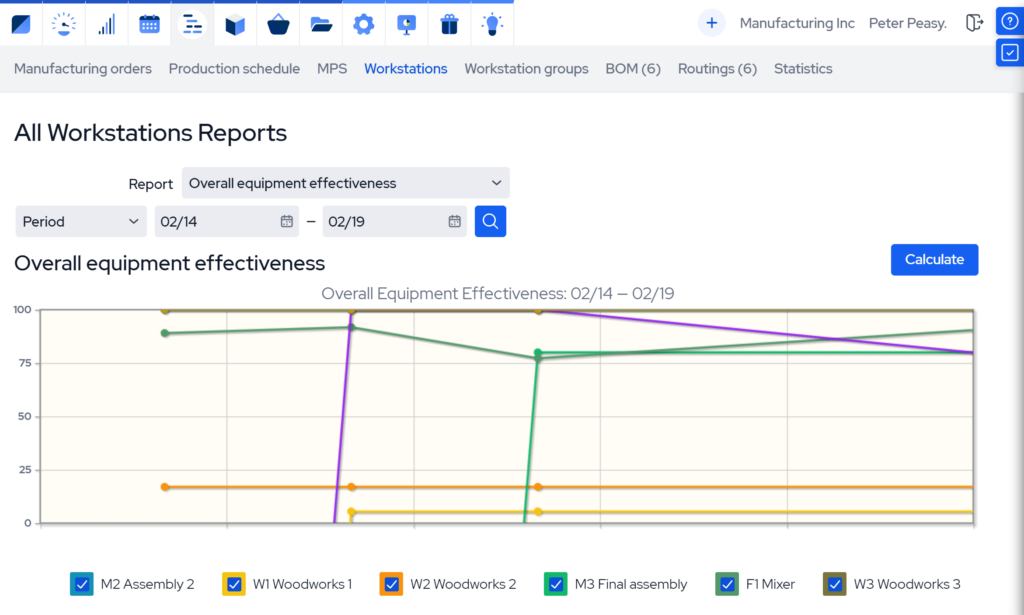
MRPeasy’s AI-powered manufacturing ERP is built specifically for small and midsized manufacturers and distributors.
This MRP engine has been in continuous development for over a decade and is suited to make-to-stock, make-to-order, and batch production.
It combines production planning, scheduling, and inventory with full traceability, purchasing, CRM, and a built-in manufacturing execution system (MES), all in one program.
And it’s designed for self-service setup, so most teams can implement it without a consultant (or extra costs).
Key features:
- One-click cost and lead-time estimates: Calculate production cost and delivery dates from the BOM in a single step.
- Material planning and BOM management: Create single-level or multi-level BOMs, with automatic material requirements planning.
- Dynamic production scheduling: Use real-time rescheduling tied to capacity, plus master production scheduling.
- Inventory with end-to-end traceability: Keep track of your full operations with lot, batch, and serial tracking with a built-in barcode system.
- Built-in MES: Oversee shop-floor labor and production reporting without a separate system.
Integrations include:
- Amazon
- QuickBooks
- ShipStation
- Shopify
- Xero
- Zapier
Pricing (per user, per month when billed monthly):
- Starter: $49
- Professional: $69
- Enterprise: $99
- Unlimited: $149
Free 15-day trial available, and reduced rate beyond the first 10 users ($79 per 10 users).
What customers say
👍 “Best value in the small manufacturing space by far. With MRPeasy, our capacity doubled. It streamlined our production, and procurement so well that I’m now able to spend a lot more time on growth and sales.” — Benjamin R.
👍 “I’ve worked in software for 15 years so I‘m very picky about what we use. I am impressed with how bug-free the software is, it’s much better than the industry average. And while there is not much middle ground for small manufacturers in terms of software cost and functionality, MRPeasy is precisely in this middle ground.” — Allyson S.
👎 “If I had to pick one thing, it would be that some reports take a bit of tweaking to get exactly what I want. It’s minor, and the system overall works extremely well for our needs.” — Gabor F.

3. Microsoft Dynamics 365 Business Central: Best for integrated workflows
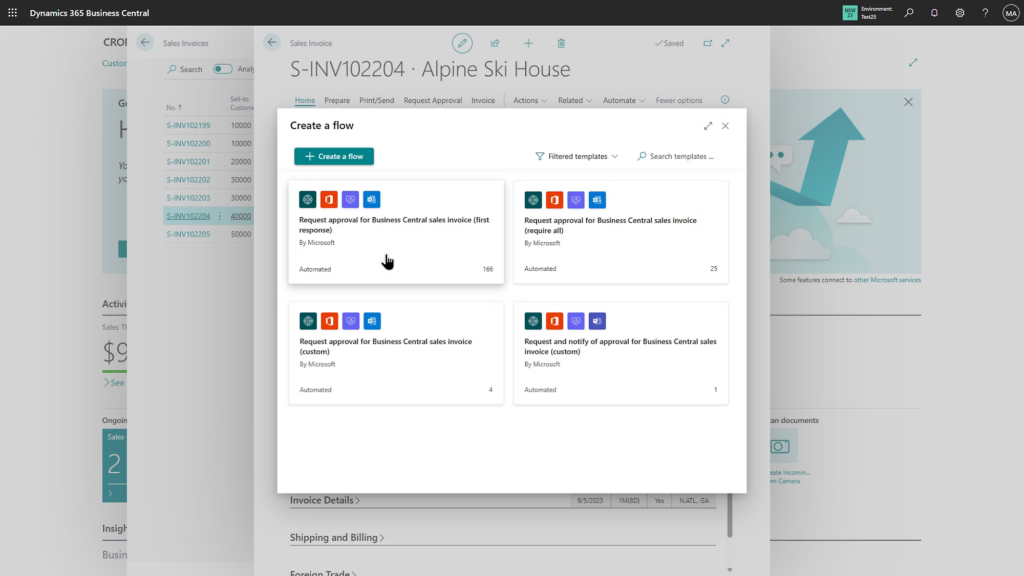
Microsoft Dynamics 365 Business Central covers finance, sales, purchasing, inventory, and project management. Manufacturing and service management are only available on the Premium plan.
Its real strength is the Microsoft ecosystem; it connects natively with Outlook, Excel, Teams, and Power BI, and extends through the Power Platform and partner-built apps.
Business Central is sold and managed through Microsoft’s certified partner network rather than self-service, so you should plan for more costly and drawn-out implementation and customization if you choose this ERP.
Key features:
- Financial management: Handle general ledger, payables and receivables, and reporting from a centralized location.
- Manufacturing (Premium plan only): Generate production orders, BOMs, and capacity and machine centers.
- Inventory and purchasing: Oversee stock, basic warehousing, and purchase order management.
- Built-in CRM: Easily access contact, opportunity, and sales data.
- Custom workflows: Adapt workflows to your processes using the embedded Microsoft Power Automate experience and Copilot.
Integrations include:
- Microsoft Teams
- Outlook Excel
- Power Automate
- Power BI
Pricing (per user/month, billed annually):
- Essentials: $80 (finance, sales, purchasing, inventory, projects)
- Premium: $110 (adds capabilities for manufacturing and service management)
- Team Members: $8 (limited access to read data, approve workflows, and create or update select information)
Free 30-day trial available.
What customers say
👍 “It makes my day-to-day work much smoother because finance, sales, inventory, and reporting all connect automatically. That means I’m not wasting time jumping between systems or manually reconciling data. And honestly, the interface feels simple enough that even non-technical users can pick it up without a steep learning curve.” — Abdul H.
👍 “The vendors are able to get the purchase orders on time. Efficient with payables which ensure effective management of vendors accounts. Great with inventory control by tracking movement of items within warehouses. Reliable with assembly. It integrates all departments together using a single database.” — Deanna W.
👎 “I think Microsoft Dynamics 365 Business Central is quite powerful, but there are a few areas where it could definitely improve. One thing is the learning curve. For new users, especially those without an accounting or ERP background, it can feel a bit overwhelming in the beginning.” — Somya A.
4. Cin7: Best for omnichannel inventory management
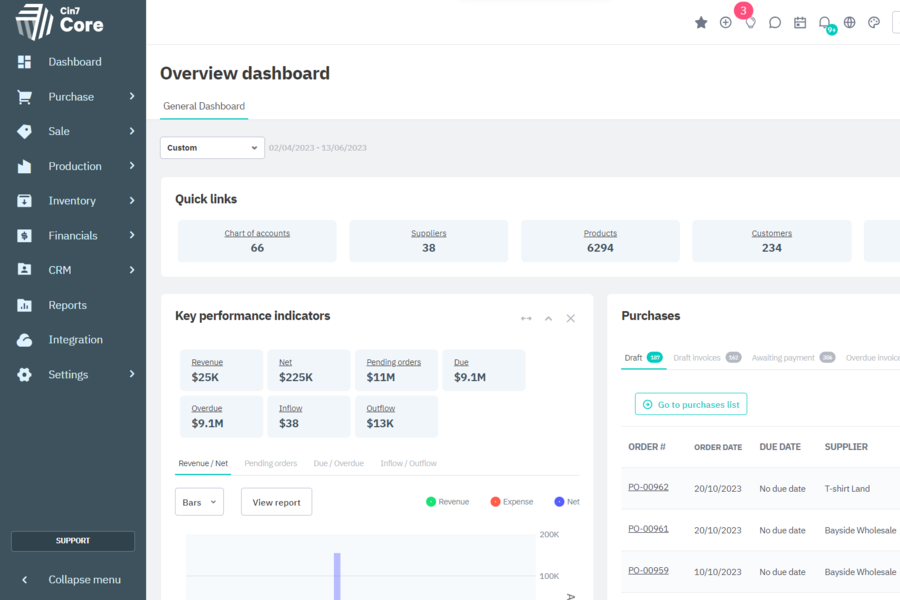
Cin7 is built for businesses selling across multiple channels, which makes it a strong fit for small-to-medium wholesalers and distribution-heavy manufacturers. It comes in two products: Cin7 Core for growing SMBs and Cin7 Omni for enterprises.
Its strengths include real-time inventory, order automation, and warehouse management across locations and sales channels. It comes with production and BOM features, but Cin7 leads on inventory and omnichannel rather than deep shop-floor manufacturing operations.
Key features:
- Real-time multichannel inventory: Manage stock visibility across warehouses, locations, and sales channels.
- Order management and automation: Automate sales orders, purchasing, and fulfillment workflows.
- Warehouse management: Streamline pick, pack, restock, and barcode scanning via a mobile warehouse management system (WMS). Advanced WMS is also available in the Pro tier.
- Procurement: Centralize purchase orders, lead times, and vendor management.
- Production and BOMs: Manage multi-level BOMs and production jobs, with MRP included from the Pro tier.
Integrations include:
- Amazon
- EDI
- QuickBooks
- ShipStation
- Xero
Pricing (Cin7 Core, per month):
- Standard: $349 (up to five users)
- Pro: $599 (up to ten users)
- Advanced: $999 (up to 15 users)
- Cin7 Omni: Custom pricing for enterprise omnichannel solutions.
Free 14-day trial available. Extra users, certain integrations, and add-ons (POS, B2B portals, automations) cost more.
What customers say
👍 “Cin7 Core unifies our entire inventory and sales operations under one platform, which has been invaluable for our multi-channel setup. We love how straightforward it is to monitor stock levels, sync orders from Shopify and Amazon, and track profitability all in real time.” — Pierre G., Co-Founder
👍 “We’ve been using Cin7 Core for our inventory and order management, and overall it has been a solid solution for our business over the last 6 months or so. One of the biggest strengths of Cin7 Core is its ability to centralize multiple functions—inventory tracking, order management, and integrations with accounting platforms—into one system.” — Ana M., Director of People and Finance
👎 “I didn’t realize that there was different modules that were not included. The manufacturing module for our production kitchen is an interesting add-on that we didn’t realize was separate..” — Dalton W.
5: Aptean ERP: Best for industry-specific requirements
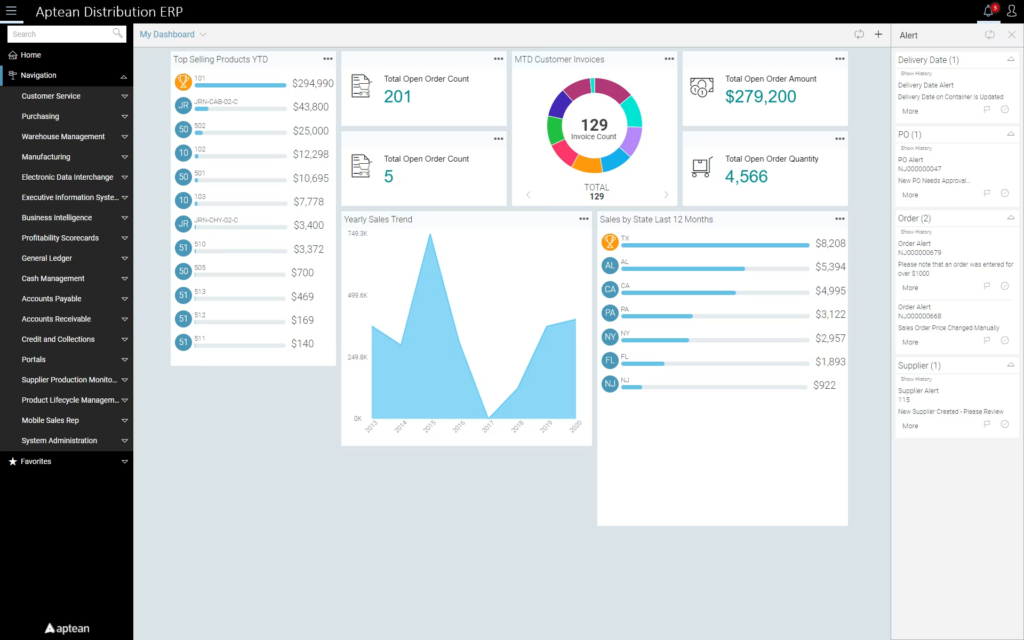
Aptean offers a portfolio of industry-specific ERP systems: food and beverage, chemicals, pharmaceuticals, and discrete or industrial manufacturing, and more.
These industry-specific builds have workflows and compliance features tailored to each sector’s rules out of the box, which reduces custom development.
The depth of features suits complex, compliance-heavy manufacturers, but because of this, Aptean’s ERP products can be costly to implement and maintain, particularly for smaller companies.
Key features
- Regulatory compliance: Co with built-in support for standards like FDA and HACCP, with recall and allergen management functionality.
- Recipe and BOM management: Manage complex formulas, recipes, and multi-level BOMs for batch and discrete production.
- End-to-end lot traceability: Access forward and backward tracking for recipe- and batch-based production.
- Production planning and scheduling: Oversee advanced, multi-constraint scheduling and shop-floor execution.
- Quality management and costing: Centralize quality control, job costing, and business intelligence reporting.
Integrations
- Aptean Pay
- Aptean Ship
- CADLink
- EDI
- Power BI
Pricing (quoted per product through a partner)
No public list price; cost depends on the product, modules, and deployment.
What customers say
👍 “It is the heart of our system of record and has performed extremely well for us over the last 18 years of food and beverage process manufacturing. We have most recently taken on massive core and new product growth during our expedited capital investment plan and Ross ERP has sustained the growth and speed of our implementation plan.” — Troy G., CIO
👍 “What stands out most about Aptean Discrete Manufacturing ERP is its ability to bring all core manufacturing processes into one system. It improves visibility across production, inventory, and planning, which helps in making quicker and more accurate decisions.” — Muhammad I., CRM Executive
👎 “The most common complaints for the teams using this platform on a daily basis center around the interface. The user interface is clunky and detailed, and despite rollout efforts, it can really use modern visual layers like AppCentral. The system still feels rooted in older software architecture, and navigation often requires an excessive number of clicks.” — Erik M.
6. SAP Business One: Best on-premise manufacturing ERP system option
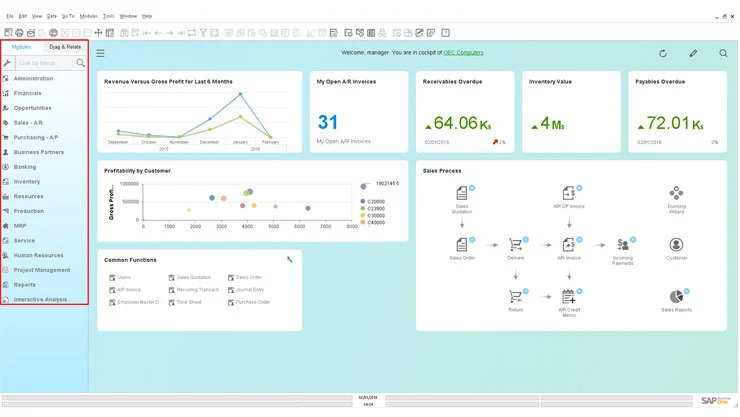
SAP Business One is built for small and mid-sized businesses. It brings financials, CRM, procurement, inventory, production planning, and quality control into one system.
It’s available both in the cloud and on-premise; the on-premise perpetual license is where it stands out, as it gives businesses more data control and deeper customization than most cloud-only ERPs.
That flexibility is also its catch: Business One is highly customizable but quote-priced, sold through SAP partners, and needs significant professional services to implement.
Key features
- Financial management: Centralize your general ledger, payables and receivables, multi-currency management, and reporting.
- Manufacturing planning: Manage MRP, BOMs, and production order tracking (deeper manufacturing functionality available via add-ons).
- Inventory and traceability: Control stock with serial and batch number tracking.
- CRM and sales: Oversee leads, quotes, and customer management in the same system.
- Customization and business intelligence: Tailor workflows, fields, and reports, with built-in business intelligence.
Integrations include:
- EDI
- Magento
- Microsoft Office and Outlook
- Shopify
Pricing (quote-based through SAP partners)
No public list price.
What customers say
👍 “I’m comfortable working with item masters, bin-managed warehouses, batch/lot tracking, and integrated purchasing-to-finance workflows. While some advanced reporting and automation require custom queries or add-ons, I’ve found B1 to be a reliable and flexible ERP that supports accurate decision-making and scalable operations.” — Gareth R.
👍 “I’ve been using SAP BO for about two years and I can say that it’s one of the most powerful business management solutions you can have as you expand your operations. We rely on it for inventory, order management, fulfillment, and a lot more. It’s very customizable and integrates well with outside tools.” — Katerina W.
👎 “It is very expensive compared to other ERP’s designed for SMB’s (mainly the license costs). The initial setup takes longer.” — Yasceine B.
7. Epicor Kinetic: Best for complex, mixed-mode manufacturing
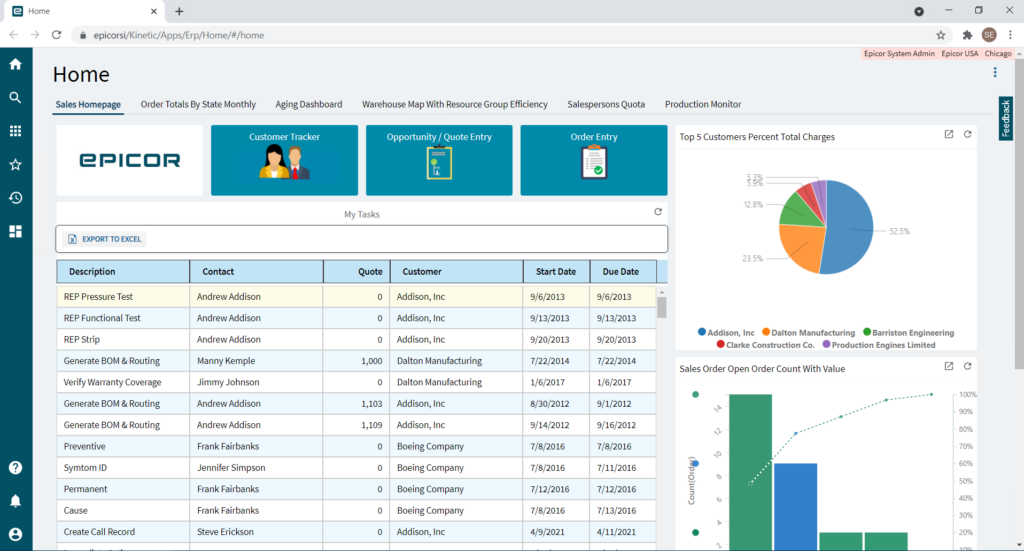
Epicor Kinetic is built specifically for discrete, make-to-order, engineer-to-order, and mixed-mode manufacturers.
It runs the full production cycle, from planning, scheduling, BOMs, and job tracking to shop floor management, quality control, and financials. And it comes with a MES built in.
The depth of features that makes Kinetic strong for complex, multi-site manufacturers also makes it harder to implement. It’s quote-priced, implemented through certified partners over many months, and may come with a steeper learning curve than lighter SMB systems.
Key features
- Manufacturing execution : Access built-in shop-floor data with real-time labor and machine tracking.
- Planning and scheduling: Leverage MRP plus finite-capacity advanced scheduling with Gantt views and what-if simulations.
- BOM and engineering: Coordinate multi-level BOMs with revision control and engineering change management.
- Configure, price, quote (CPQ) product configurator: Run rules-based configuration for make-to-order and engineer-to-order products.
- Financials and business intelligence: Centralized core accounting, costing, and analytics, with the Epicor Prism AI agent.
Integrations include:
- Avalara
- CADLink
- Microsoft 365 and Outlook
- Salesforce
- Shopify
Pricing (quote-based through Epicor partners)
No public list price.
What customers say
👍 “I like Kinetic for its ability to make jobs and parts move through the system faster and eliminate manual work. I really appreciate the ability to add additional features and customize as you grow, which is beneficial as our company evolves.” — Tracey P.
👍 “I like that Kinetic is fully customizable. I also appreciate the opportunity to create dashboards and perform mass audits. As a custom manufacturer with hundreds of jobs and parts that differ daily, the optionality to match custom requests with custom responses is valuable to me.” — Sarah I.
👎 “Out of the box, the Kinetic user interface isn’t as user friendly for people that need to update or review a lot of data as part of their daily functions. There is a lot of empty space without a lot of data. A more compact view with more data visibility would be better in my opinion.” — Eve M.
8. Odoo: Best for modular deployments with limited budgets
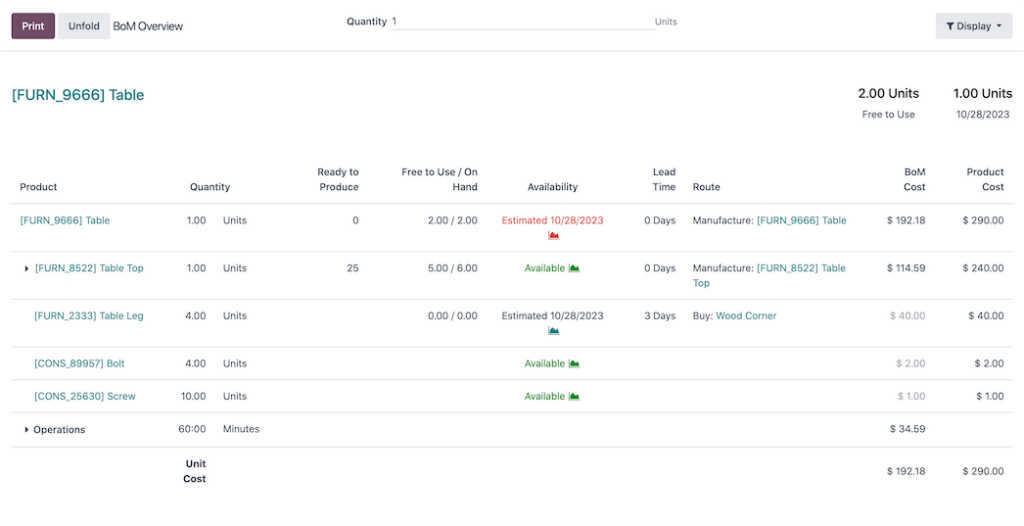
Odoo’s modular ERP bundles manufacturing, inventory, accounting, CRM, sales, and e-commerce into one system.
It’s available in two formats: a free, self-hosted Community edition (open-source, no official support), and the cloud-hosted version with unlimited support and maintenance.
On Odoo’s paid, cloud-hosted plans, a single per-user price unlocks every app, while the free tier gives you access to one app and unlimited users.
That breadth of apps is the appeal, but it comes with trade-offs. As an all-in-one platform, Odoo covers a lot of ground without going deep in any single area, so process manufacturing, advanced scheduling, and shop-floor control may be weaker than the specialist tools on this list.
Key features:
- Manufacturing modules: Build multi-level BOMs, work orders, and work centers for discrete and assembly production.
- All-in-one platform: Manage inventory, accounting, CRM, sales, purchasing, and e-commerce in one connected system.
- Order simulation: Simulate manufacturing orders with real-time capacity planning, component availability, and cost control.
- Studio low-code builder: Create custom apps, fields, and workflows without deep coding.
- Open-source extensibility: Extend the platform via an open API plus thousands of community and marketplace apps.
Integrations include:
- Amazon
- Microsoft Outlook
- Shopify
- Stripe
- Zapier
Pricing (per user/month, billed annually)
- One App Free: Free (single app, unlimited users)
- Standard: $24.90 (all apps, cloud-hosted)
- Custom: $49 (adds Studio, multi-company, and external API)
Standard and Custom prices are Odoo’s discounted rates, which apply for the first 12 months on your initial users before stepping up. The One App Free tier lets you run a single app at no cost, so you can trial the platform before committing to a paid plan.
What customers say
👍 “What I like most about Odoo ERP is how it brings different business functions together on a single platform. Managing sales, CRM, invoicing, and inventory feels much easier because everything is connected and accessible in a single place. The interface is clean, and once you get familiar with it, day-to-day work feels more organized, streamlined, and efficient overall.” — Muhammad O.
👍 “My overall experience was great and will recommend this platform for small to medium sized operations. This is a great option for warehouse management.” — Erik S.
👎 “The biggest issue is the learning curve. Because it’s highly modular and customizable, onboarding can feel overwhelming, especially for new users without ERP experience. Basic tasks are straightforward, but configuring workflows or understanding how modules interact often requires time or external support.” — Chinecherem N.
A quick note on ERP systems vs. MRP systems
An MRP system is production software that automates core manufacturing processes like material requirements planning, production scheduling, tracking, and forecasting. It can also come with features like inventory management, quality control, and BOM control. In short, MRPs handle production planning and inventory.
A manufacturing ERP includes everything an MRP does, then adds CRM, HR, financials, and third-party integrations to run the whole business on one platform. So every manufacturing ERP contains MRP functionality, but not every MRP is a full ERP.
The main difference between MRPs and ERPs is that the MRPs strictly cover manufacturing processes, while manufacturing ERPs take those processes and combine them with expanded functionalities to connect all the departments in your business.
How to choose a manufacturing ERP
One of the biggest mistakes businesses make with ERP software is choosing a tool with a long feature list rather than one that fits how they actually produce. Your production model and your company stage should dictate the type of product you chose.
Start with how you make things, because it determines which features you can’t compromise on:
| Production model | What it looks like | Prioritize an ERP with |
|---|---|---|
| Make-to-stock / repetitive | Standard products built to forecast | Demand forecasting, reorder-point automation, inventory optimization |
| Make-to-order (MTO) | Products built once an order lands, often configurable | Fast quoting, flexible BOMs and routings, capacity scheduling |
| Engineer-to-order (ETO) | Custom, project-based builds designed per order | Project costing, revision control, engineering change management |
| Batch/process | Formula- or recipe-based output (food, cosmetics, chemicals) | Recipe management, lot traceability, expiry and compliance tracking |
| Discrete | Blueprint- and BOM-based assembly (machine shops, electronics) | Multilevel BOMs, shop-floor control, serial traceability |
| Mixed-mode | A combination of the above on one floor | A flexible system that handles several models without heavy customization |
Then consider your business stage. If you’re running on spreadsheets or accounting software today, your first ERP should prioritize fast self-service implementation and ease of use over deep customization, since you likely don’t have a dedicated IT team.
This is the stage MRPeasy is built for, and self-implementation and quick setup matter more here than enterprise-grade configurability.
Ask yourself what your biggest bottleneck is. Map the issue to the capability that fixes it to know which features to prioritize in a platform:
- Stockouts and inventory blind spots point to real-time inventory, lot tracking, and automated reordering.
- Slipping production schedules call for capacity planning and drag-and-drop scheduling tied to real availability.
- Traceability gaps demand end-to-end lot and serial tracking, which is non-negotiable in the food, medical devices, and automotive industries.
- Slow or inaccurate quoting needs automated BOM costing with real-time cost and lead-time estimates.
- Missed delivery dates require scheduling linked to actual material and machine capacity, not guesswork.
- Departments working off different numbers call for one shared database across sales, production, purchasing, and finance.
And before you commit, run the shortlist through five questions:
- How do we manufacture?
- What’s our single biggest bottleneck right now?
- Can we implement this without a dedicated IT team?
- Will it scale to our next stage in users and sites?
- What does it really cost to implement, not just to license?
A full ERP isn’t always the answer. If you have fewer than five users or your pain is mostly inventory rather than production, a focused MRP or inventory tool may cover you for less.
The return on a full system grows once production scheduling, costing, and cross-department coordination start to hold you back.
Which manufacturing ERP wins?
The right manufacturing ERP comes down to fit, not feature count. Systems like SAP Business One, Epicor Kinetic, and Acumatica bring depth, but they also bring partner-led implementations and five-figure costs that rarely suit a smaller shop.
For a growing small or midsized manufacturer that wants production planning, inventory, and traceability in one system, without a consultant or a long rollout, MRPeasy is the perfect fit.
Frequently asked questions about manufacturing ERP software (FAQ)
There’s no single best ERP for manufacturing, because the right fit depends on your size and how you produce. For small and mid-sized manufacturers, MRPeasy and Microsoft Business Central are common picks. Mid-market manufacturers often land on Epicor Kinetic or Acumatica, while large enterprises run SAP or NetSuite.
For most small manufacturers, the best ERP is a cloud system you can implement yourself without a five-figure consultant bill.
MRPeasy is built for this; it covers production planning, inventory, purchasing, and costing for small and midsized manufacturers, starting at $49/month per user.
Cloud ERPs designed for self-service onboarding are the easiest to adopt, since they need no dedicated IT team and little custom setup.
MRPeasy is one of the simplest for manufacturers, with a guided setup most teams complete in a few weeks.
Microsoft Business Central and Acumatica are user-friendly too but usually involve an implementation partner. Ease of use also depends on training, so check what type of onboarding support each vendor includes.
A manufacturing ERP should cover production planning and scheduling, BOMs, inventory and stock control, purchasing, and shop-floor reporting at minimum.
Strong costing and quoting matters for accurate margins, and lot or serial traceability is essential in regulated sectors like food, medical devices, and automation.
Look for built-in CRM and accounting integration too, so sales, production, and finance share one source of data.
It depends heavily on the system. Self-service cloud ERPs like MRPeasy can be implemented for little-to-no upfront fee beyond the subscription, which starts around $49 per user per month.
Partner-led systems are a different scale; minimum implementation fees commonly run in the thousands before software costs, plus months of setup. Budget for data migration, training time, and any customization, not just licenses.
An ERP system unifies various functionality, including customer relationship management (CRM), inventory and purchasing, supply chain management, and project management.
These platforms synchronize data between departments into a single database. For example, when a sale is completed on your connected e-commerce website, the relevant order data is automatically synced across inventory, production, and accounting.
No, manufacturing ERP software is a class of ERP systems that’s specifically tailored to companies whose business revolves around producing or distributing physical goods.
These platforms include dedicated features for manufacturing like production planning and scheduling, advanced bill of materials (BOM) management, demand forecasting, quality control, shop floor workflows, and inventory management.
Manufacturers can get high ROI out of specialized ERP systems. Benefits include:
Fully integrated production management: One platform unites production, inventory, CRM, accounting, and HR to replace disconnected tools and cut manual data entry and errors.
Data-based decision-making: A central source of real-time data lets managers spot inefficiencies, find cost savings, and respond to market changes quickly.
Better planning and forecasting: Automated demand forecasting and scheduling help predict material needs, avoid stockouts and overproduction, and align output with actual demand.
You might also like: ERP Implementation Cost – What Manufacturers Need to Know
Get manufacturing know-how delivered to your inbox!