Best Inventory Management Software in 2026 – Top 8 List for Small Businesses
Choosing the right inventory management system is vital to the success of any business that handles physical merchandise. The right system helps track stock, understand availability, and connect inventory with purchasing, sales, or production. In this list, we compare eight of the best inventory management platforms for small businesses in 2026.
Best inventory management software in 2026
Here are our top 8 inventory management software options for small businesses in 2026. Since different businesses need very different levels of inventory control, we include a mix of systems prioritizing inventory-first tools, production, distribution & e-commerce integration, retail-oriented solutions, and larger ERP options.
1. MRPeasy – best inventory software for small manufacturers and distributors
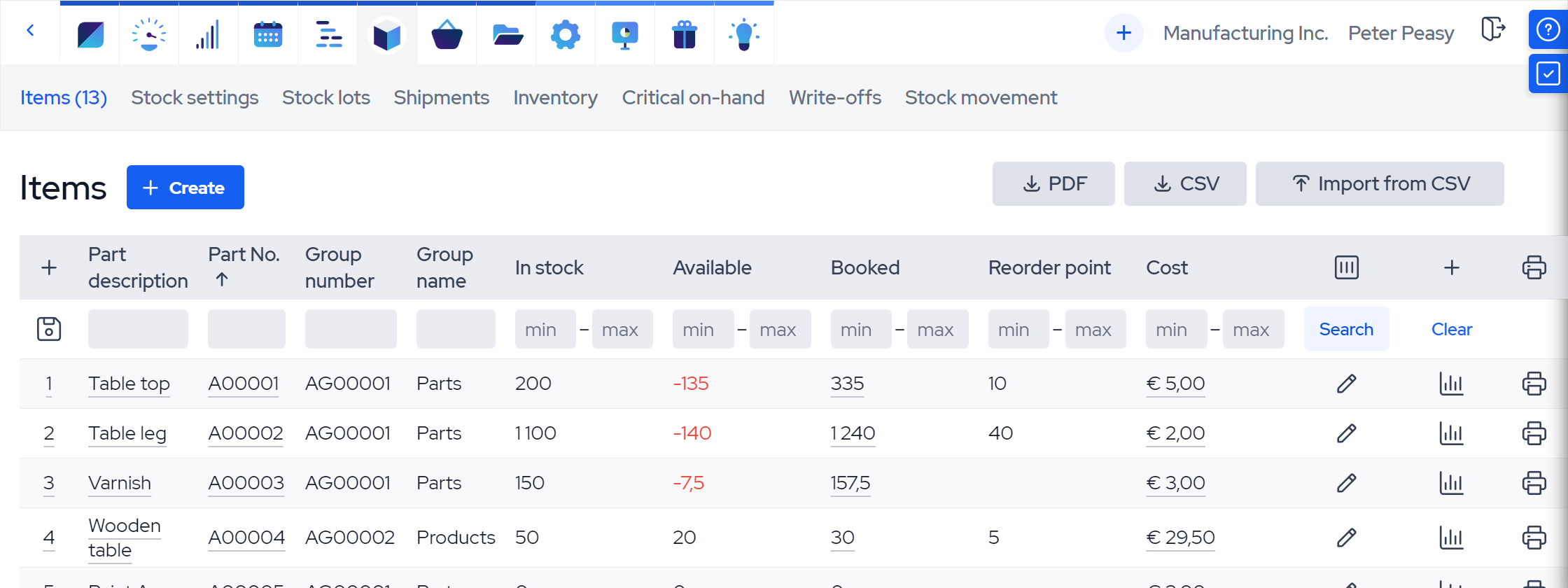
MRPeasy is a cloud-based ERP and inventory management system built for small manufacturers and distributors. It goes beyond basic stock control by tying inventory directly to purchasing, sales orders, warehouse movements, and production planning. It’s designed for businesses where inventory does not exist in isolation.
Features
MRPeasy’s biggest strength as an inventory tool is integration into a broader operational workflow. Stock levels update automatically as materials are purchased, booked to orders, moved between locations, picked for shipment, and consumed in production. It provides teams with a clear picture of what’s physically available, what’s incoming from whom and when, and what needs replenishment as new orders come in. There are also native integrations with fulfillment and e-commerce apps like ShipStation or Shopify for more complete supply chain and distribution workflows.
Its inventory feature stack includes multiple stock locations, lot and serial tracking, barcoding, expiry tracking, returns, reorder points and safety stocks, stock transfers, packing, warehousing workflows, and more. By including purchasing, CRM, e-commerce, and accounting, MRPeasy handles the messy middle ground where inventory control overlaps with real operations better than inventory-only systems.
MRPeasy is best suited to small and medium-sized businesses that add any kind of value to their stock, whether through kitting or bundling, packaging, or in-house production. For this, it offers robust production planning & scheduling, BOM (bill of materials) management, quality control, and shop-floor reporting tools.
Pros & cons
Pros
- Strong operational depth and integration with the rest of the business, particularly for manufacturers.
- Inventory is tightly connected with purchasing, multichannel sales, and production workflows.
- Advanced stock features like lot and serial traceability, multiple warehouses, expiration tracking, barcoding, returns, etc.
- Clear pricing with no module-based pricing or additional paywalls.
Cons
- More system than small retailers or simple online sellers may need.
- Offers best value when you use its broader workflow, not just stock tracking.
- Built around best practices, leaving businesses with highly customized workflows wanting more customization freedom.
Pricing & implementation
MRPeasy plans are $49/user/month for Starter, $69/user/month for Professional, $99/user/month for Enterprise, and $149/user/month for Unlimited, with 1 month free on annual billing. Features scale by plan, but even the Starter tier offers solid inventory, warehouse, purchasing, and production workflows, unlimited integrations and orders, and free support.
The system is built with self-implementation in mind and offers free materials and guides on getting started. Onboarding is lighter than a traditional ERP project, but requires more structure than a simple plug-and-play stock app. Small businesses with clean data and straightforward processes can expect to go live within a few weeks. In return, the system can replace multiple disconnected tools rather than just adding another one.
What users say
MRPeasy users praise the software for providing them with strong control over stock, purchasing, order management, and production in one place. Reviews also frequently highlight ease of use relative to more traditional ERP systems, improved stock visibility, and that the software is built around the day-to-day needs of small and scaling operations rather than enterprise complexity.
The main limitations users point to are usually related to flexibility rather than core functionality. Some businesses want deeper customization and a smoother UX in specific areas. Others note that MRPeasy works best when the company is willing to adopt more structured processes rather than relying on legacy workarounds.
2. Zoho Inventory – solid general-purpose inventory software for growing SMBs
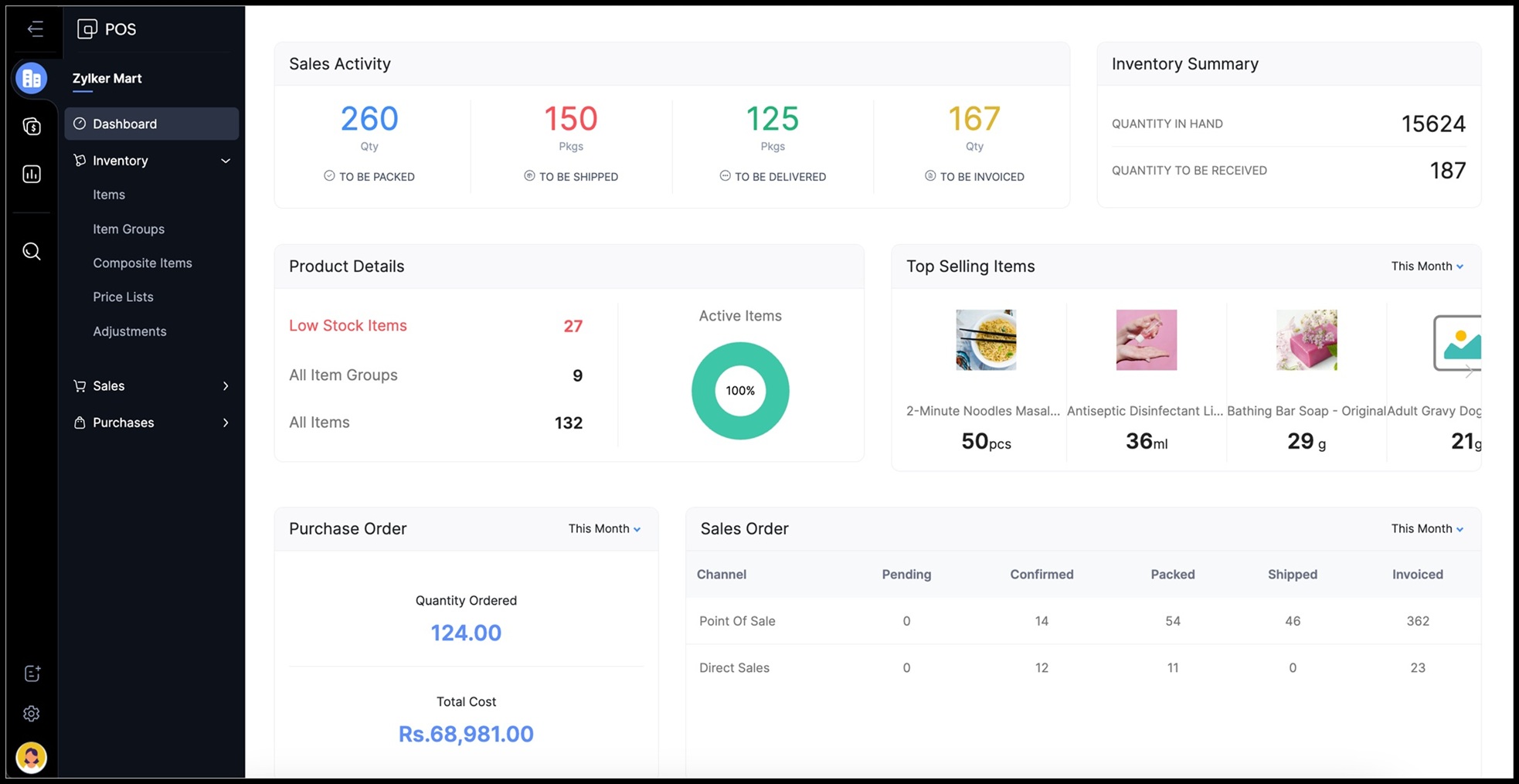
Zoho Inventory is a web-based inventory and order management platform designed for small businesses that need better stock visibility in sales, purchasing, and fulfillment. It’s especially appealing to companies already invested in Zoho’s app ecosystem, or to those who want a relatively affordable, easy-to-understand inventory system without stepping into ERP territory.
Features
Zoho Inventory focuses on core inventory workflows that most small businesses rely on most – item and warehouse tracking, reorder points, purchase orders, sales orders, shipping, backorders, dropshipments, serial and batch tracking, and barcode support. It’s also strong on multichannel inventory use cases, making it a natural fit for businesses that sell online across several channels and need stock levels to stay aligned.
Where Zoho stands out is accessibility. It’s easier to adopt than most ERP systems, and its plan structure gives businesses a lower-cost entry point. At the same time, Zoho’s offer is a more general inventory and order management platform than a deep operational system. If your inventory is closely tied to production, finite scheduling, or more advanced manufacturing workflows, it might not be the best fit.
Pros & cons
Pros
- Transparent pricing with a free plan and low-cost entry tiers.
- Good multichannel inventory and order management coverage.
- Useful batch/serial tracking and warehouse features for SMBs.
- Natural inventory solution for businesses already invested in the Zoho ecosystem.
Cons
- More about inventory and order control focus than deeper operational workflows like capacity planning or more advanced warehouse processes.
- Some more advanced features are locked behind additional paywalls.
- Less suitable for businesses that need inventory tied tightly to production workflows.
- Some users report inconsistent support and occasional sync friction.
Pricing & implementation
Zoho Inventory offers a surprisingly functional Free plan, capped at 50 orders per month. More serious control comes with its paid tiers starting at $29/month for Standard, $79/month for Professional, $129/month for Premium, and $249/month for Enterprise when billed annually. There are additional paid add-ons for seat counts, order volume, locations, advanced autoscans, and advanced warehousing.
Implementation is usually manageable for small businesses and is lighter than an ERP rollout. Companies moving from spreadsheets or basic stock tools can often get started fairly quickly, although setup becomes more complicated when multiple sales channels, warehouses, or accounting integrations are part of the project.
What users say
Zoho Inventory gets positive feedback for providing users with much better stock visibility without feeling overly technical. It helps teams move off spreadsheets, manage orders more systematically, and connect inventory with the broader Zoho stack at a mostly affordable price point.
The platform’s most common complaints concern system depth and polish. Reviewers sometimes note that certain workflows feel limited, that support can be inconsistent, and that more complex setups reveal friction with automation, channel syncing, or the need for additional paid add-ons.
3. inFlow Inventory – an inventory-first system with strong warehouse practicality
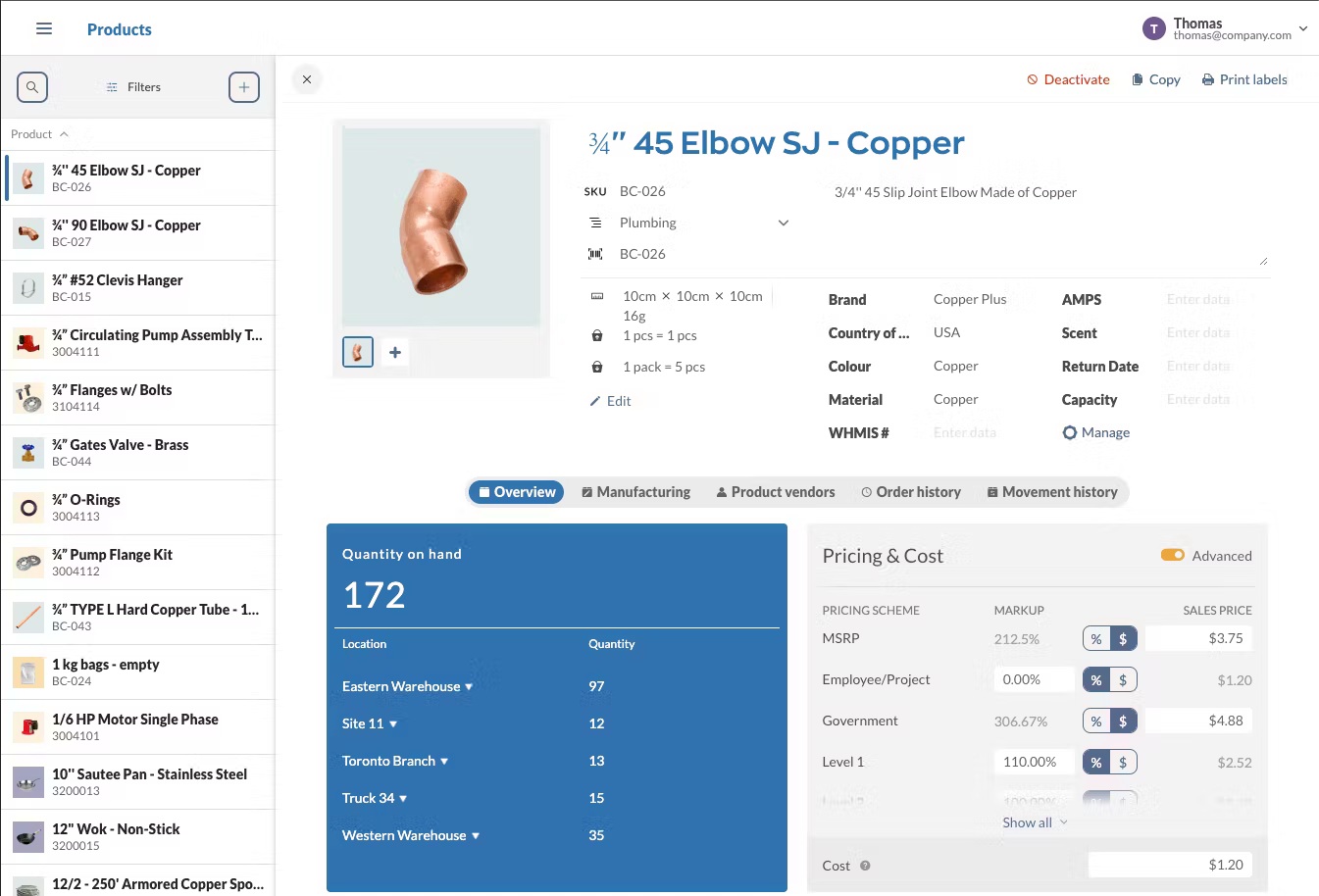
inFlow Inventory is an inventory platform for small businesses that need practical control over stock, purchasing, sales, and fulfillment. It sits closer to the operational middle than very light stock apps, but is still more approachable than a full-size ERP.
Features
inFlow is built around the premise of making physical inventory work easier. It supports stock tracking across locations and sublocations, stock counts, low stock alerts, transfers, reorder points, purchase orders, sales orders, pick lists, fulfillment status, returns, dropshipping, barcode scanning, custom labels, and integrations with QuickBooks Online and Xero. It also has a manufacturing edition, but the system’s core identity remains inventory-first.
inFlow is a good fit for wholesalers, distributors, and product businesses that want solid warehouse discipline without taking on a full operations system. Where it can start to feel less ideal is when inventory needs to be inherently connected to more complex production planning and scheduling or more advanced multi-department workflows.
Pros & cons
Pros
- Strong workflows for receiving, picking, stock counts, and labeling.
- Easy to use for day-to-day inventory tasks without feeling overly stripped down.
- Confidently integrates purchasing, sales orders, stock control, and fulfillment into a single system.
- Built-in stockroom tools such as barcodes, sublocations, pick lists, reorder points, and low-stock alerts for tighter warehouse control.
Cons
- Pricing and plan packaging are less transparent than many SMB SaaS tools.
- Batch/serial control, traceability, and operational depth are lighter than in more integrated systems.
- Advanced manufacturing and cross-department workflows can require workarounds.
- Businesses with growing complexity may eventually need broader ERP functionality.
Pricing & implementation
inFlow’s pricing system is less straightforward than some competitors. The company offers three editions of its software, each available in various tiers – Stockroom (starting at $99/month) for basic inventory control, Inventory ($129-$699/month), which adds price tracking, sales, purchasing, etc., and Manufacturing ($179-$899/month), the most complete edition, which also includes production planning workflows. Software seats are limited by tier, as are the number of integrations you can add. Add-ons for certain features also come at an extra price. For example, the Inventory edition for Small Business includes 5 fixed seats and allows 3 integrations for $349/month before add-ons.
Implementation complexity is usually moderate. Bringing the system online is a more structured endeavor than setting up a basic inventory app, especially if you want to roll out barcode workflows, fulfillment processes, or accounting integrations. It still remains far less demanding than a traditional ERP deployment, though.
What users say
inFlow Inventory receives high scores for being a practical, warehouse-friendly app that’s easier to work with than many more bloated systems. Reviews call out the barcode features, stock visibility, and the way it helps teams tighten up receiving, picking, and reordering.
Common limitations concern scaling and edge-case flexibility. Some users note that the software can feel restrictive in more complex environments. The pricing system and tier-feature completeness are also mentioned as something to consider as needs grow.
4. QuickBooks Enterprise – inventory management through an accounting-led platform
QuickBooks Enterprise is a desktop platform that provides QuickBooks users stronger business management and inventory capabilities than standard QuickBooks Online. It’s best suited to product-based businesses that want inventory control closely tied to accounting, pricing, and order management, but don’t necessarily need deeper supply chain or manufacturing features.
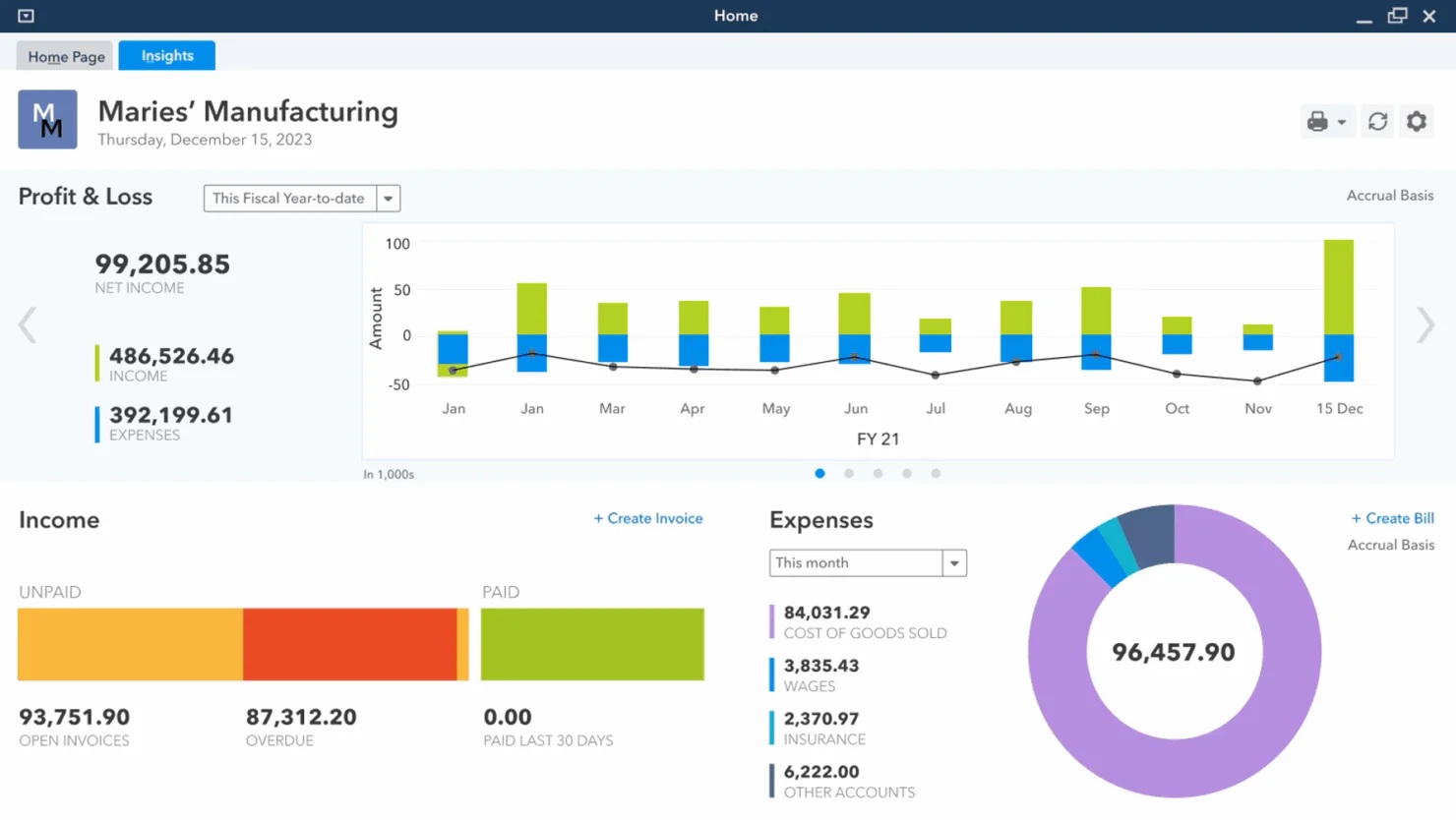
Features
QuickBooks Enterprise provides well-implemented basic inventory tracking, order management, and pricing features. Its Advanced Inventory module, included in the Platinum edition and up, extends inventory control to include bin location tracking, landed costs, and mobile barcode scanning. For businesses already centered around QuickBooks, that can be a major advantage because inventory lives inside a familiar accounting-led workflow.
QB Enterprise’s strengths are also its limits, though. The system works best when inventory is closely tied to accounting workflows and basic operational control. It’s not a full-on inventory platform in the same sense as many other providers on this list. If your operation becomes more complex inventory-wise, you may start to feel the tension between the platform’s accounting roots and broader supply chain needs before long. Opting for QuickBooks Online for accounting and integrating it with a dedicated inventory tool might make more sense in these cases.
Pros & cons
Pros
- Good fit for businesses already invested in QuickBooks.
- Advanced Inventory adds useful barcode and bin-location functionality.
- Industry-standard accounting and financial visibility alongside stock control.
Cons
- Advanced inventory features are only available in higher subscriptions.
- Not a true cloud-based SaaS, hosted privately on your hardware. A cloud version is available but requires web server installation. Mobile apps are available for some workflows.
- Not suitable for advanced warehouse or manufacturing workflows. Difficult to scale stock and supply chain features on.
Pricing & implementation
QuickBooks Enterprise comes in three editions – Gold (starting at $185/month), Platinum (starting at $227/month), and Diamond (starting at $447/month). The total price depends on the number of users and whether cloud hosting is required. For example, 3 users on the Platinum plan and cloud hosting is $565/month.
Implementing QuickBooks Enterprise is usually less disruptive than a full ERP rollout, especially if the business already runs on QuickBooks. It can still become a fairly involved project when inventory, barcode workflows, hosting, or process cleanup are added, though.
What users say
QuickBooks Enterprise users appreciate the platform for bringing accounting and inventory workflows into a single system. Reviews regularly highlight good reporting, financial visibility, and the convenience of not having to run separate tools for accounting and inventory tasks.
On the flipside, QB Enterprise’s negatives include high cost, a steep learning curve – especially for users new to QuickBooks, and a somewhat outdated UI. Since it’s a desktop-based setup, it also demands stronger computer hardware, regular software updates, and continuous IT support, compared to modern fully cloud-based options.
5. Ordoro – a strong inventory option for e-commerce and dropshipping businesses
Ordoro is an e-commerce-first operations platform with separate shipping, inventory, and dropshipping apps. It’s not a broad stock-control app for every business type, but a useful choice for merchants who need to manage inventory for order fulfillment and multi-channel selling.
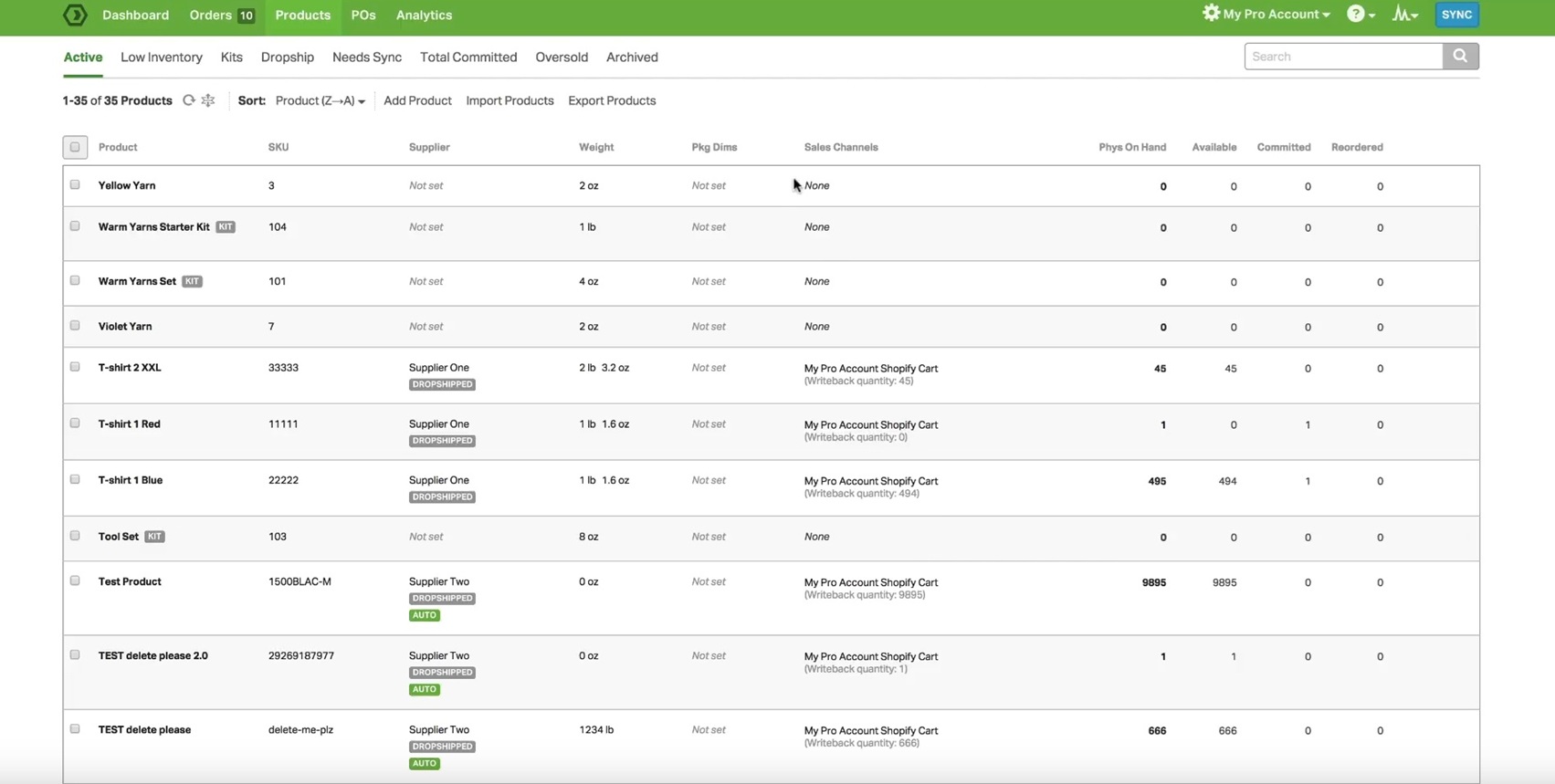
Features
Ordoro’s inventory app focuses on tracking stock across stores and warehouses, while its other platforms also add shipping and dropshipping automation. It supports multi-channel inventory syncing, purchase orders, kitting, supplier management, barcode scanning, and low-stock alerts. The platform is built to unify shipping processes, making Ordoro an appealing offer first for online sellers who need basic inventory control.
That being said, Ordoro is clearly optimized around e-commerce operations rather than broader inventory control. It’s great for merchants managing storefronts, warehouses, and shipping rules, but not for manufacturers or stock-heavy distributors that need compliance-ready traceability, warehouse execution, or production-related functionality. While the full build does include some BOM and purchase order/manufacturing order control, Ordoro is fundamentally about streamlining e-commerce back-end operations, not optimizing inventory processes for a larger operation.
Pros & cons
Pros
- Good fit for e-commerce businesses with shipping-heavy workflows that need inventory tightly connected to order routing and marketplace fulfillment.
- Inventory, shipping, and dropshipping features can be combined into a single platform.
- Useful multi-store and multi-warehouse support, especially if you operate many channels.
- Strong operational focus on pick, pack, ship workflows and day-to-day order fulfillment efficiency.
Cons
- Less versatile than general-purpose inventory tools outside e-commerce fulfillment scenarios.
- Inventory app pricing starts fairly high compared to lighter SMB inventory tools.
- Unsuitable for businesses requiring deep traceability, purchasing automation, or production control.
- Easier to justify if you also need its shipping and dropshipping tools, not just inventory management on its own.
Pricing & implementation
Ordoro offers three apps, each optimized for certain workflows. Shipping starts with a free tier and tops out at $149/month. Inventory starts at $349/month, and Dropshipping is available from $299/month. Bundled pricing is also available for businesses that want all three.
Implementation is usually reasonably manageable for e-commerce businesses already selling across channels. Complexity can creep in from a larger number of channels, warehouses, and fulfillment rules that need to be baked in.
What users say
Ordoro tends to get its most positive feedback from merchants who are juggling multiple sales channels, vendors, or fulfillment partners. Reviews often laud the platform for helping reduce manual coordination, making order routing and shipping more manageable, and providing teams with a cleaner way to handle inventory alongside fulfillment.
The weak points brought out are more specific. Some mention that support can be slower than they would like when something urgent comes up. Others note that occasional specific workflow requirements can depend on future product updates, rather than something that can be configured right away. That makes the platform easier to like for businesses whose process maps well to Ordoro’s built-in logic than those who might need a lot of “edge-case” flexibility.
6. Square for Retail – inventory software for store-based and omnichannel retailers
Square for Retail is a retail POS (point-of-sale) platform with built-in inventory management. It’s intended for SMEs with physical stores and omnichannel retailers that want stock control inside the same system they use for selling. It’s not a general inventory platform in the same sense as MRPeasy, Zoho, or inFlow, but it’s highly relevant for retailers and other companies that sell their own wares.
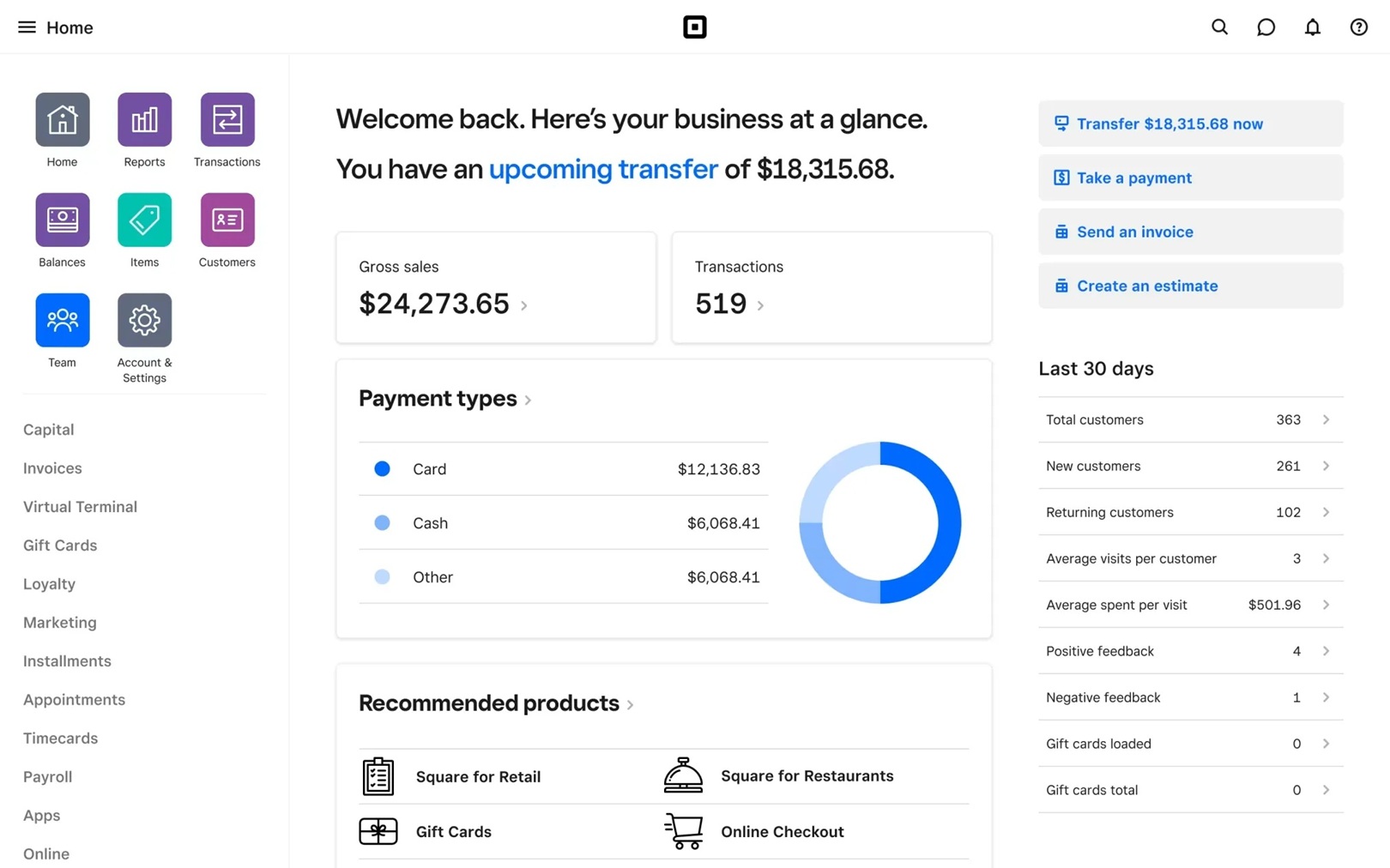
Features
Square for Retail combines POS, inventory, purchasing, and basic retail management into a single platform. It covers the stock tasks most small retailers care about day to day, like item tracking, counts and adjustments, purchase orders, vendor management, stock history, and multi-location visibility. For growing operations, the platform adds stronger inventory capabilities like returns and transfer orders in its higher tiers.
Square’s big thing is simplicity. If your inventory process mainly exists to support selling, receiving, replenishing, and moving stock between store locations, it can be a very practical choice. It only starts to look less compelling when inventory needs to support deeper warehouse logic, supply chain planning, or anything closer to manufacturing or distribution control.
Pros & cons
Pros
- Good fit for small retailers and omnichannel sellers that want inventory and POS in one system.
- Easy to learn, quick to deploy, and generally straightforward for store staff to use.
- Includes useful purchasing and vendor tools for day-to-day retail stock management.
Cons
- Retail-first rather than inventory-first for broader business types.
- Multi-location and more advanced workflows are stronger on paid tiers.
- Transaction fees, hardware, and add-ons can push up the total cost over time.
- Not designed for businesses that need manufacturing, advanced distribution, or more complex inventory logic.
Pricing & implementation
Square for Retail offers Free, Plus, and Premium tiers. The Free tier has no monthly subscription cost, but the highest processing fees and limited workflows. Plus ($49/month per location) offers the bulk of feature value, adding reviews, bundling, preorders, etc. Premium ($149/month per location) adds a few advanced features and the lowest processing fees.
Square for Retail is designed for quick and easy setup. For small retailers, especially if they are starting fresh with Square’s POS ecosystem, implementation usually takes a few days. The main cost and complexity considerations tend to come from hardware, multi-location setups, payment processing fees, and any additional tools you might need to layer on top.
What users say
Square for Retail generally gets positive feedback for ease of use. Users often highlight how simple it is to train staff on, how smoothly checkout and inventory work together, and how useful it is to manage selling and stock inside one system rather than jumping between tools.
The most common complaints focus on scaling hurdles and total cost creeping up over time. Some reviewers mention that inventory features feel too light for more advanced use cases. Others point out that processing fees, paid-tier requirements, and added services can make the platform feel less economical over time.
7. Sortly – simple, foolproof inventory tool for very small teams
Sortly is a lightweight inventory management app built for small businesses that want a reliable way to simply track items, quantities, and locations without taking on a bigger operations system. It’s one of the most accessible tools on this list and the clearest “starter” option.
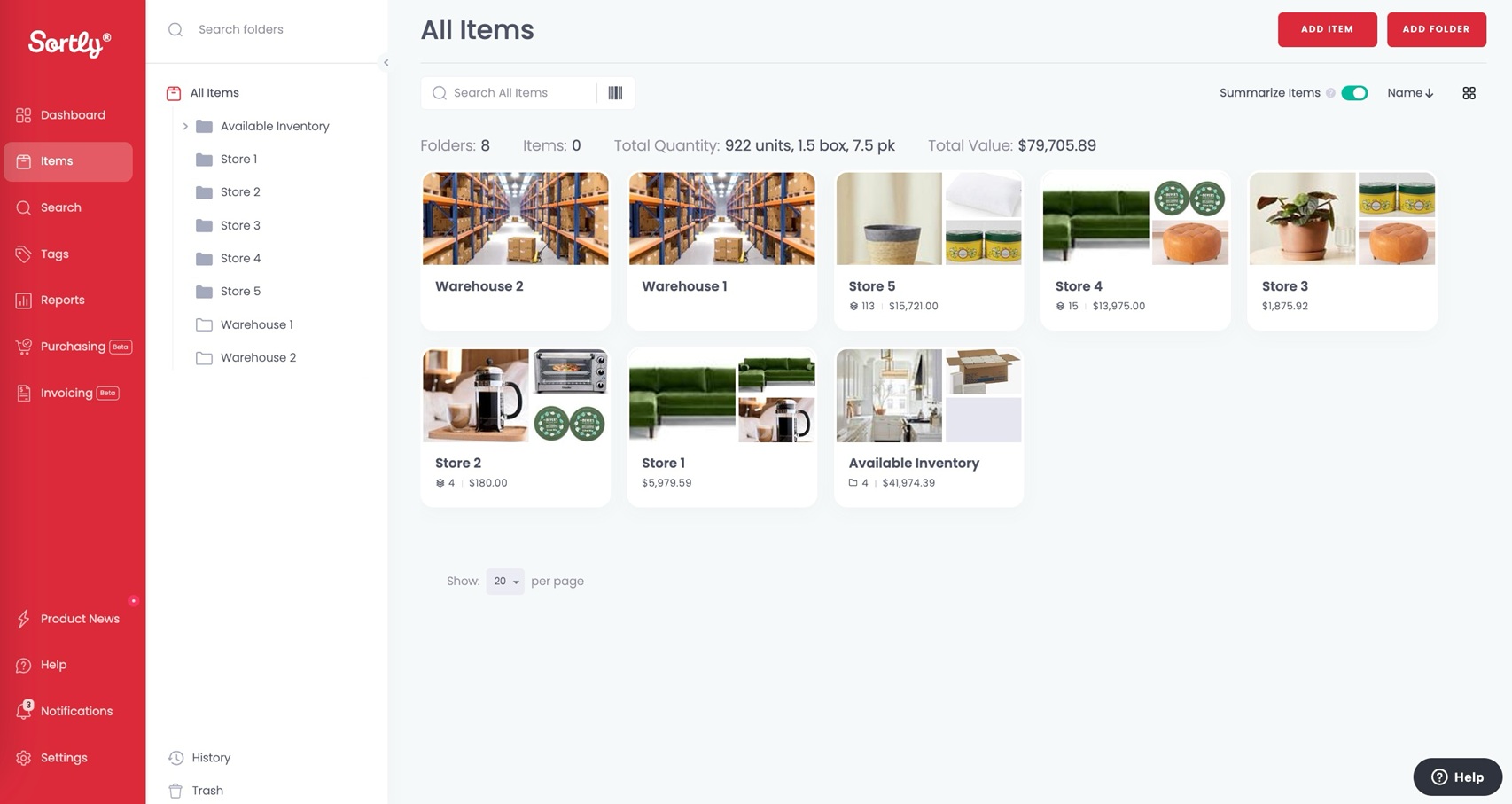
Features
Sortly focuses on straightforward stock and asset tracking rather than deeper operational workflows. It supports item records, folders and categories, barcode and QR scanning, photos, custom fields, imports, user permissions, and a mobile-first interface that makes it easy to count, move, and look up items on the go.
That simplicity is exactly why some small teams love it. For businesses that just need better visibility than a spreadsheet can provide, Sortly is a solid and highly rated offer. Still, once inventory needs to connect to purchasing, sales orders, fulfillment, or broader warehouse processes, its limits become obvious.
Pros & cons
Pros
- Very easy to set up and simple enough for non-specialists to use without much training.
- The free plan is actually usable, which lowers the barrier to getting started.
- Mobile-friendly design works well for quick stock checks, updates, and barcode or QR code tracking.
- A practical option for simple stock or asset tracking when broader operational features are not a priority.
Cons
- Lighter on purchasing, fulfillment, and the day-to-day workflows that more active product businesses usually need.
- Easy to outgrow once stock volume, complexity, or process requirements increase.
- Advanced inventory features are more limited than those in deeper inventory and ERP systems.
Pricing & implementation
Sortly offers a Free plan, then paid tiers at Advanced from $24/month, Ultra from $74/month, and Premium from $149/month. There’s also a custom Enterprise tier, which unlocks API and extends the item count. Plans differ by item counts, number of user licenses, and features. For example, Advanced offers 2 user seats, Ultra adds purchase orders, and QuickBooks accounting is available from Premium.
Implementation is usually very quick and low-risk. You can expect to be up and running within a week. That’s a big part of Sortly’s offer by design. It’s a clean first step for very small businesses or teams coming off spreadsheets. The tradeoff is that when your inventory workflows start growing in size and complexity, you might need to replace it before long.
What users say
Users often praise Sortly for being straightforward, visually clean, and easy for non-specialists to adopt. Reviews tend to highlight how quickly teams can start tracking stock or assets without a long setup project.
The main criticisms are about depth and scalability. Reviewers often say it works best for simpler use cases, and that more complex purchasing, warehouse, or inventory-planning needs can expose its limits fairly quickly.
8. NetSuite – heavyweight ERP with strong inventory depth
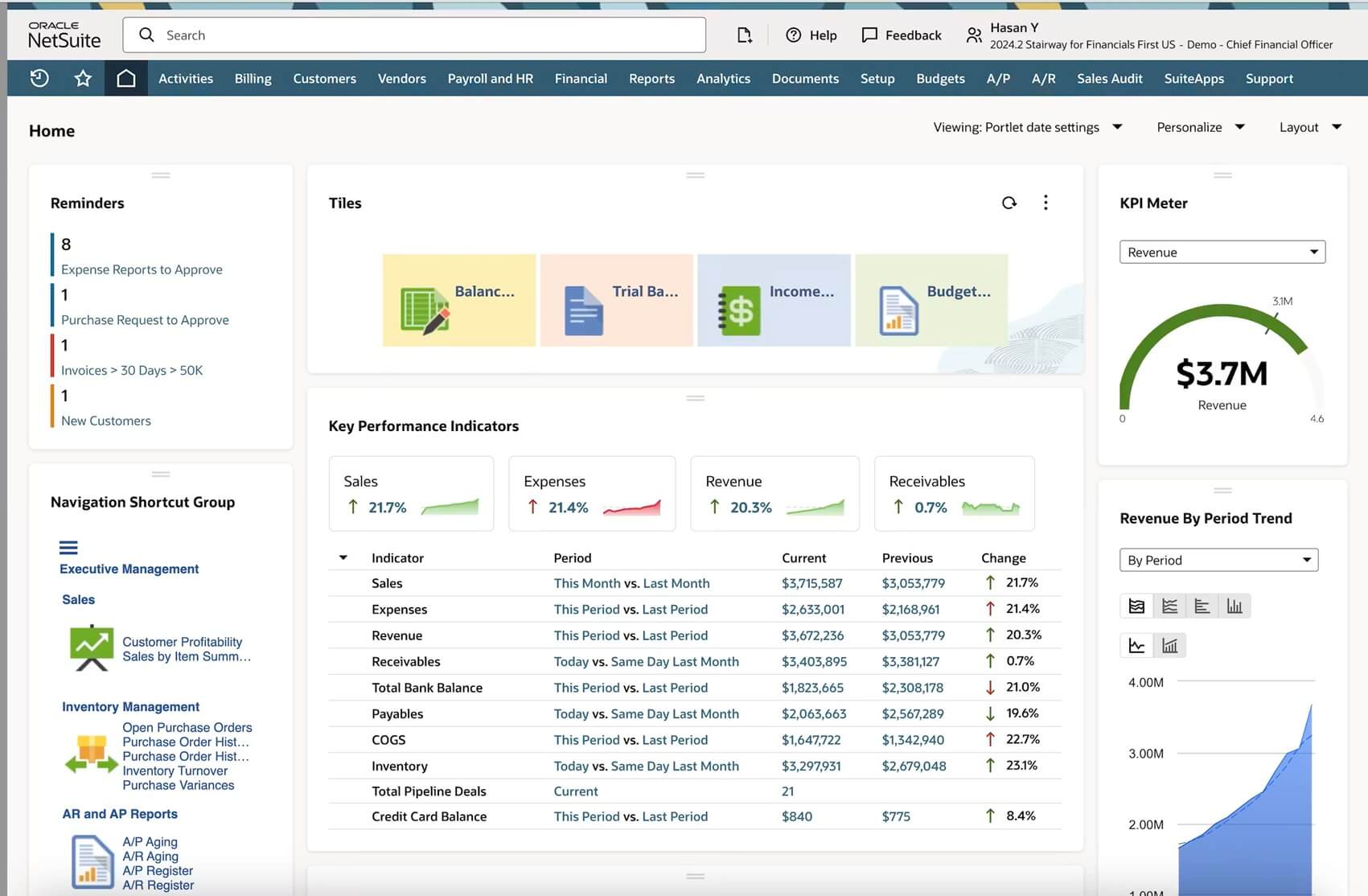
NetSuite is a cloud ERP with robust inventory management functionality, positioned for both SMEs and larger enterprises that require deeper functionality and have the funds to deploy it. In practice, it’s a realistic option for companies already operating at an advanced level of complexity or undergoing rapid growth.
Features
NetSuite supports broad inventory control across warehouses, locations, purchasing, order management, finance, and various supply chain workflows. It’s built to handle far more than just stock tracking, which makes it attractive to businesses that want inventory connected to the rest of the company in a single system.
While it can be very catering to your requirements, NetSuite is not an inventory app you subscribe to and start using next week, or even next month. It’s a full-deploy ERP, and its inventory functionality is bundled with the implementation effort, cost, and organizational commitment that enterprise-style systems come with. It’s a lot of system, at a lot of cost.
Pros & cons
Pros
- Broad inventory and ERP functionality in a single platform.
- Strong fit for more complex, rapidly scaling, or multi-entity businesses.
- Good long-term scalability for companies growing into enterprise-level operations.
- Connects inventory with finance, purchasing, order management, and other business processes.
Cons
- Implementation is much heavier than with SMB-first inventory systems.
- Oftentimes more system than a typical small business actually needs.
- Usually requires partner support, company-wide implementation, and longer-term commitment.
- Quote-based pricing makes it harder to compare and more expensive than most subscription-based offerings.
Pricing & implementation
NetSuite pricing is always quote-based rather than public. The sales and implementation process is consultative, with total cost depending on modules, users, entities, and partner involvement. Typical deployment and running costs point to well north of $100,000 for the first year.
Implementation is typically the heaviest on this list. Businesses should expect a structured project with data migration, process design, configuration, and training rather than a quick SaaS setup. For many small businesses, NetSuite is a viable later-stage option rather than a natural first-choice inventory system.
What users say
Users who need broad ERP capabilities often praise NetSuite for its deep integration and for bringing inventory, finance, and operations together in one place. Once fully implemented, it’s regularly described as powerful, scalable, and capable of supporting more complex business structures than many lighter systems.
The platform’s downside is just as well known. Reviewers frequently point to extreme cost, implementation weight, and the ongoing effort needed to get the most out of the platform. For smaller teams, the challenge isn’t whether NetSuite can do all you need it to, but whether taking on that much system makes practical sense.
What is inventory management software?
Inventory management software helps a business track, control, and plan its inventory. At a basic level, it records what stock you have, where it’s stored, and how quantities change as you purchase, sell, move, allocate, and return items.
But inventory software can go far beyond simple traceability. Depending on the system’s granularity and intended design, it can include key features such as item and SKU management, stock counting workflows, reorder points and safety stock levels, purchase order management, warehouse management, barcode scanning, lot and serial tracking, stock transfers, and inventory reporting. More advanced systems further connect stocking with order management, fulfillment, forecasting, accounting, and production workflows.
Why do I need inventory software?
If you’re managing stock through spreadsheets, disconnected apps, or manual counts, you’re inevitably struggling with visibility and timing. That’s because you don’t know what’s currently available, what’s already committed, what needs replenishment, or where errors are creeping in. The result is usually a constant internal balancing act trying to avoid stockouts, overstocking, delayed shipments, rushed purchases, and perfectly avoidable customer service problems.
Inventory software reduces many of these problems by giving the business one source of truth for stock. It helps you receive, store, allocate, move, count, and reorder inventory more systematically. It automates many manual processes, reduces errors, and creates a dependable foundation for growth, whether in purchases, sales, fulfillment, or production planning.
Different businesses need different inventory capabilities
The right inventory system for you depends on how your business operates, its size, and the sector you’re active in. A retailer selling across many stores and online channels doesn’t need the same functionality as a distributor managing multiple warehouses, or a manufacturer whose stock levels are tied directly to production. That is why “the best inventory software” is never about features on paper but how well the system matches the role inventory plays in your business.
Here’s key functionality to look for, depending on your business type.
Retail and e-commerce
Retailers and e-commerce businesses usually need to keep stock levels aligned across sales channels and make replenishment easier to manage foremost. For retailers, POS integration is often essential, while e-commerce sellers and dropshippers rely on multi-channel syncing with platforms like Shopify, Amazon, or Etsy as a non-negotiable.
Look for features like:
- Multi-channel inventory syncing
- POS or storefront integration
- Low-stock alerts and reorder support
- Purchase order and supplier management
- Bundling, returns, and accounting software integration
Distribution
Distributors typically need more advanced inventory and supply chain traceability compared to other businesses. They often deal with larger product ranges, greater purchasing complexity, faster stock turnover, and multiple warehouse or fulfillment locations, so staying up to date and in control is crucial for smooth processes.
Look for features like:
- Real-time and granular stock visibility
- Barcode scanning and inventory counts
- Multiple lots and warehouses support
- Key inventory metrics tracking and live dashboards
- Fully integrated purchase and sales order management
Manufacturing
Manufacturers need their inventory to be connected to their production planning and scheduling, but also to purchasing and order management. When the shop’s raw materials, work-in-process (WIP), finished goods, purchasing, and scheduling all start affecting one another, a simple inventory management solution is not going to cut it.
Look for features like:
- Bills of materials (BOM) and routings control
- Production scheduling and finite capacity planning
- Lot and serial traceability
- Work-in-process tracking and cost control
- Quality inspections and subcontracting support
3 tips on choosing the right inventory management system
- Think about the scope. Some businesses only need a simple way to track stock and count inventory more reliably, while others need an all-in-one system that connects inventory to purchase orders, sales orders, barcode workflows, or production. The right system for you is usually the one that matches how inventory actually behaves in your business and offers some scaling potential, rather than an all-the-bells-and-whistles approach.
- Look at the total cost of ownership. Add-ons, advanced modules, support, barcoding and reporting hardware, integrations, and the implementation effort all affect the economics of a system. A seemingly inexpensive tool can end up costing more than a more complete option if it requires workarounds or third-party extensions to do what you need.
- Consider implementation weight and future fit. Some inventory apps are great systems for migrating away from spreadsheets, but easy to outgrow. Others can support more complexity and growth, but take longer to set up and learn. Your next software solution should excel at solving current stock problems while still making sense if your business adds more SKUs, more locations, more users, more volume, or more operational complexity over the next few years.
How we rank these tools
We’ve designed this list around how small businesses actually approach inventory software. Some businesses need inventory software mainly for automating retail or e-commerce. Others need better purchasing and warehouse control. Other still, especially manufacturers and distributors, often want inventory to connect directly to broader operational workflows.
We looked at inventory depth, usability, pricing transparency, implementation burden, and how well each system fits different SME use cases. We deliberately included software from different corners of the market rather than stacking the list with near-identical direct competitors. We’re hoping that way the comparison is more useful, providing small businesses with different approaches to managing stock and broadening horizons.
Frequently asked questions (FAQ)
There is no single most popular inventory management system for every business type. For small businesses, well-known options include Zoho Inventory, Sortly, NetSuite, and MRPeasy, but the best-known choice usually depends on whether the company is focused on retail, e-commerce, distribution, or manufacturing. In practice, the right fit for you matters more than brand recognition.
The 80/20 rule, a.k.a the Pareto principle, refers to the idea that around 80% of sales or inventory value comes from about 20% of products. In inventory management, the notion is closely related to ABC analysis, where businesses prioritize tighter control over their most important items. The core idea is to focus inventory management on stock where accuracy and availability matter the most.
Yes, some inventory systems offer free plans or free versions. Examples include Zoho Inventory, Square for Retail, and Sortly. But bear in mind that free tiers usually come with hard limits on users, orders, locations, or advanced features. They can be viable options for very small businesses, but they’re mostly designed as an upsell move.
Yes, Excel or other spreadsheet apps are an okay starting point for basic inventory tracking, especially when stock levels are low and processes are simple. They usually become difficult to manage once you start needing real-time visibility and features like barcoding, multi-location tracking, or purchasing and sales sync. For most growing businesses, Excel is rarely a viable long-term inventory system.
You may also like: 11 Most Important Inventory Management KPIs in 2026
Get manufacturing know-how delivered to your inbox!