Sales Forecasting in Manufacturing – A Guide for SMBs
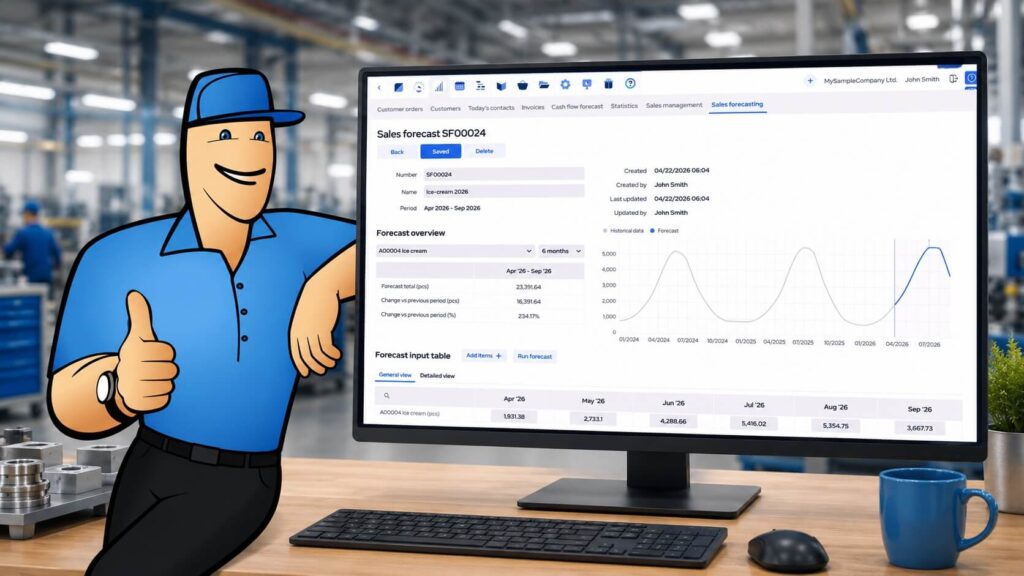
Sales forecasting helps manufacturers estimate expected future demand based on historical sales data, customer order patterns, seasonality, and known market changes.
What is sales forecasting in manufacturing?
Sales forecasting in manufacturing is the process of estimating how many units of each product customers are likely to need in a future period. These expected quantities can then be used to inform production and purchasing decisions before customer orders are confirmed.
Unlike general sales forecasting, which often focuses on future revenue, close rates, or sales team performance, sales forecasting in manufacturing is closely tied to demand planning. The main goal is to understand what products may be needed, in what quantities, and when.
This makes sales forecasting a useful input for production planning, procurement, inventory management, and master production scheduling.
For example, if one of your standard products usually sees a seasonal increase in early summer, a forecast for the item helps prepare materials and production time earlier, rather than reacting only once orders are already fully booked.
Why forecasting matters for small manufacturers
Even small changes in demand can quickly affect production schedules, stock levels, purchasing timelines, and delivery promises. Accurate forecasting turns historical sales patterns into a reliable planning input, reducing guesswork across the business.
More confidence in production planning
Accurate sales forecasting enables manufacturers to make informed decisions on production and inventory based on likely demand, rather than guessing volumes and only finding out as confirmed orders arrive.
This insight simplifies decisions like what to make next, when to start purchasing materials, and whether current capacity is enough for the months ahead.
For small manufacturers, this is especially important because planning mistakes can quickly create bottlenecks. Producing too little can lead to missed sales and late deliveries. Producing too much can tie up cash in finished goods, components, and raw materials that may not be needed for months.
Reduced stockouts and excess inventory
A sales forecast helps optimize inventory levels closer to what customers are actually likely to need. This gives manufacturers more time to stock up on products with growing demand and avoid tying up too much cash in products with slowing sales.
This is especially useful when managing both faster- and slower-moving products within the same inventory. Instead of applying the same purchasing logic to every item, forecasted quantities can support more targeted stock and replenishment decisions and help set smarter reorder quantities.
Improved purchasing and material planning
Seeing expected product quantities earlier gives manufacturers a better chance to plan purchasing before demand becomes urgent.
There is more time to check supplier lead times, place purchase orders earlier, and make sure the required materials are available when production needs them. As a result, purchasing becomes less reactive, and production is less likely to be delayed by missing parts.
For example, if a forecast shows higher expected demand for a product that uses a long-lead-time component, procurement can begin earlier, reducing the risk of delaying production because a key part is missing.
Planning is less dependent on manual methods
Many small manufacturers still use spreadsheets or other offline tools to estimate future demand. While this can work for simple operations, every update creates manual work and version-control issues.
A more structured forecasting process keeps demand planning closer to actual customer order history. This replaces disconnected planning files with a more data-driven workflow and makes it easier to review, adjust, and reuse forecasts over time.
Sales forecasting vs. demand forecasting
Sales forecasting and demand forecasting are often used interchangeably, but they usually mean slightly different things.
Sales forecasting often focuses on predicting future sales performance, revenue, close rates, and customer demand from a commercial perspective.
Demand forecasting is more focused on estimating the quantity of products, materials, or components that will be needed in the future. In manufacturing, this is often the more practical planning use case because production and procurement decisions depend on quantities, not only revenue.
For manufacturers, the most useful forecast is usually one that estimates expected product quantities and connects them with production planning, purchasing, and inventory management.
Common sales forecasting methods in manufacturing
Manufacturers can use different forecasting methods depending on their products, available data, and planning needs.
Historical sales forecasting
Historical sales forecasting uses past customer order data to estimate future demand. This is one of the most common methods for manufacturers with repeat sales, standard products, or stable product families.
For example, if a product sold 200 units in the same period last year and sales patterns have remained stable, that history can provide a useful starting point for planning future demand.
Seasonal forecasting
Seasonal forecasting accounts for recurring demand patterns that happen during specific times of the year.
This is useful for manufacturers whose products sell more strongly in certain months, quarters, or seasons. For example, food and beverage manufacturers, consumer goods producers, and companies supplying seasonal industries may need to prepare materials and production capacity well before demand peaks.
Trend-based forecasting
Trend-based forecasting looks at whether demand is increasing, decreasing, or staying stable over time.
If sales of a product have grown steadily over several months or years, a trend-based forecast can help manufacturers prepare for continued growth. If demand is slowing, the forecast can help avoid overproduction and excess inventory.
Manual forecasting
Manual forecasting uses business judgment, customer knowledge, market research, and sales team input to adjust expected demand.
This is especially useful when historical data alone does not tell the full story. For example, a manufacturer may know about an upcoming customer project, a one-off large order, a discontinued product, or a market change that is not reflected in past sales data.
AI-assisted forecasting
AI-assisted forecasting uses historical data to generate expected future quantities automatically. This can be especially useful when dealing with many products, long planning horizons, or complex sales patterns.
However, AI-generated forecasts should still be reviewed manually. The best results usually come from combining system-generated estimates with practical business judgment.
Connecting sales forecasts with production planning
A sales forecast becomes more valuable when it is connected to the production planning process.
Forecasted product quantities can be used to estimate how much needs to be produced, what materials need to be purchased, and whether current capacity is enough to meet expected demand.
This is where sales forecasting connects closely with the Master Production Schedule, or MPS.
The Master Production Schedule outlines which products need to be manufactured, in what quantities, and when. A sales forecast can act as one of the main inputs for the MPS, especially in make-to-stock environments where demand forecasts drive production planning.
In make-to-order or assemble-to-order environments, forecasts may not be used to produce finished goods in advance. However, they can still support better planning for common materials, subassemblies, supplier follow-up, capacity, and delivery promises.
What types of businesses can benefit from sales forecasting?
Different manufacturing and distribution businesses can use sales forecasting in different ways.
Make-to-stock manufacturers
Make-to-stock manufacturers are typically the most reliant on accurate forecasting.
If projected numbers are too conservative, they risk stockouts and missed sales. But overshooting sales projections can hurt just as much, as cash gets tied up in excess finished goods and materials.
Forecasting helps compare expected demand with previous periods and prior-year numbers, so seasonal shifts and market trends are easier to catch before they turn into stock problems.
Make-to-order and assemble-to-order manufacturers
Make-to-order and assemble-to-order companies do not usually use forecasts to produce finished goods in advance. However, they can still benefit from forecasting.
Even when manufacturing is triggered only when an order comes in, recurring product families, subassemblies, raw materials, and shared workstations still need to be planned in advance.
Visibility into which products are likely to drive demand in the coming months makes decision-making around purchasing, supplier follow-up, capacity, and delivery promises easier.
Distributors and retailers
For distributors and retailers, forecasting is mostly about smarter replenishment.
Instead of relying only on current stock levels or last month’s orders, forecasts enable the use of customer order history to estimate what might be needed next.
Forecast dashboards are especially helpful when managing many SKUs, seasonal items, or products that move at very different speeds.
How to improve sales forecasting accuracy
A forecast should support better decisions, not replace business judgment. The following practices can help manufacturers improve forecasting accuracy over time.
Use the forecast as a baseline, not the final answer
A good forecast narrows the range of likely demand, but it does not remove uncertainty.
Review suggested quantities against what you know about customers, seasonality, upcoming deals, supplier issues, or larger one-off orders. The goal is not to predict the future perfectly. The goal is to make better production and purchasing decisions earlier.
Double-check every forecast, triple-check slower sellers
Stable, high-volume products are usually easier to forecast than slow-moving, seasonal, or highly customized items.
For standard products with repeat demand, a system-generated forecast is likely to provide a useful starting point. For intermittent or project-based demand, manual review is much more important because a few unusual orders can distort the picture.
Compare forecasts with actuals and previous-year sales
A good forecasting process should make it easy to check whether the forecast makes sense next to real sales history and last year’s same period.
This is useful for spotting seasonality, market trends, or products where demand is shifting to new patterns. If the number looks technically correct but seems commercially unrealistic, it should be adjusted.
Keep lead times and capacity in mind
Forecast accuracy matters more when the planning decision has to be made early.
A product that uses long-lead-time materials or limited work center capacity should be reviewed more carefully than one that can be replenished or produced quickly.
Review manual changes over time
Manual edits are useful when people know something reliably that the system does not have data for. But editing should not become guesswork in a different form.
If manual adjustments consistently improve the plan, they are adding value. If not, it is better to rely more on order history and use manual changes only for clear business reasons.
Sales forecasting in manufacturing ERP software
Manufacturing ERP and MRP systems can make sales forecasting more practical by connecting historical sales data with production planning, inventory management, purchasing, and scheduling. Instead of keeping forecasts in disconnected spreadsheets, manufacturers can use ERP-based forecasting to keep expected demand closer to customer order history, item data, inventory levels, and production planning workflows.
In manufacturing ERP software, sales forecasts become especially useful when they can be connected directly with production planning, purchasing, and the Master Production Schedule. MRPeasy supports this workflow through its Sales Forecasting functionality.
How the Sales Forecasting feature works in MRPeasy
Sales Forecasting is available in MRPeasy’s Enterprise and Ultimate tiers. The feature is part of the CRM module and allows you to create individual forecasts for one or more of your products. The process is straightforward. Simply choose a forecast name, select the first month, set the forecast horizon (time period), and add the products you want to include.
The forecast horizon can be set to 3, 6, 12, or 18 months, and the starting month can be set up to two years in the future. Each forecast can include up to 100 products.
MRPeasy generates forecast values automatically using historical customer order data. The calculation is based on ordered quantities and delivery dates, while quotations and canceled orders are excluded. If a new product lacks at least 3 months of non-empty historical sales data, the system flags it as lacking historical data. You can still enter forecast values manually for these products, however.
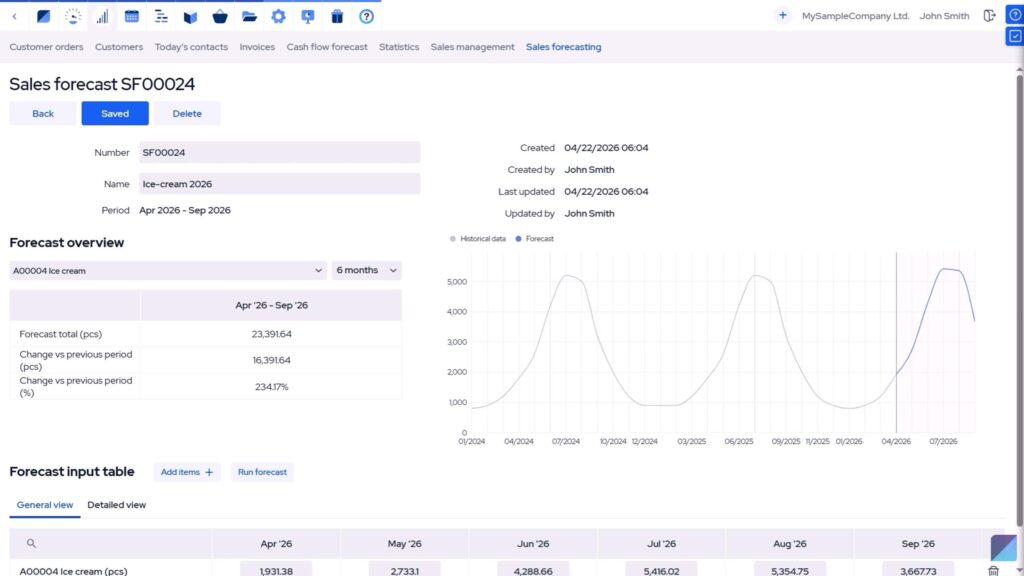
Forecasts can also be edited manually to add market insight or customer knowledge to the AI-generated prediction.
Editing and reviewing the forecast
Forecast values are shown in a product-by-month input table. Each product has its own row, and each month in the forecast period has its own column, so you can review, enter, or adjust expected quantities directly.
The table provides a General view that shows forecast values, and a Detailed view that adds context like actual sales quantities, previous-year values, and year-on-year change. If your market research says the numbers should be different, checking and adjusting the AI-generated forecast is seamless.
Forecast overview and trend comparison
The Forecast overview section summarizes the forecast for a selected product. You can review totals grouped by configurable periods and compare changes against previous periods or previous-year values.
This helps quickly notice whether expected demand is increasing, decreasing, or following seasonal patterns. When calendar-year grouping is selected, MRPeasy can also show the estimated year total by combining actual sales from months that have already passed with forecasted future sales for the remaining months.
Watch the demo video for Sales Forecasting in MRPeasy.
Connecting sales forecasts with the Master Production Schedule
Perhaps the biggest planning value lies in linking your sales forecasts to MRPeasy’s Master Production Schedule (MPS). Once linked, the forecasted quantities populate the Sales forecast row in the MPS for the selected product, streamlining production and procurement planning around expected demand.
To use forecasts in the MPS, select a non-expired forecast for the appropriate product from the Sales forecast row. The row is then populated with values from the forecast, linking back to the forecast details page. If you manually change forecast values in the MPS, the forecast is automatically unlinked, helping to clarify whether the plan is still based on the original forecast or has been manually adjusted.
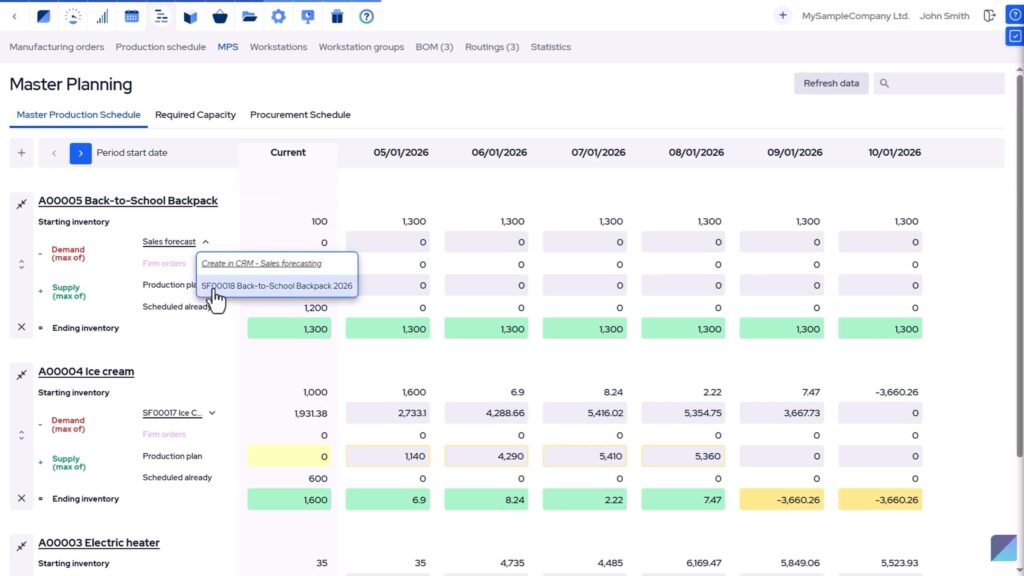
See our MPS demo video for detailed information on the Master Production Scheduling functionality.
Frequently asked questions (FAQ)
Sales Forecasting gives you expected product quantities that can be used before customer orders are confirmed. When a forecast is linked to the Master Production Schedule, those quantities populate the Sales forecast row in the MPS, helping you plan production and procurement around likely demand. This makes the forecast actionable instead of leaving it as a separate planning estimate.
Yes. AI-generated forecasts are useful starting points, but they should still be checked against what you know about customers and their behavior, seasonality, market conditions, larger upcoming orders, and external factors. The best results come from combining system-generated estimates with practical business judgment.
Start with products where planning mistakes are expensive, like high-volume items, seasonal products, long-lead-time products, and items that use constrained materials or work centers. Slow-moving or highly customized products may still be worth forecasting, but they usually need more manual review.
Yes, but the value derived is usually different from make-to-stock production. MTO and ATO companies don’t generally use forecasts to build finished goods in advance, but they can still use expected demand based on past sales performance to plan common materials, subassemblies, supplier follow-up, and available production capacity.
In manufacturing, sales forecasting often overlaps with demand forecasting because the main goal is to estimate how many units of each product customers are likely to need. MRPeasy supports this practical, quantity-based approach by using historical customer order data to forecast future product demand.
You might also like: Integrating with Microsoft Power BI for Improved Manufacturing Analytics
Get manufacturing know-how delivered to your inbox!