Serial Number Tracking in Manufacturing: A Practical Guide for SMEs
Serial number tracking is usually described as a way to identify individual inventory items. But that considerably undersells it. The real payoff is a searchable history for one unit across purchasing, production, inventory, sales, and after-sales. This guide covers how to build one.

Key takeaways
- Serial number tracking is the process of assigning a unique identifier to each individual unit and recording the events in that unit’s lifecycle against it. This creates a searchable history spanning purchasing, production, inventory, sales, and after-sales.
- Serial numbers provide unit-level traceability, while SKUs identify product types and lot or batch numbers identify groups of items. Manufacturers can combine serial and lot tracking to trace finished products back to the specific materials and components used.
- Serialization is most valuable for high-value, regulated, warrantied, safety-critical, or field-serviceable products. For inexpensive, high-volume items, lot tracking is often sufficient and creates less administrative overhead.
- A useful serial number record should connect the unit to its supplier and purchasing data, production history, components and material lots, quality records, inventory movements, customer, and service history. The serial number itself has little value unless these events are recorded against it.
- Serial number tracking enables faster root-cause analysis and more targeted recalls by tracing a defective finished product back to its components and affected material lots, then forward to other products and customers exposed to the same issue.
- Manufacturing ERP software can simplify serial number tracking by keeping purchasing, production, inventory, sales, quality, and after-sales records in one system. This reduces disconnected records and helps maintain complete traceability throughout the product lifecycle.
What is serial number tracking in manufacturing?
Serial number tracking is the process of assigning a unique identifier to each individual unit and recording every event in that unit’s life against it. The serial number belongs to a single, unique physical unit and is never reused. However, a stamped serial number proves nothing on its own – if nothing was recorded against it, the part remains untraceable.
Serialization history covers more ground than most manufacturers expect:
- Purchasing and receipt – which supplier sent the unit or its materials, on which purchase order, and when it arrived.
- Production – which manufacturing order built it, which operations it passed through, and which components went into it.
- Inventory – where it’s been stored and how it’s moved.
- Sales – which order shipped it and which customer received it.
- After-sales – warranty status, returns, and repair records.
Every one of those events already happens in the normal course of business. Serial number tracking captures them and ties them to an identifier. This turns scattered transactions into a searchable record for a specific unit.
That’s also where serialization parts ways with an ordinary inventory management system, which tracks quantities and locations. Serial number tracking follows one unit through its entire product lifecycle, past the loading dock and into service, which is where the investment usually justifies itself: warranty claims, returns, and field failures.
Serial numbers fit discrete manufacturing more naturally than process manufacturing, since discrete production turns out countable units that can carry an individual mark. Distributors use it for the same reason, tracking units they never built but still answer for. Warehouse management runs on the same logic: a serialized item stays individually identifiable from receipt to dispatch rather than melting into a bin count. We’ll look at what belongs on that record and which products justify the effort later in this guide.
Serial numbers vs. lot numbers, batch numbers, and SKUs
Serial numbers are one of three identifiers most manufacturers use, and each answers a different question.
- An SKU identifies a distinct type of item. Every single unit of that item shares it, which makes the code useful for stock levels and ordering, but useless for telling one unit from another.
- A lot or batch number identifies a group of items produced (batch) or received/stored (lot) together. It narrows a problem to the run or delivery that caused it. We cover the finer distinction between the two in our guide to batch records.
- A serial number identifies exactly one unit and nothing else.
The three stack rather than compete. A panel builder assigns the SKU number “MCP-200” to one model of motor control panel. The fifty units built in March share a batch number. Each of those fifty carries its own serial number. Same product, three levels of resolution.
Can you use lot and serial tracking together?
Yes, and most SMEs should. The usual setup puts serial numbers on the finished unit and lot tracking on the raw material that went into it, so one serial resolves back to the specific material lots inside it. Higher-value components often get their own serials too, with lot tracking covering everything else.
Where barcodes and RFID fit
Barcodes belong to a different category, and the mix-up is common. Part numbers, lot numbers, and serial numbers are identifiers: the data itself. Barcodes, QR codes, RFID tags, and direct part marking are carriers, or how that data gets onto the item and back off it again. In practice, a barcode doesn’t track anything on its own. Reporting an action by scanning it is what creates the record.
When should manufacturers and distributors serialize?
Serialization decisions usually get made backward. Most operations start by asking whether they can serialize, when the useful question is what do I need to know when something goes wrong?
If the worst call you expect is “which run was bad,” lot tracking answers it. If the call is “which customer has this exact unit, what went into it, and is it still under warranty,” only a serial number gets you there.
But answering that has a price. Every serialized unit adds a scan at receiving, a scan at each operation you track, a scan at shipping, and a record that has to stay accurate for as long as the unit exists. On a fifty-dollar assembly with no warranty attached, that’s overhead you’ll never get back. However, on the right products, it’s the cheapest insurance in the building.
Serialization tends to pay when:
- Regulation demands unit-level records – medical devices, pharmaceuticals, aerospace, firearms, automotive safety components.
- A warranty or service obligation follows the individual unit, not the order.
- The product is field-serviceable and builds up a service history worth keeping.
- Unit value is high enough that marking and scanning costs are noise.
- You’re exposed to counterfeiting or return fraud.
- A single unit failing carries safety consequences.
Lot tracking is enough, and serialization turns into a tax when:
- Goods get consumed in bulk or come off a process line.
- Unit value is low, and volume is high.
- No warranty follows the individual item.
- batch-level recall granularity already satisfies your regulator.
For example, fasteners, raw stock, and consumables rarely justify it. Neither do components consumed in-house that never reach a customer. The same goes for any operation that can’t hold scan discipline on the floor, since a partial serial-number record is worse than an honest batch record.
Most SMEs opt for selective serialization: serial numbers on finished goods and high-value components, lot numbers on everything else.
Serialization decision checklist
Run this against one part number, not the whole business. “Should we serialize?” has no answer. “Should we serialize the MCP-200?” does.
- Does a regulation or customer contract require unit-level traceability?
- Does an individual warranty or service obligation follow this unit?
- Will anyone need its build history after it ships?
- Is the unit value high relative to what it costs to mark and scan?
- Can your floor realistically scan it at every point you plan to track?
If mostly yes – serialize it. If mostly no – lot tracking’s enough. If mixed – serialize this part and lot-track the rest.
What data should be linked to a serial number?
A serial number is only worth as much as the records behind it. Those records get built in stages. Each stage answers a question somebody may eventually ask.
- Origin and receipt. Which supplier shipped it, on which purchase order, when it arrived, and what the incoming inspection found. This also captures the vendor’s own batch number for purchased components. It’s what you’ll cite when the defect is theirs, not yours.
- Production. The manufacturing order that built it, the operations it ran through, the workstations and operators involved, and the timestamps. Most importantly, the component serials and material lots consumed – the link that lets one finished serial resolve into everything inside it.
- Quality. Inspection results, any nonconformances raised, rework performed, and QC approval status. Attached to the unit, not filed separately, so the unit’s history and its quality record are the same record.
- Inventory. Current status and where it’s been – this is what a simple quantity count misses. Useful statuses run from planned and received through consumed, booked, shipped, and written off. The result is real-time visibility. At any moment, you know whether the unit is on a shelf, in a job, or out the door.
- Sale and delivery. The sales order, the customer, the ship date, and the invoice. This is the field that turns a recall from a broadcast into a phone call.
- After-sales. Warranty start and expiry, RMA history, service and repair records, parts fitted during repair, and which end user currently holds the unit. Service history is where serialization pays back over years rather than weeks.
One field deserves particular attention: the BOM revision or product version in effect when the unit was built. Skip it, and you’ll eventually have two units with consecutive serial numbers behaving differently, with nothing in the record explaining why.
None of this is unusual data. Most operations already capture nearly all of it, scattered across receiving records, job travelers, inspection sheets, and invoices. What turns it into a history is that every piece hangs off one identifier and comes back in a single query.
Serial number tracking example: tracing a defective component
A customer calls. A motor control panel installed eight months ago is tripping intermittently, and the only useful thing they can give you is the serial number on the enclosure: MCP-200-0143.
Working backward: finding the cause
That serial pulls up the unit’s build record. It came off the March run, and the record lists every component consumed in it – including the control relay, traced to material lot RL-0022, received from your relay supplier on a February PO.
The incoming inspection notes on that lot are unremarkable. The quality record on this unit is clean too. But two other panels have come back this year, and when you check their build records, both contain relays from RL-0022.
That’s the answer. Not a build problem, not an operator, not a bad batch of your own work. One supplier lot was defective.
Working forward: finding the exposure
RL-0022 is now the hinge. Instead of asking what went into MCP-200-0143, you ask where else that lot went.
The lot resolves to every manufacturing order that consumed it. Those orders resolve to their finished serial numbers. Those serials resolve to sales orders and customers. Fourteen panels contain relays from RL-0022. Nine are still with customers, three are in finished goods inventory, and two were consumed in a larger assembly that shipped in April.
Fourteen units, with names and addresses attached. Not the entire March run, and not every MCP-200 you’ve built this year.
That distinction is the whole return on serialization. Without it, the honest response to a suspect component lot is to contact everyone who bought that product and hope. With it, you make fourteen phone calls, quarantine three panels on your own shelf, and document exactly what you did and why. The auditor gets a record. The customer gets a straight answer, and the supplier gets a chargeback.
Benefits of serial number tracking
Everything in the above example came out of one capability: the ability to resolve a single unit into its complete history and back out again. It provides faster root cause work, targeted recalls, a documented answer for the auditor, a straight answer for the customer – all the same capability, just pointed in different directions. That’s what most operations serialize for.
Other serial number tracking benefits
Return fraud gets harder. A customer buys a new unit, then returns an older, broken one of the same model for a refund. Without serial numbers, the two are indistinguishable at the returns desk. With them, the clerk can check whether that specific unit was ever sold to that customer. The same check catches gray-market goods.
Warranty claims stop being an argument. Ship date, customer, and coverage window are facts attached to the unit, not something reconstructed from an invoice search. Claims inside the window get honored quickly. Claims outside it get declined with evidence, which is a conversation worth having once instead of monthly.
Field service arrives prepared. If you service what you build, a technician can pull the unit’s build record before rolling a truck: BOM revision, components inside, prior repairs. Often the difference between one visit and two.
Inventory accuracy improves as a side effect. Serialized stock is counted by identity rather than quantity, so a miscount becomes a specific missing unit instead of a variance to reconcile. Write-offs reflect what actually left the building.
How to implement serial number tracking in seven steps
Implementing serial numbers is less a project than a set of decisions you make once amd then follow consistantly. Two of them are expensive to undo, because by then units are marked and records exist under the old scheme. The rest you can adjust as you go.
- Design the numbering scheme. Sequential or random, human-readable or opaque, check digit or not. The trap is embedding meaning – dates, plant codes, product families. All of those change, and the scheme breaks when they do. Keep the number dumb and let the record carry the meaning.
- Decide where the number gets assigned. At receipt for purchased components, at a particular operation, at final inspection, or at pack-out. Assign at pack-out, and everything upstream is invisible to that serial. Assign early, and you capture more history, but you’re asking the floor to scan unfinished goods, which is where discipline usually breaks down.
- Match the carrier to the product’s life. Label stock suits goods that stay indoors. Direct part marking earns its cost on anything facing heat, chemicals, or abrasion. RFID makes sense where line-of-sight scanning isn’t feasible. A mark that doesn’t survive the process is worse than no mark at all.
- Define what gets captured at each scan point. Every scan should answer a question somebody actually asks. Scans that only exist to prove you have manufacturing KPIs, produce data nobody reads, and discipline nobody wants to keep.
- Link components to the finished unit. The parent-child connection, made inside the manufacturing order, is what connects material lot numbers to an item’s history. Skip it, and you have serialized inventory rather than traceability.
- Pilot on one product line. Run something representative through a full cycle, including a return if you can arrange one. A month of real use surfaces more gaps than any amount of planning.
- Write the exception procedure. Unreadable marks, missed scans, rework, scrapped serials, units reissued after repair. Programs rarely fail because the tracking solution can’t handle exceptions. They fail because nobody decided on standard operating procedures, and the floor improvised.
Common serial number tracking mistakes
Most of these show up after implementation looks finished, which is what makes them expensive.
The record stops at the loading dock. Everything gets captured cleanly through shipping, but returns, repairs, and replacement parts never make it back onto the unit’s history. The system works right up until somebody calls about a unit they bought two years ago, which is when it was supposed to earn its keep.
Serial numbers live in a spreadsheet beside the real system. Somebody starts a shadow register because it’s faster, and within a month, each serialized item disagrees with the system of record. During an actual trace, nobody can say which one is right, and you’re stuck sorting out which history is real before you can answer anything.
Numbers get reused. A unit gets scrapped, and its number recycled, or a label is reprinted, and an old number goes back into circulation. Uniqueness is what everything else depends on, and it’s the only failure here you can’t repair – once two units share a number, both histories are permanently unreliable.
Nobody tests the chain. The linkage looks fine on screen until a real recall, when the gaps turn up under pressure. Run a mock trace instead: pick a serial you shipped last quarter, resolve it back to its components, then run forward from one of those lots to every customer holding it. An hour tells you whether the system does what you think it does.

Choosing serial number tracking software
Everything to this point has been about the discipline: what to serialize, what to record, how to keep the chain intact. The tracking system is what makes that discipline sustainable past a few dozen units. We’re going to skip recommending a spreadsheet for very basic setups, for the reasons outlined above.
Two questions determine your tracking software choice – what it has to do, and whether it’s better done in a dedicated tool or within a manufacturing ERP.
What to look for in traceability software
Serial number tracking software earns its place by what the record has to do, and everything in this article points to the same short list.
- One system of record. If serial numbers live anywhere other than your production tracking, you’ll be reconciling instead of getting quick answers. No inventory management software with a serial field bolted on the side will save you from that.
- Parent-child linkage inside production. Component serials and material lots, tied to the finished unit’s serial number at the manufacturing order level. This is what makes the backward trace possible.
- Full event history, not current status. Where a unit is now is inventory control. Where it’s been is traceability.
- Coverage from the purchase order to after-sales service. A record that stops at shipping can’t answer a warranty question.
- Built-in barcode scanning and label printing. The barcode scanners and printers are how the record gets created. Having separate tools for that is another database reconciliation nightmare waiting to happen.
- Search that starts from one serial. Enter a number, get the chain. If it takes an export and a spreadsheet, it won’t get used under pressure.
Serial number tracking with manufacturing ERP software
The above list is really a description of scope. The history has to run from purchasing through production, inventory, sales, and service, which means the tracking software has to reach across the same supply chain the unit does.
That’s the argument for manufacturing ERP over a dedicated tracker. The required functions already share one system in an ERP, so the linkages exist before you even start. A standalone tool has to be integrated with all five to reach the same place, and every integration is a seam where the chain can break.
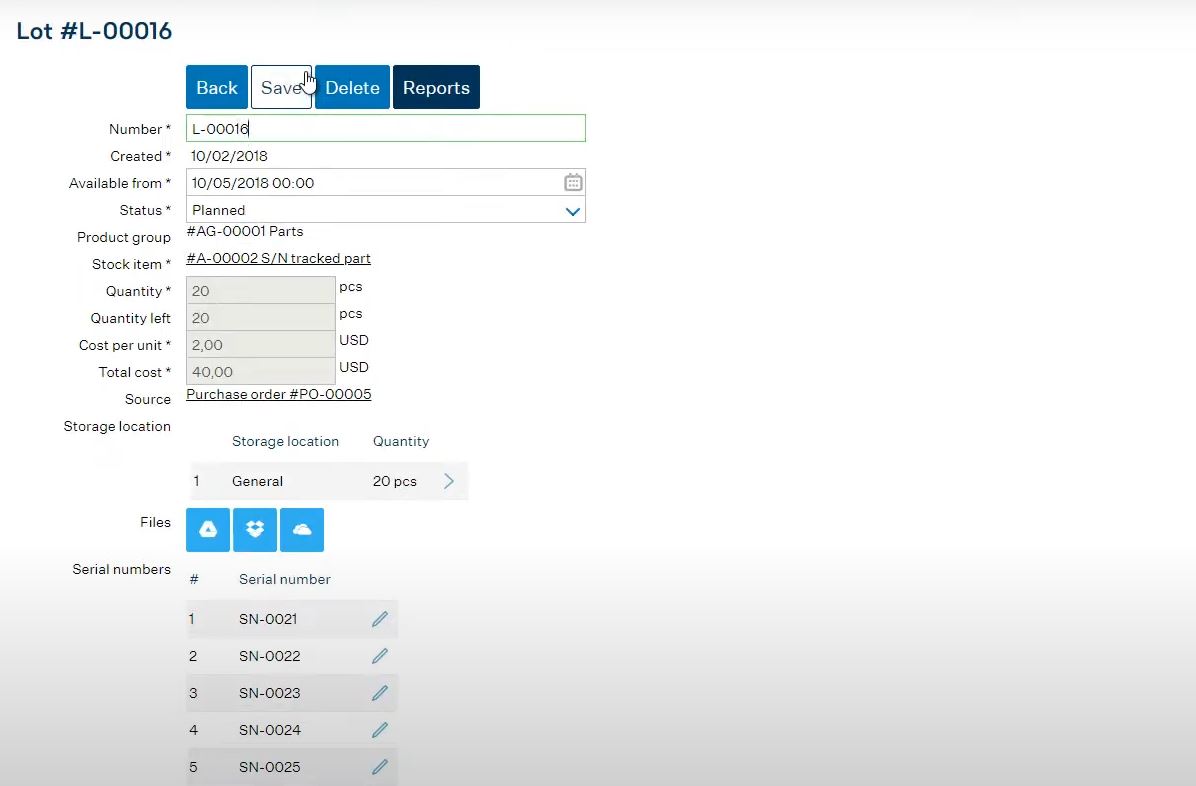
In MRPeasy, serials are tracked within stock lots and can be assigned manually, in bulk, or by scanner. In manufacturing orders, you can link the serial numbers of consumed components directly to the finished product’s serial number for complete parent-child traceability. Each unit carries its own status and event history, and integrates with Customer Returns/RMAs to automatically log return and service details. Quality inspections and BOM/routing revisions are connected within the system.
None of this requires an enterprise budget or an enterprise IT department. The capability that answers a customer’s question about a two-year-old unit is the same whether you build fifty a month or fifty thousand. What changes is how much of it you need on day one. So start with modules that would cost you the most to trace by hand. Then build your programming as needed.
Frequently asked questions (FAQ)
No. A serial number uniquely identifies an individual product or component, while a tracking number is typically used by carriers to follow a shipment during delivery. Serial numbers remain associated with an item throughout its lifecycle and can be used to trace its production, sale, service, and other history.
A serial number identifies a specific unit, while an SKU identifies a product type or variation shared by multiple units. A barcode is a machine-readable way of encoding information and can contain a SKU, serial number, or another identifier.
Serial number tracking provides unit-level visibility and traceability throughout inventory movements. It allows businesses to see the status, location, and history of individual items, helping improve stock control, traceability, quality management, and recalls.
Serial number tracking lets businesses identify the exact unit covered by a warranty and access its history. This makes it easier to verify warranty claims, trace when and where an item was sold or manufactured, manage repairs and replacements, and maintain accurate service records.
You may also like: Inventory Optimization Methods and Techniques