Best CPQ Software for Manufacturers in 2026
Finding the right CPQ software can be difficult, since there are dozens of tools to choose from and the right fit depends heavily on how your business operates. In this list, we compare eight of the best CPQ tools for manufacturers in 2026, broken down by use case.

8 best CPQ tools for manufacturers
| CPQ Software | Best For |
|---|---|
| MRPeasy | Small manufacturers who want CPQ built into their manufacturing ERP |
| Paperless Parts | Job shops and contract manufacturers quoting from CAD files |
| Kickflip | Ecommerce brands selling customizable products direct-to-consumer |
| Hive CPQ | B2B manufacturers selling through dealer/distributor networks |
| DriveWorks | Engineer-to-order manufacturers already using SOLIDWORKS |
| Tacton CPQ | Complex engineer-to-order manufacturers with multiple existing systems |
| Acumatica | Manufacturers that want CPQ inside a highly customizable ERP |
| NetSuite CPQ | Manufacturers already committed to the NetSuite platform |
Since quoting varies by manufacturer, our list covers a range of setups, from small shops using spreadsheets to complex engineer-to-order operations. Here are our 8 picks for the best CPQ tools for manufacturers.
1. MRPeasy – best for small manufacturers
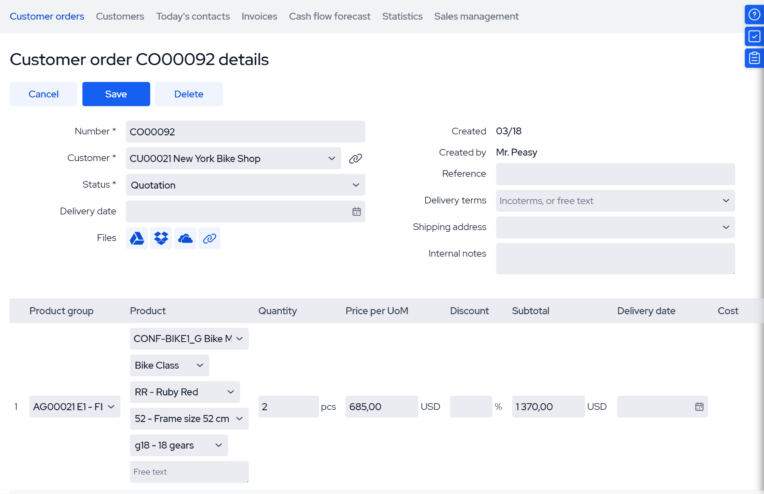
MRPeasy is a cloud-based manufacturing ERP for small manufacturers and distributors. It connects production planning, inventory, purchasing, and sales into one system, and has a CPQ functionality built in.
Features
MRPeasy’s CPQ tool pulls directly from the same live data as production, inventory, and purchasing, so every quote reflects actual material costs, real stock levels, and true production capacity. This means that:
- Product configuration options are directly tied to bills of materials.
- Pricing is updated when material prices change.
- Sales can see when orders can be fulfilled based on live production calendars.
- Accurate pricing and realistic delivery dates can be determined immediately.
Because quotes convert directly into sales and manufacturing orders without re-entering data, the whole process from quote to production stays consistent and error-free.
Who is it best for?
MRPeasy is specifically designed for small to mid-sized manufacturers (up to 200 employees) looking for a CPQ solution that syncs directly with production, inventory, and purchasing. It’s well-suited for all kinds of setups like make-to-stock and make-to-order, or job shops, as well as distributors and wholesalers, although the latter might find its extensive built-in production planning features overkill.
Pricing
MRPeasy is an affordable option for small, growing manufacturers. Plans are billed on a per-month, per-user basis. The Professional plan, which includes the built-in product configurator, starts at $69/user/month. Additional users beyond the first 10 are added at a discounted rate.
The software also offers transparent pricing. Users can sign up for a 30-day free trial to test out the system’s full functionality. MRPeasy is a no-strings-attached offer, with no need to enter credit card information or sign any contracts to get started or use the software.
What users say
Pros: Customers praise MRPeasy for its ease of use, inventory and production management capabilities, value for money, and support. Users claim it’s easier to implement than larger ERPs and is a natural next step for manufacturers moving away from spreadsheets.
Cons: Some criticisms include a lack of customization, as MRPeasy is designed around production planning best practices and customer feedback, and the cost of higher-tier plans for very small teams.
2. Paperless Parts for job-shop estimating and quoting
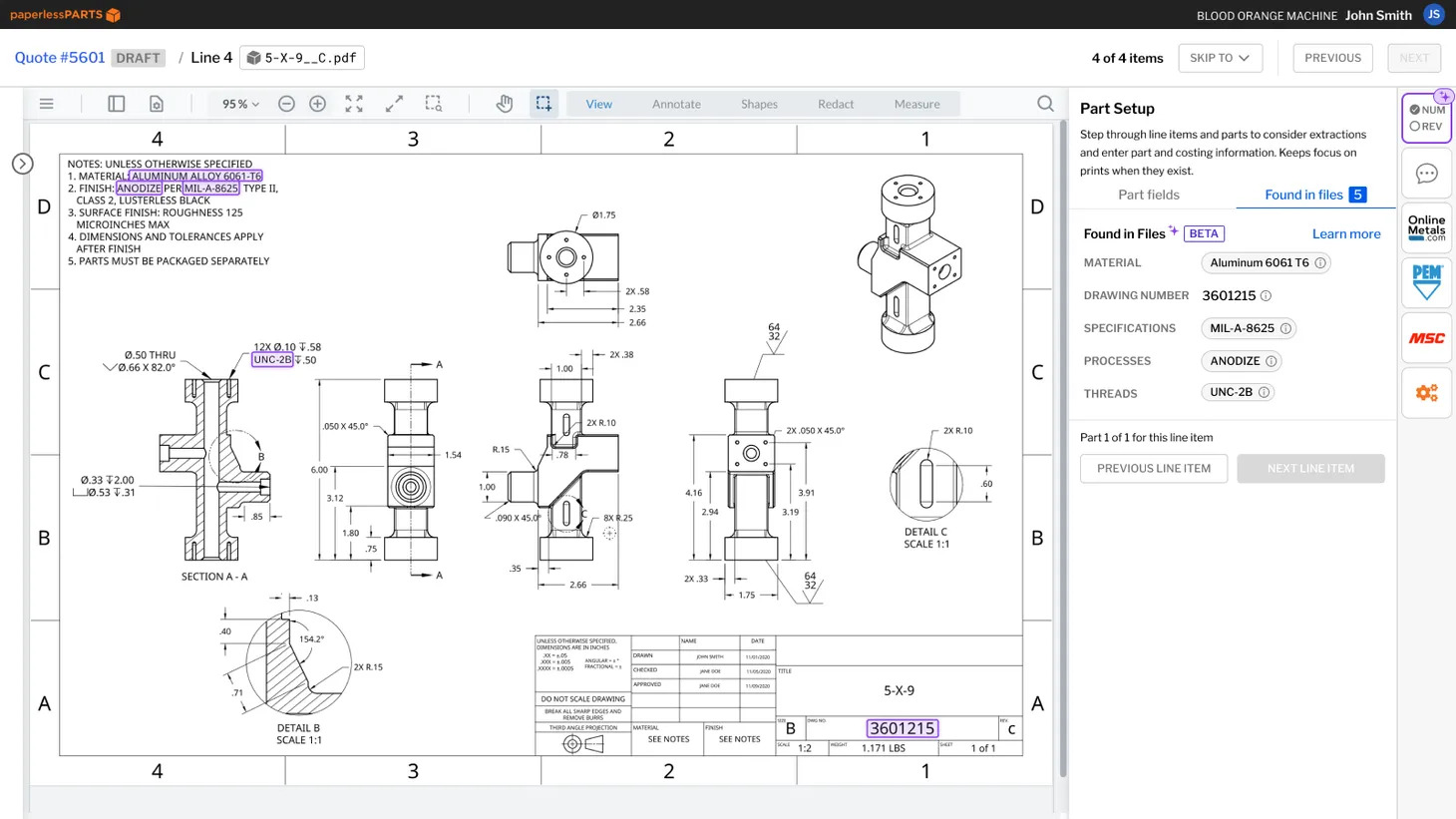
Paperless Parts is an estimating and quoting platform built for job shops, contract manufacturers running CNC machining, and metal service providers. It’s meant to help manufacturers quote complex products faster.
Features
Paperless Parts has a customer-facing portal, which allows clients to configure and submit orders independently. When RFQs move into the system, all customer and part information is automatically captured and organized in a single dashboard.
The software reads CAD files and geometrically analyzes part files to identify manufacturing features and flag potential manufacturability issues. The system also calculates cycle times and applies pricing logic to produce accurate quotes without manual takeoffs.
Paperless Parts is a standalone CPQ software, so it requires integration with an ERP if you want to tie product configuration to your production. This makes it more suitable for manufacturers that prioritize quoting of complex products over seamless integration with BOMs, production schedules, purchasing, and inventory.
Who is it best for?
Paperless Parts is a good fit for job shops and compliance-driven manufacturers whose main challenge is quote accuracy and speed for complex parts. Paperless Parts is suitable for businesses whose customers submit parts to be priced, rather than needing to be walked through product options. The software is also compliant with ITAR (International Traffic in Arms Regulations), which is essential for manufacturers in the aerospace and defense industries.
Pricing
Paperless Parts doesn’t publish its prices. It’s not priced per seat but based on shop size, RFQ volume, required modules, integration complexity, onboarding, and training.
What users say
Pros: Customers like that Paperless Parts allows for faster quoting, provides automatic feature recognition from CAD models, and makes it easier to organize RFQs. Many also appreciate the level of customer service Paperless Parts provides.
Cons: One drawback is that estimating can be more difficult with large or complex parts. There may also be challenges with costing certain outsourced processes and quote revisions. In addition, some users say the custom pricing-rule engine (P3L) offers a lot of depth but takes a lot of time to configure.
3. Kickflip for ecommerce product customization
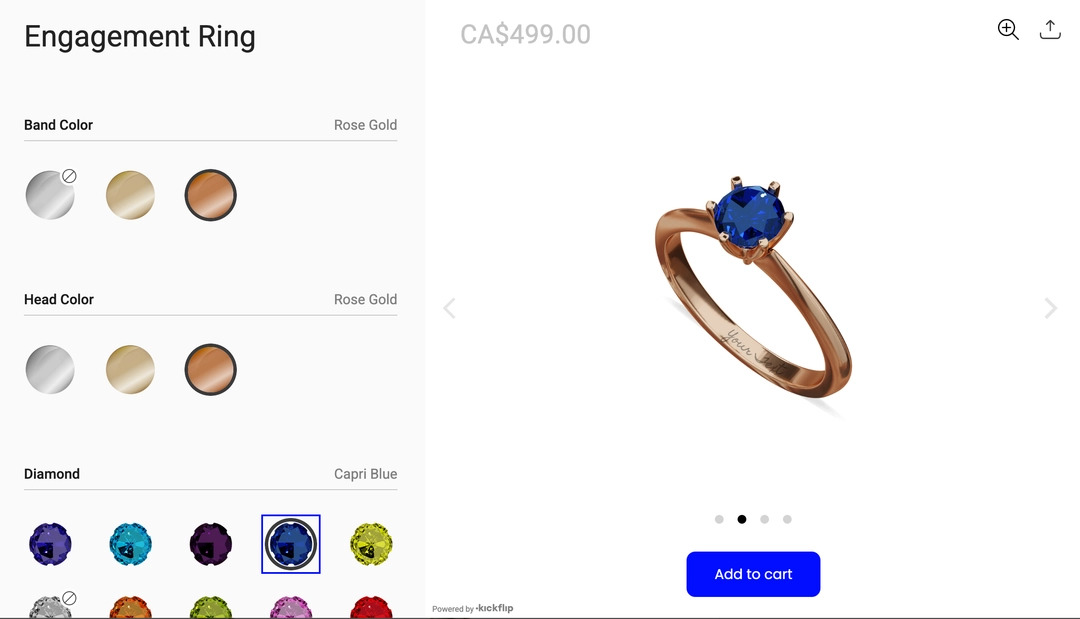
Kickflip is a no-code product configurator for ecommerce websites. It’s designed to let customers personalize their products and see how their choices affect appearance and price.
Features
Kickflip’s 3D visual product configuration and customer-facing portal allow customers to personalize products visually, see real-time price updates, and place orders on their own.
The platform’s product customization is driven by a visual, no-code builder rather than true geometry or engineering logic. This means it clearly shows each variation, but doesn’t model complex structural or dimensional changes.
Therefore, Kickflip is a strong fit if your products have clearly defined variations (e.g., color, size, material), but not suitable if your products require a lot of engineering.
Who is it best for?
Kickflip is best suited for manufacturers selling customizable products directly through an online store, where customer-facing product configuration is essential. However, if connecting your CPQ to production is a priority, then solutions like MRPeasy may be a better fit. MRPeasy’s Shopify and WooCommerce integrations also mean that customer orders can be automatically checked against what you can actually build and deliver.
Pricing
Kickflip pricing starts at $59/month, plus a transaction fee that starts at 1.95% per custom product sold and decreases as sales volume increases. A Configure Price Quote add-on (letting customers submit a configuration for review instead of buying immediately) costs an extra $99/month.
What users say
Pros: Kickflip users like the software’s visualization features, easy setup, and responsive support. Many say it improved conversion rates and cut the need for manual product mockups, with several noting they were able to get a fully working configurator live without any developer help.
Cons: The initial setup can take time, there’s a learning curve for more advanced configuration logic, and orders don’t always hand off cleanly into production. Some smaller businesses also say pricing feels steep relative to their size.
4. Hive CPQ for manufacturers with large dealer and distributor networks
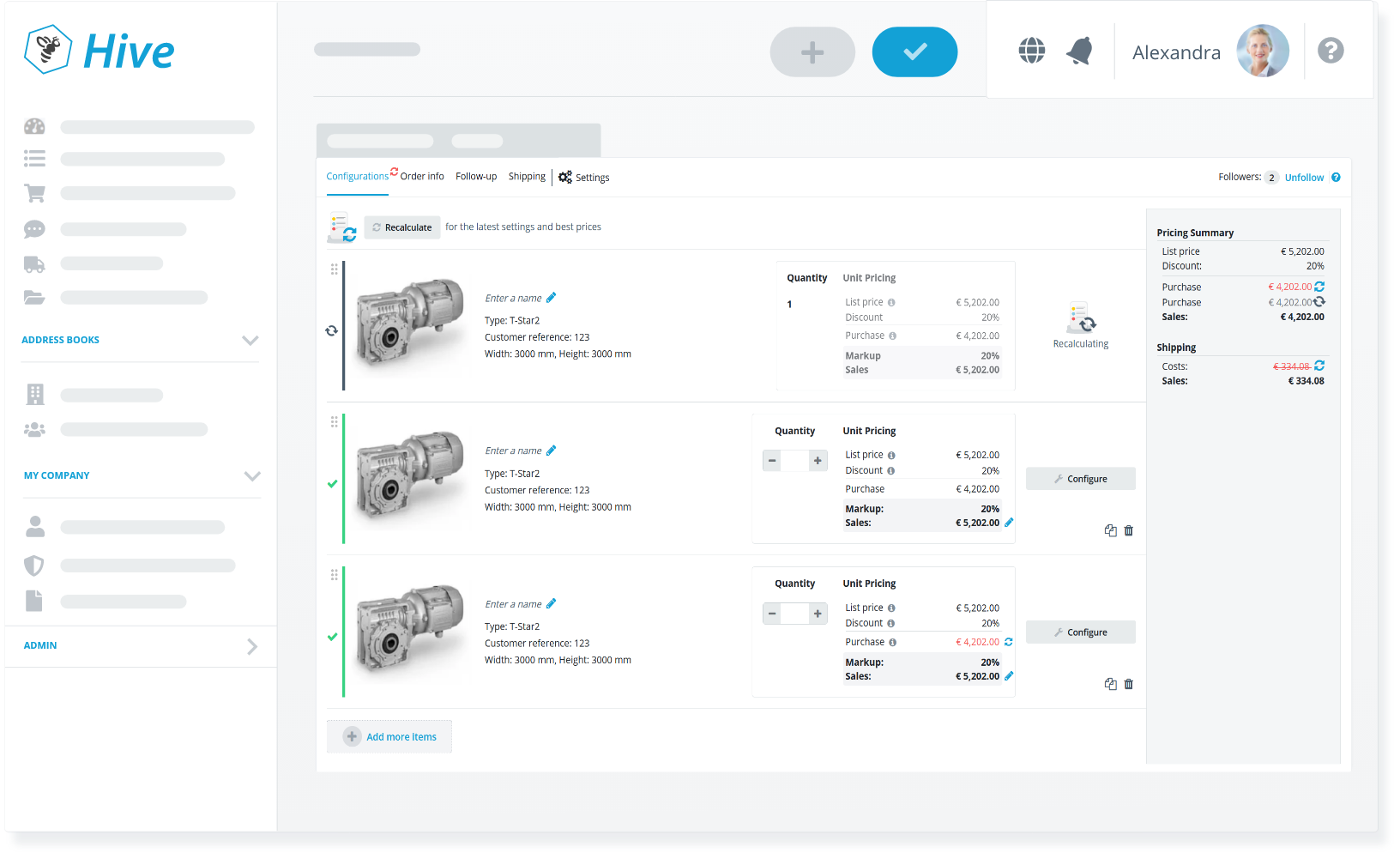
Hive CPQ is designed for manufacturers selling complex, configurable products through distributors, dealers, or other sales partners. It centralizes product rules, pricing, and technical information so that external partners can easily prepare configurations and quotes.
Features
Hive CPQ allows your partners to configure, price, and quote products on their own, guided by the rules and approval workflows you set. This means that every quote stays technically valid and correctly priced no matter who builds it.
The platform also comes with real-time 3D visualization, so dealers and their customers can see exactly what they’re ordering as they build it. When a quote is finalized, Hive CPQ generates a multi-level bill of materials and converts the quote directly into an order, with real-time tracking for both distributors and their customers.
Who is it best for?
Hive CPQ is a good choice if you’re a medium-to-large manufacturer selling through distributor or installer networks. It’s especially useful when dealing with multiple dealer tiers, partner-specific pricing, or distributors who need to generate valid quotes independently.
Pricing
Pricing for Hive CPQ is not publicly available. Prices are based on product complexity, dealer network size, and implementation needs. Implementation can be self-service or full-service, and usually takes at least a few months. Starting costs might also be too high for small manufacturers.
What users say
Pros: Users praise Hive CPQ’s flexibility, responsive customer support, and 3D visual configuration. Some say it reduces ordering errors and frees up sales teams to work on other tasks. Many users are happy with the fact that dealers can configure and order without manufacturer involvement.
Cons: Common criticisms include option overload for less experienced dealers, limited customization of the configurator’s frontend interface, and a real learning curve that comes with the platform.
5. DriveWorks for SOLIDWORKS-based manufacturers
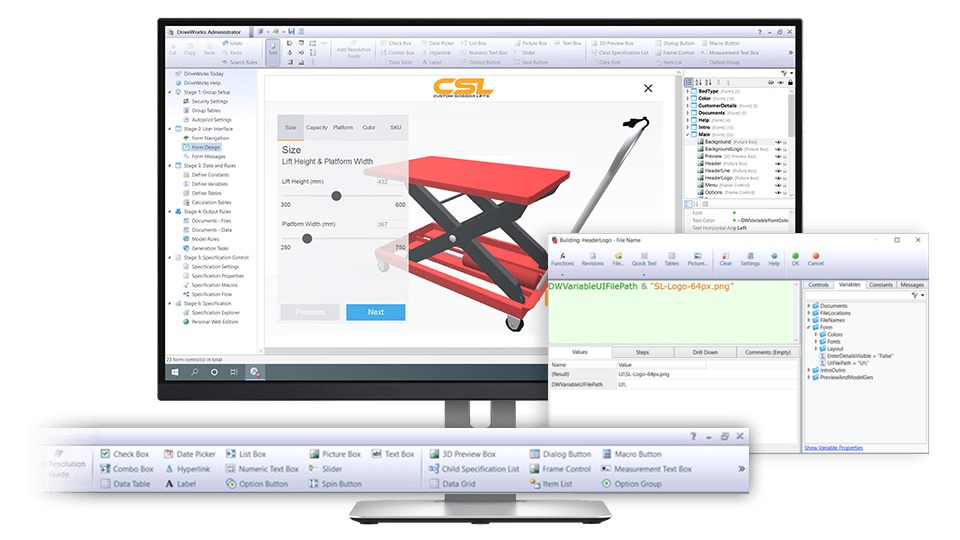
DriveWorks is a design-automation and CPQ platform built around SOLIDWORKS. It uses engineering rules to configure products, price them, and generate quotes.
Features
DriveWorks automatically produces order-specific SOLIDWORKS models, drawings, and manufacturing documents. It also uses real-time 3D previews, which means your configurations can be built and reviewed before a quote is finalized.
Who is it best for?
DriveWorks is best for engineer-to-order manufacturers already using SOLIDWORKS. Suitable for products that are redesigned with new dimensions or combinations for nearly every order (e.g., machinery, HVAC, or architectural products).
Pricing
DriveWorks uses modular licensing. DriveWorks Xpress ships free with SOLIDWORKS, DriveWorks Solo covers entry-level automation, and DriveWorks Pro adds full CPQ and web configuration.
What users say
Pros: Users like that DriveWorks can automate not just CAD files, but also Word, Excel, database, and manufacturing documents generated straight from configurations. This cuts down on manual engineering rework for repetitive, but unique, products.
Cons: However, users say it comes with a steep learning curve and getting real value out of advanced setups requires extensive knowledge of both engineering rules and SOLIDWORKS itself.
6. Tacton CPQ for complex engineer-to-order manufacturing
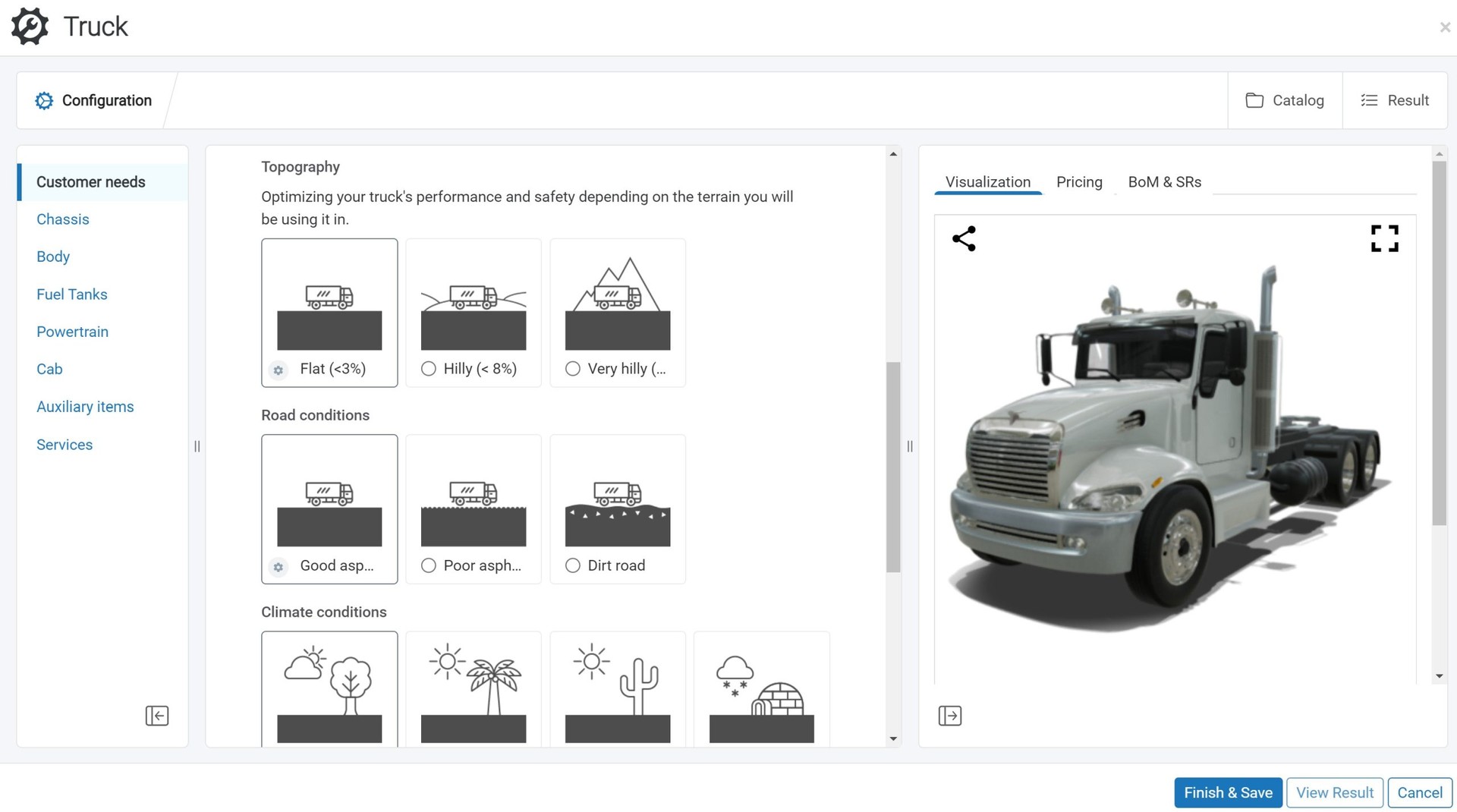
Tacton CPQ is built for large manufacturers where product complexity is the core sales and engineering challenge. It connects customer requirements with product rules, pricing, visualization, and engineering data so sales teams can configure technically feasible products without asking engineers to validate every quote manually.
Features
Tacton CPQ uses constraint-based configuration, which is a more advanced approach than the rule-based configuration logic most CPQ tools rely on.
This keeps every possible combination technically valid, manufacturable, and correctly priced, even across very large product lines. It also automatically generates CAD drawings so parts don’t need to be remodeled by hand for every order.
Guided selling allows sales reps, dealers, and customers to answer needs-based questions, instead of working directly with engineering specifications. Tacton uses these answers to select suitable components and create the appropriate configuration, price, bill of materials, and proposal.
The platform also provides real-time 3D visualization, which helps users understand how a product changes when they select different options.
Who is it best for?
Tacton CPQ is well-suited for established engineer-to-order and configure-to-order manufacturers. It’s a good choice if you manufacture highly configurable industrial products with thousands of possible options, dependencies, and engineering rules (e.g., machinery, heavy vehicles, or industrial equipment).
While Tacton is a good choice for complex products, implementing and using the software requires strong internal IT support. It also comes with a steep learning curve and requires ongoing maintenance. If you’re not manufacturing highly complex products, there are more practical and affordable CPQ tools available.
Pricing
Tacton CPQ doesn’t publish its pricing. It uses a subscription billing model that scales with the number of users and modules selected. Pricing is also determined by product complexity, integrations, and implementation scope.
What users say
Pros: Users like that Tacton CPQ can handle complex configurations built from many rules and dependencies. Many also cite its strong guided selling, visualization, and pricing optimization.
Cons: Many users point out that the UI could be more intuitive. Users also say it takes real training and a strong internal IT team to get the most out of the platform. Given the learning curve, users suggest starting with a narrower use case, like generating sales proposals, and expanding over time into a full configure-to-order workflow.
7. Acumatica for multi-entity manufacturers
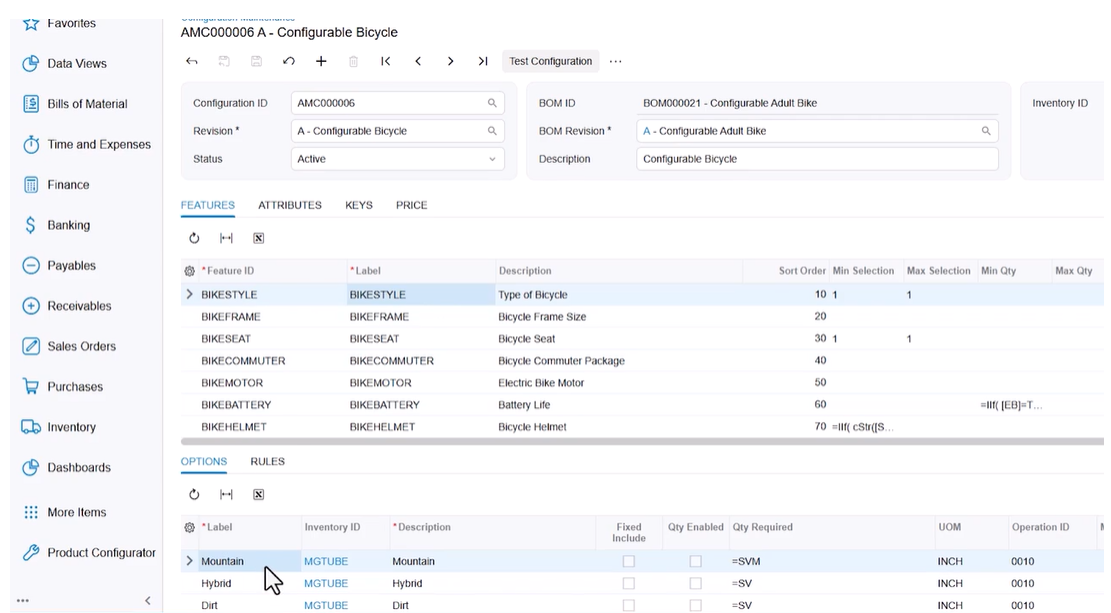
Acumatica is a highly customizable, general-purpose ERP system used across industries including manufacturing, distribution, construction, and retail. Its Manufacturing Edition includes a rules-based product configurator that functions as a built-in CPQ tool.
Features
Acumatica’s product configurator uses predefined rules to automatically generate a unique bill of materials and routing for each configuration. The system calculates pricing accordingly, and configurations can then be used for sales orders and production orders.
Acumatica stands out for its multi-entity support. It lets you run multiple subsidiaries, business units, or locations from a single system, with consolidated data and reporting across the whole organization. This makes it especially useful for manufacturers who need configuration, pricing, and production data to stay consistent across multiple entities.
However, because the configurator lives inside a customizable, multi-industry ERP, adapting it to manufacturing can be time-consuming and often requires outside consultants. On the other hand, a manufacturing ERP with a built-in CPQ provides clear, out-of-the-box workflows and faster implementation.
Who is it best for?
Acumatica is best for manufacturers operating across multiple entities, subsidiaries, or locations that need one system to keep configuration and data aligned. It also suits companies that mix manufacturing with distribution, since this often comes with multi-entity complexity. It’s less suitable if you’re a small, single-site manufacturer looking for affordable, self-service setup.
Pricing
Acumatica’s usage-based pricing depends on modules required and implementation needs. The Manufacturing Edition carries the highest base licensing of any Acumatica edition, typically $25,000 to $100,000 per year before implementation. Actual quotes vary significantly.
What users say
Pros: Users consistently praise Acumatica’s customization capabilities, inventory and accounting tools, and unlimited-user licensing model. This makes it a strong choice for growing, multi-entity organizations that need one system to adapt to different parts of the business.
Cons: The most common complaints with Acumatica are regarding setup. Users point to challenging implementations, a real learning curve, and significant setup and license costs.
8. NetSuite CPQ for manufacturers already on NetSuite
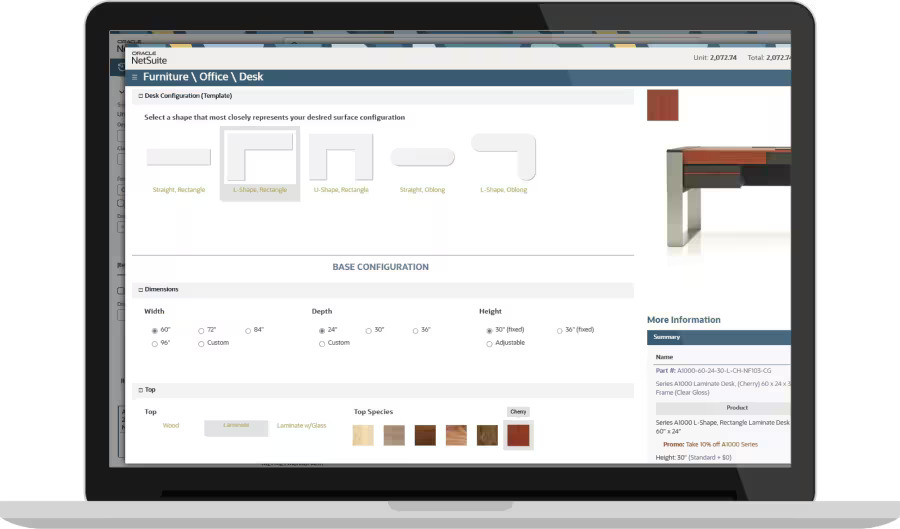
NetSuite CPQ is a rules-based configure, price, quote module. Because it’s built into NetSuite, product configuration and quotes stay in the same environment as information on customers, orders, inventory, and financials.
Features
Using NetSuite CPQ, sales reps can walk a customer through a valid product setup, see a 2D preview update as choices are made, and get accurate pricing pulled directly from the system’s live data.
Confirmed configurations are automatically converted into quotes and later into work orders with BOMs and routings. The entire configure, price, quote process happens without leaving the NetSuite ecosystem.
Who is it best for?
NetSuite CPQ is a good fit for manufacturers already using (or planning to implement) NetSuite as their core ERP. It’s less suitable for small to mid-sized manufacturers that need an affordable standalone configurator.
Pricing
NetSuite CPQ doesn’t share its pricing publicly, as it varies significantly depending on customer needs. However, customers must pay for the core NetSuite license plus modules and users, with NetSuite CPQ sold as an additional module and a separate implementation fee.
What users say
Pros: Reviews of the earlier Verenia product, on which NetSuite CPQ is built, praised accurate handling of complex configurations and fewer quoting errors. In addition, by using NetSuite CPQ, all product configurations are based on live NetSuite pricing, inventory, and customer data.
Cons: The most common complaints are about implementation complexity and the cost of NetSuite as a whole.
What is CPQ software?
Configure, Price, Quote (CPQ) software is a tool used for creating and distributing quotes for customizable products.
Sales teams can use CPQ software to configure products based on client requirements, determine selling prices based on those configurations, and create professional quotes that can be easily sent to customers. Some CPQ tools are customer-facing, which means customers can do the configuration, pricing, and quoting on their own.
The benefit of CPQ software is that it applies product rules automatically, so you don’t have to work through every product customization or cost calculation by hand. When sales teams or customers configure a product, they can see feasible product options and accurate pricing immediately.
What to consider when choosing CPQ software
There are many different CPQ tools available, all with specific use cases. When trying to find the right CPQ software for your business, consider the following:
Level of configuration needed
Different CPQs are built to handle different levels of complexity. For example, if you offer custom-engineered products rather than standardized ones, you may need CPQ software with features like 3D visualization and automatic CAD generation.
On the other hand, if your products have more straightforward configuration options (color, size, materials), then basic CPQ software may be sufficient. A CPQ built into manufacturing ERP software trades some of that depth for a direct connection to inventory, production, and purchasing.
Avoid CPQ software that has more configuration than you need, because this might add unnecessary complexity and cost.
Who will use the software?
Understanding who will be using the software and what steps they will take (configuration, pricing, quoting) is essential when trying to find the right fit for your business. Will sales reps configure products based on customer requirements or will clients configure products on their own through a customer-facing CPQ tool?
Standalone vs. integrated CPQ
A standalone CPQ tool typically works well on its own, but it doesn’t know what your business can actually build. Pricing and configuration rules live separately from your real inventory, capacity, and production schedule. This means a quote that looks valid can still be unrealistic once it reaches the shop floor.
When CPQ software is built into an MRP system, it’s integrated with all aspects of production. Configurations are made according to accurate bills of materials, quotes are based on up-to-date material costs, and orders are only placed if the system shows you have the materials, labor, and workstations available to complete them.

How we rank these tools
We’ve designed this list around how manufacturers actually approach CPQ software. Some businesses need CPQ mainly for customer-facing product configuration, like an ecommerce brand personalizing products online. Others need it for fast, accurate estimating on complex, one-off parts. Others still, especially small manufacturers, want configuration and quoting connected directly to their production planning, inventory, and purchasing.
We looked at configuration depth, ease of implementation, pricing transparency, and how well each system connects (or doesn’t) to broader manufacturing operations.
We deliberately included software from different corners of the market rather than stacking the list with near-identical, directly competing CPQ tools. That way, the comparison is more useful, and manufacturers can find a CPQ tool that matches their specific business, rather than picking from a list of interchangeable options.
Frequently asked questions (FAQ)
CPQ pricing varies according to configuration depth, number of users, and whether the tool is standalone or part of a broader system. For example, MRPeasy is a manufacturing ERP with a built-in CPQ, billed on a per-user per-month basis. Standalone CPQs for complex engineer-to-order manufacturing, like Tacton, usually have custom pricing based on product complexity and implementation scope. Add-ons, integrations, and training can also add unexpected costs.
Not always. Some manufacturing ERPs come with a built-in CPQ directly tied to BOMs, inventory, production, and purchasing, so quotes reflect what can actually be built. Standalone tools become necessary for specialized features an ERP doesn’t offer, such as DriveWorks’ CAD-based configuration or Kickflip’s 3D customer-facing configurator.
If you’re a small manufacturer, look for CPQ features that match your industry requirements and production needs. For example, if you’re a job shop quoting custom, one-off parts, you might want Paperless Parts for its fast, accurate estimating. If you want quotes tied to real material costs and production capacity, you might be better off with a CPQ built into a manufacturing ERP, like MRPeasy.
You might also like: Best Inventory Management Software – Top Picks For SMEs 2026
Get manufacturing know-how delivered to your inbox!