Batch Records in Manufacturing: What to Track and How ERP Helps
A batch record is the documented history of one batch of goods. Most manufacturers run into the term through compliance and never move it out of that box. That’s a mistake. The record pays off whether or not an auditor ever comes asking.

What is a batch record?
A batch record, also called a batch manufacturing record (BMR), is the documented history of one specific batch of goods. It captures what was made or procured, from which materials, by whom, on which equipment, and under what conditions. It’s a record of what happened, not a plan for what should happen.
Batch records originate from regulated manufacturing processes such as pharmaceutical manufacturing, biotech, food and beverage, cosmetics, and chemicals. Good manufacturing practices dictate much of what the record must contain, and a regulator can ask to see it.
The information isn’t industry-specific, though. A machine shop running brackets still pulls specific material lots, runs specific machines, and assigns specific operators. So does a coatings company blending a tank. The data exists whether anyone writes it down or not. A batch record is the data compiled into a report, when needed.
Batch record example
A small food manufacturer runs 400 jars of hot sauce as batch HS-2607. The batch record for that run shows:
- The production order and the batch number, HS-2607.
- The peppers, vinegar, and salt consumed, each with its lot number and supplier.
- Quantities planned against quantities actually used, including the six jars lost to bad seals.
- The kettle it cooked in, the line it filled on, and the operators on shift.
- The pH check at fill, the result, and who approved it.
- The finished jars, their best-before date, and the customers who received them.
A year later, that record still answers a question the spec sheet can’t: what happened to this batch, on this day?
Batch record vs. master batch record
Bach records are constantly confused with master batch records, and the difference is worth stating precisely.
A master batch record (MBR) is a template. It’s the approved full recipe for a process: the bill of materials, the routing, the equipment list, the SOPs, the in-process controls to run, and the yield to expect. One MBR governs every batch of creating a product.
A batch record is the completed history of one execution of that template. Which lots actually went in. Who actually ran it. What the tests returned. What yield came out. The MBR is the blueprint while the batch record is the as-built. The two only work as a pair. Without an approved MBR, there’s no baseline to measure against, and a deviation becomes a number nobody can evaluate.
BMR, MBR, BPR, EBR: sorting out the acronyms
The terminology varies, so it’s worth laying out plainly.
- Batch manufacturing record (BMR). The batch record itself. The history of one completed batch.
- Batch production record (BPR). The same document under a different name, common in FDA-regulated contexts.
- Master batch record (MBR). The approved template a batch is supposed to follow. Also called the master production record or master formula.
- Electronic batch record (EBR). A batch record created and maintained in software instead of on paper.
Usage varies by industry, by company, and sometimes by department. A supplier’s BMR may be your BPR. When an auditor or a software vendor uses one of these acronyms, confirm which document they mean.
Batch records vs. lot tracking
Lot tracking and batch records get used almost interchangeably, and they’re not the same thing. Lot tracking follows materials by number; a batch record captures how a batch was actually made. You want both, but it helps to know which does what.
Lot tracking assigns a lot or batch number to materials and products, then follows those numbers through receiving, storage, production, and shipping. It answers two questions: where did this material go, and where did this product come from?
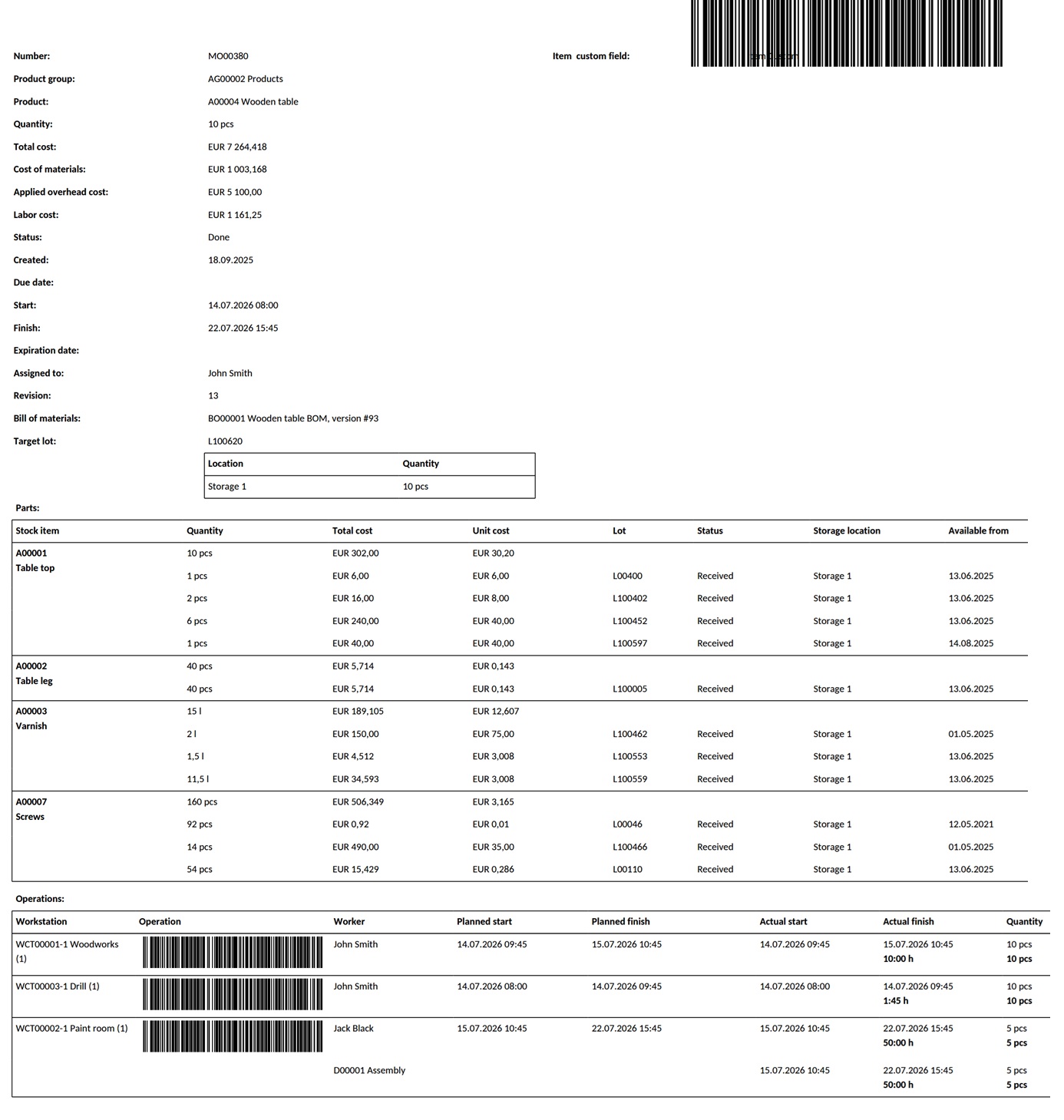
A batch record starts with that same lot data, but it keeps going. It pulls in the operations performed, the equipment and workstations used, the operators on the job, the process parameters, and the quality checks and their results, then ties all of it to one batch number. The lot numbers tell you what moved. The batch record tells you what happened. So the two aren’t competing, and they aren’t the same thing either. You can run solid lot tracking and still have thin batch records if the operations, conditions, and quality results never get captured anywhere. But it doesn’t work the other way. Without lot numbers underneath it, a batch record can’t tell you which supplier’s material went into which finished lot, which is the one thing you’ll need most when something goes wrong.
What should be included in a batch record?
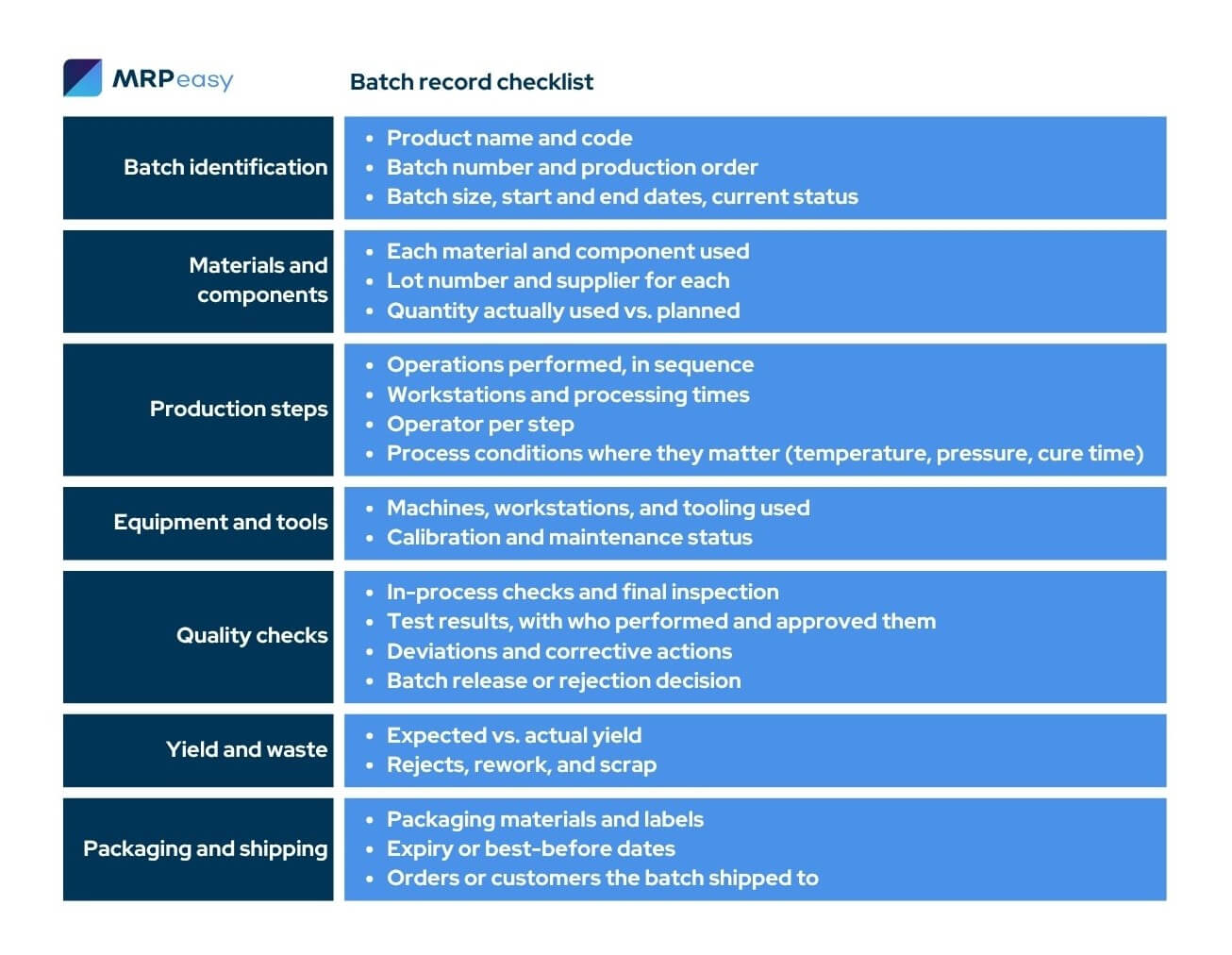
There’s no single legal template for a batch record outside regulated industries, but a useful batch record answers seven questions about the batch. What is it, what went into it, how was it made, on what equipment, did it pass, what did it yield, and where did it go? Here’s what each of those takes.
- Batch identification
Product name and code, batch number, production order, batch size, dates, and current status. This is the handle you grab the record by. If the identification is wrong or missing, everything else in the record is still accurate, but impossible to find when you need it.
- Materials and components
Every raw material and component consumed, with its lot number, supplier, and the quantity actually used rather than the quantity planned. For materials with a shelf life, the record is also how you prove the batch was made with in-date stock rather than something past its expiry.
This is what makes backward traceability possible: a year from now, this line is how you find out whose resin went into the batch that failed.
- Production steps
The operations performed, in sequence, with workstations, processing times, and the operator who ran each one. Where process parameters affect the outcome — temperature, pressure, cure time, mix speed — they get recorded here, because “we followed the usual settings” is not an answer when a batch comes out wrong.
- Equipment and tools
The machines, workstations, and tooling used, with references to their calibration and maintenance status. If a gauge was out of calibration or a machine was overdue for service, the batches it touched are the ones you’ll want to check first.
- Quality checks and inspections
In-process checks, final inspection, and quality control testing, with the results and who performed and approved them. Any deviation from the standard goes here too, along with the corrective action taken and the batch release or rejection decision.
- Yield, waste, and costs
Expected yield against actual yield, plus rejects, rework, and scrap. This is where a batch record stops being a quality document and starts being a cost document: the gap between what a batch should have consumed and what it actually consumed is money, and most manufacturers never see it.
- Packaging and shipping
Packaging materials and labels, expiry or best-before dates, and which orders and customers the finished batch shipped to. This is the part of traceability most manufacturers skip, and it’s the one you need when a problem surfaces after the product has left the building.

The importance of accurate batch records
A complete batch record pays off in four places, and compliance is only the most obvious one.
Traceability and recalls
Manufacturing traceability runs in two directions, and a complete batch record supports both. Backward, you start from a finished product and find the exact material lots and suppliers that went into it. Forward, you start from a suspect raw material lot and find every batch it entered and every customer who received one.
The difference this makes is scope: the shop with good records recalls only the three batches that used a bad lot, instead of pulling a quarter’s worth of product to be safe.
Quality control and continuous improvement
A single inspection tells you whether one batch passed. A stack of batch records tells you something about product quality no single inspection can: that a particular supplier’s material keeps producing marginal results, that one machine runs more scrap than the others, that yield drops on a certain shift.
The record turns a vague sense that something changed into a specific, checkable answer, because the evidence was captured batch by batch while it happened.
Regulatory and audit readiness
For regulated manufacturers, batch records are a regulatory compliance obligation, not an option. Good manufacturing practices, 21 CFR Part 11, audit trails, and a documented QMS all assume the records exist and hold up under inspection. But the audit doesn’t only come from a regulator. Customers audit suppliers, insurers ask questions after a claim, and a serious buyer wants to see your quality system before signing.
Records that are ready for a regulator are ready for all of them, whether or not anyone ever requires them of you.
Cost and process improvement
A batch record is also the one place where expected cost meets actual cost. Standard costing assumes a batch consumes a set amount of material, labor, and machine time; the batch record shows what it actually consumed. The gap between the two is where quoting goes wrong and margin is lost.
Most manufacturers only find it when they start comparing batches, which is exactly what an accurate record lets them do.
Paper batch records, spreadsheets, and electronic batch records
The format a batch record lives in decides how much of the information gets captured, how fast you can find it later, and how much you can trust it. Most manufacturers move through three stages: paper, spreadsheets, and software.
Paper
Paper is where most batch records start, and for a small operation with short BOMs and a handful of SKUs, it can be enough. An operator fills in a traveler as the batch runs, and the record is done when the batch is.
The trouble shows up later, when you need to read it. Handwriting is missed or misread, pages go missing, and there’s no way to search a filing cabinet for every batch that used one supplier’s lot. Paper also has no built-in audit trail, so a value changed after the fact looks exactly like one recorded on the line. It works right up until the day you need to trace something fast, which is the one day it matters.
Spreadsheets
Spreadsheets are the natural next step, and a well-built one is a real improvement. Records become legible and searchable, a template can enforce some consistency, and formulas can total yield and flag a number that lands out of range. A lot of capable manufacturers run their entire batch history this way, and it works far better than the filing cabinet did.
The ceiling is data integrity. A production planning spreadsheet doesn’t stop someone from overwriting a cell, keeping a private copy, or filling in yesterday’s run from memory this morning. It also doesn’t connect to inventory, so the lot numbers in the sheet and the lot numbers on the floor can drift apart. Additionally, nothing records who changed what, or when, so the history is only as trustworthy as everyone’s discipline on their busiest day.
Electronic batch records
An electronic batch record (EBR) is a batch record created and maintained inside manufacturing software as the batch runs, rather than written down and typed up afterward. This is the stage that removes the manual step, and with it most of the ways a record goes wrong.
Because the EBR is generated from the actual production order, it captures lot numbers as materials are issued, timestamps each step as it’s reported, and holds an audit trail no one has to maintain by hand. Operators report against the job at the workstation instead of transcribing it later, so the record reflects what happened while it’s happening.
The honest cost is that an EBR asks for the data discipline up front, on the floor. In exchange, the production history is captured automatically.
Common mistakes manufacturers make with batch records
Most bad batch records fail the same few ways, and every one of them is a habit rather than a hard problem to solve.
Filling in the record after the fact. The batch runs, and someone writes it up at the end of the shift from memory, or worse, records what was supposed to happen instead of what did. A record built from memory isn’t a production history, it’s a guess. Capture it as the batch runs, because you can’t trust it later.
Tracking materials in but not products out. Plenty of shops log every lot they consume, and never record which finished batches went to which customers. That’s half a traceability system. It answers what went wrong but not who received it, which is the half you need when you’re deciding how far a recall has to reach.
Treating deviations as something to avoid reporting. If logging a deviation means a hassle or a lecture, people stop logging them, and the record turns into a story where nothing ever went wrong. A batch history that only records the good days is worse than none, because it looks trustworthy and isn’t.
Keeping records nobody ever reads. A batch record nobody reads is just work you did for nothing. The value is in reading them, comparing them across batches, and noticing the supplier whose material keeps drifting or the machine that keeps running scrap. However, even if you have no use for a record as production happens, a manufacturing software with built-in traceability still records all the data, allowing the generation of records later if necessary.
Letting the record live in pieces across departments. Production keeps its numbers, quality keeps its results, the warehouse keeps its lot data, and the manufacturing documentation that should be one record is scattered across three systems that don’t talk. If the pieces never come together, you don’t really have a batch record. You have the raw material for one.
Batch record checklist
Use this as a starting template and adapt it to what you make. Not every line applies to every product, but a complete batch record generally covers all seven areas.
How manufacturing software helps maintain batch records
Everything above is easier when the record isn’t a separate job. A manufacturing ERP with built-in traceability builds batch records automatically out of the work the shop, purchasing, and inventory are already doing, and connects them to everything a record is supposed to link to.
The record builds itself. When production runs against a manufacturing order, the system already knows the BOM, the routing, and the materials issued, so the batch record assembles as the order is reported. No one maintains a parallel record by hand.
Lot numbers link both ends. A manufacturing ERP assigns lot numbers to materials on receipt and to finished goods on completion, tying both to the order between them. That turns traceability into a query: pick a material lot and see every batch it entered, or pick a batch and see every lot inside it.
Everything lives in one system. Forward traceability reaches the customer only if sales are integrated with production or purchasing, which is the link a spreadsheet can’t make. Report a problem with a shipped batch, and the path back to the material lot and out to every other customer who got one is already there.
Compliance is built in. Timestamped audit trails, EBRs, and printable reports are a click away in a manufacturing tracking system, not a separate scramble at audit time. Manufacturers in more highly regulated sectors sometimes layer on dedicated manufacturing execution system (MES) or QMS tools, but for most small and mid-sized shops, a manufacturing ERP covers the whole chain in one place.
Key takeaways
- A batch record is the documented history of one specific batch, showing what was produced, which materials and lots were used, who performed the work, which equipment was involved, and what conditions and results were recorded.
- A master batch record defines how a product should be made, while the completed batch record documents what actually happened during one production run.
- Complete batch records support backward and forward traceability, helping manufacturers identify affected materials, batches, orders, and customers without recalling more products than necessary.
- Batch records should cover identification, materials, production steps, equipment, quality checks, yield, waste, packaging, and shipping information.
- Paper and spreadsheets can work for smaller operations, but they rely heavily on manual entry and make audit trails, data integrity, and rapid traceability more difficult.
- Manufacturing ERP software can automatically generate electronic batch records from production, inventory, purchasing, quality, and sales data, reducing administrative work while improving compliance, cost visibility, and recall readiness.
Frequently asked questions (FAQ)
An electronic batch record, or EBR/eBMR, is the digital production history of a specific batch. It captures information like materials and lot numbers, production steps, operators, equipment, quality results, deviations, yield, and timestamps as the work is performed.
Batch record retention periods depend on the industry, jurisdiction, product shelf life, customer requirements, and the manufacturer’s quality management system. For example, US pharmaceutical regulations generally require relevant batch records to be retained for at least one year after the batch’s expiration date, while certain products without expiration dates have different requirements. Manufacturers should establish a documented retention policy that complies with all applicable regulations and contracts.
Batch manufacturing records are created from information recorded by the people involved in producing and controlling the batch. Operators typically document production steps and material use, while supervisors and quality personnel review results, deviations, and release decisions. In an integrated manufacturing system, much of the record can be generated automatically from production, inventory, and quality transactions.
Yes. Small and mid-sized manufacturers can implement electronic batch records using a modular manufacturing ERP, MES, QMS, or another connected production system rather than a large enterprise-wide platform. The important requirement is that the system reliably connects materials, lot numbers, production activities, quality checks, and finished batches without recreating the record manually across disconnected tools.
You may also like: Inventory Tracking – An Essential Guide for SMEs
Get manufacturing know-how delivered to your inbox!