Order Management: What It Is, How It Works, and Why It Breaks Down
Managing orders can be easy when your operations are small. But when you reach a certain point, order management can become too complex to be done manually. This is where digital order management solutions are essential.

What is order management?
Order management is the process of handling customer orders through their entire lifecycle, including everything from order placement and shipping to returns and optimization. Effective order management isn’t just about tracking orders. It means connecting every employee, process, and data point, so that orders are aligned with all aspects of a business.
How the order management process works
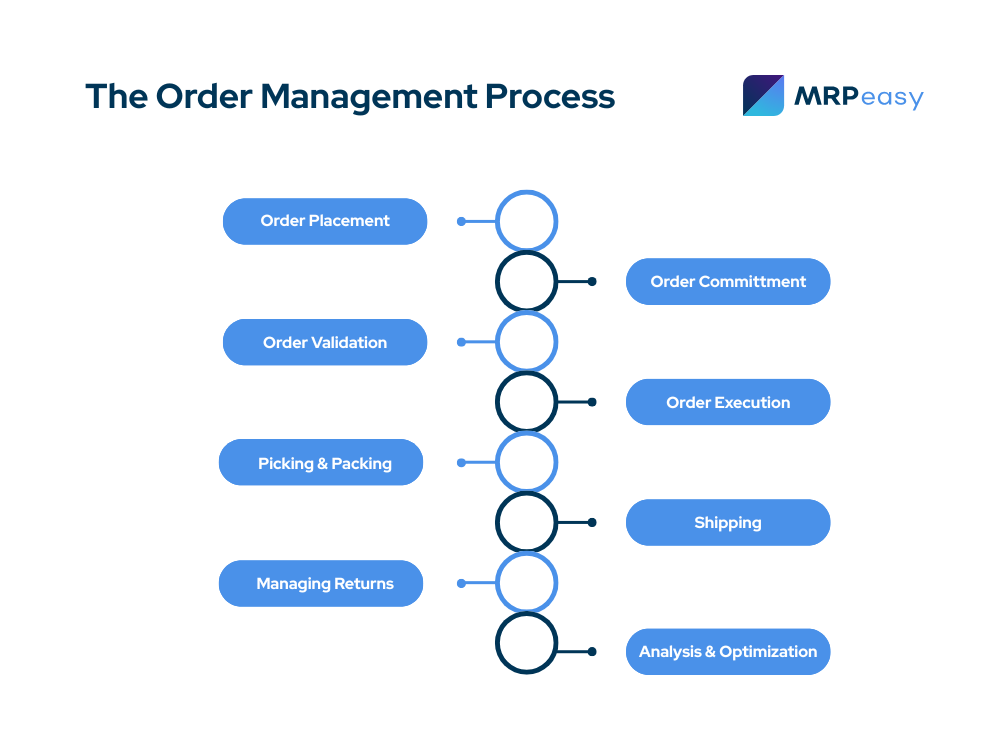
Order management looks different for every business, depending on the type of company, size, and industry. However, your order management process should involve these key steps:
1. Order placement
Order management begins when a customer places their order (also called order capture). This can occur through many different channels. For e-commerce stores, order capture typically happens through a webshop. For manufacturers, customers might place their orders via email. Regardless of how an order is placed, what’s important is that it’s recorded in a centralized system. This makes it easy to track and manage orders throughout the entire order lifecycle.
2. Order commitment
Next is order commitment. Before accepting an order, you need to know whether you can actually fulfill it. Otherwise, you may end up promising a customer you can fulfill an order, but later having to tell them their product is unavailable or their shipment will be delayed.
In some cases, committing to an order just means checking inventory and confirming product availability. Other times, it’s not so simple. For example, if you’re a manufacturer, you may need to confirm you have the raw materials, components, and production capacity needed to create the product before committing to the order.
3. Order validation
To make sure orders are fulfilled correctly, all order information must be validated. This means confirming all order details are correct, including:
- Customer information
- Product specifications
- Quantity
- Price
- Shipping costs
- Payment terms
- Applicable taxes
Validation is crucial because it prevents issues down the road. For example, if you skip this step, you might end up with incorrect product specifications. Then, production will be based on the wrong information, the finished product won’t meet customer requirements, and the customer returns the product to be reworked. Just by failing to validate the order, business processes have been disrupted and the customer experience has suffered.
4. Order execution
After order details have been validated and item quantities, prices, and delivery dates are confirmed, the order can be carried out. This step is where actions are triggered to fulfill the order. This means either reserving available stock for picking or creating purchase and manufacturing orders so finished products can be made and allocated to the customer order.
5. Picking and packing
During the picking stage, warehouse staff “pick” allocated products from inventory to fulfill the order. Warehouse workers typically rely on digital picking lists to streamline this step. Inventory management software is also critical, as it can show real-time inventory updates as items are picked.
Packing is where products are prepared for shipment. This means packaging products to protect them in transit, confirming all products are included in the shipment, and including any documentation that’s needed.
6. Shipping
When shipping an order, a carrier is chosen either by the customer or the company fulfilling the order. The company also creates shipping labels, packing slips, and customs documents (if necessary).
Once the order is shipped, the customer receives tracking information. Shipments should be monitored and customers should receive notifications of any delays. It’s important to communicate with customers at every point of the delivery process and have a solid system in place for handling lost shipments, delays, damaged goods, or failed delivery attempts.
7. Managing returns
Being able to manage returns effectively requires a clear return and refund policy. This gives peace of mind to customers and makes it easier for you to process returns. Returned products need to be received and inspected, and you’ll need to decide whether they need to be restocked, refurbished, or disposed of.
Having solid workflows in place can help you process returns quickly, which keeps customers happy and operational disruptions to a minimum. It’s also important to consider how returns affect your inventory and your financials. For example, returned items can distort available inventory, and refunds can negatively impact cash flow.
8. Analysis and optimization
Analysis and optimization can help you improve your order management process and your operations as a whole.
For example, by tracking on-time delivery metrics, you can see where you’re offering unrealistic lead times and then adjust lead times so future delivery dates are more reliable. Another useful metric is return rate, which is the percentage of returned orders. This metric can help identify reasons orders are being returned, and make improvements accordingly.
How order management works for different business models
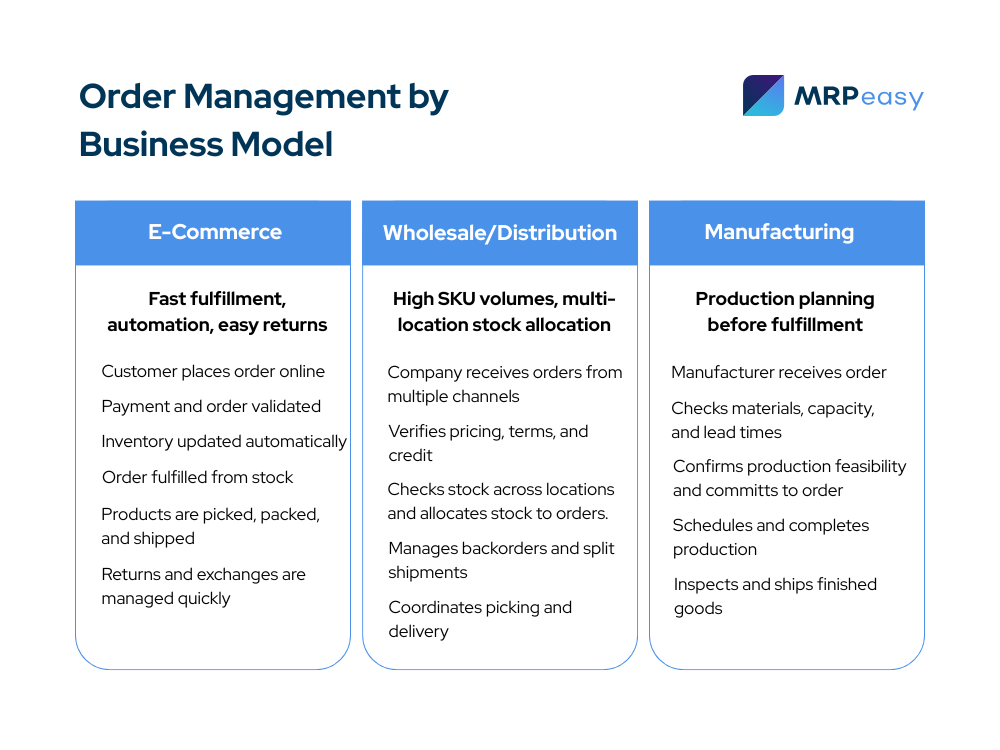
To see how order management differs across business types and industries, let’s look at how e-commerce, manufacturing, and wholesale/distribution companies manage orders.
How e-commerce companies manage orders
Online retailers typically deal with large order volumes, which means orders need to be fulfilled quickly and accurately. To make the process as efficient as possible, order placement is usually automated.
A customer places an order, enters their payment details, and payment is authorized. The company’s webshop should reflect updated inventory levels to prevent stockouts or overselling. After the order is placed, it must be validated. This might include:
- Verifying product and pricing
- Confirming customer details and addresses
- Screening for fraud
After validation, the order is routed to its fulfillment location, whether it’s a main warehouse, third-party logistics provider (3PL), or drop-ship supplier. Orders are picked, packed, and prepared for shipment as quickly as possible, and customers receive tracking information and timely updates regarding their shipment.
Managing returns is a big part of order management for e-commerce companies. There must be efficient systems in place for approving and tracking returns, issuing refunds, and processing exchanges. If this step isn’t carefully managed, both customer trust and profit margins can quickly erode.
Order management in distribution/wholesale
Distribution and wholesale companies handle an enormous number of SKUs and have many different suppliers and customers. They also sell B2B, which means pricing, delivery schedules, and credit terms vary from order to order. Customers place orders through multiple sales channels, including customer portals, sales reps, or directly through email. After an order is placed, the wholesaler or distributor verifies key details, such as:
- Customer information
- Pricing
- Agreed-upon discounts
- Credit limits
- Delivery terms
Multi-location inventory management is a common challenge with distributors and wholesalers, and software is needed to compare incoming sales orders with available inventory across multiple warehouses. Deciding how to allocate limited stock to a large number of customers is another common challenge. As a result, backorders, partial shipments, and split deliveries are often used.
Once orders are confirmed and items are booked from inventory, orders can be grouped for picking; methods like batch picking, zone picking, and case picking are commonly used to make picking as efficient as possible. When shipping products, there needs to be tight coordination with carriers, clear documentation, and real-time visibility of shipments for the company and its customers.
Order management for manufacturers
Order management looks different for manufacturers. It’s not always as simple as checking inventory availability, picking items from stock, and shipping them to customers.
If you’re a manufacturer, your customers might request specific quantities, configurations, and delivery requirements when they place an order. And if you don’t have an item in stock, you’ll need to produce it yourself. This means checking if you have enough raw materials or components available to make the product, then reviewing production schedules, lead times, and available production capacity. Only then can you commit to the order.
If you need to manufacture the end product, a customer order is converted into one or more manufacturing orders (and sub-assemblies if required). Manufacturing orders are prioritized, scheduled, and released to the shop floor, and production moves through defined operations. Work-in-process (WIP) can be monitored using WIP tracking software to catch delays or issues early on.
Completed products are inspected and booked to inventory. They are then picked, packed, and shipped according to agreed-upon delivery dates.
Signs your order management process is breaking down
Here are some tell-tale signs your order management process isn’t functioning well.
Over-promising delivery dates
This is one of the most obvious signs your order management system is breaking down. If you’re making promises you can’t keep, this shows that you don’t have the right systems in place to check inventory or production capacity when orders come in.
The solution is to have a system that ties customer orders directly to inventory, production capacity, and lead times. This way, you can commit to orders based on real data, not just assumptions.
Constant rescheduling and firefighting
If you lack a system that connects order data across all departments, your order management process might look something like this:
Sales might commit to an order without seeing current production capacity, then production schedules have to be changed to accommodate these orders. In addition, purchasing has to place rush orders to make up for material shortages.
Just by a lack of coordination, teams are constantly having to put out fires. This leads to all kinds of problems, including delays, inefficient production, and dissatisfied customers.
Manual workarounds become common practice
Another sign your order management process needs improvement is if workarounds become common fixes. Even if manual processes like communicating delivery dates through email or relying on Excel for production planning are holding for now, they often hinder scalability. The solution is to have a standardized order management process in place, rather than relying on experience and memory to hold everything together.
Order management using ERP software
Many businesses use a separate order management system to manage orders. An OMS is software typically used by sales teams to manage orders. While it comes with benefits, it still operates separately from other departments.
For manufacturers, Manufacturing ERP software with a built-in order management system serves as a centralized database for all order data. This ties your orders directly to all departments, including production, inventory, and purchasing. Here’s how ERP software such as MRPeasy can help you manage orders.
Order placement
Manufacturing software makes it easy to estimate costs and create quotes based on existing inventory and production schedules. With ERP software, you can receive orders via integrations with e-commerce platforms or other CRM tools. You can also enter them manually into the software. The software serves as a centralized place to store order data, which creates a reliable foundation for the rest of the order management process.
Order validation and commitment
A manufacturing ERP makes validation and commitment simple. First, it makes it easy to see if you can actually commit to an order, based on current stock, production capacity, and lead times. This makes it so you never have to over-promise on orders. It also lets you review customer details, items, quantities, and due dates related to each order, all within one system.
Order execution and tracking
Manufacturing software connects orders directly to your manufacturing operations, which makes order execution simple and accurate. If items are available, you can book them to an order and inventory will be updated accordingly. If products aren’t in stock, the system can automatically create demand and show you the materials needed to make them.
ERP software lets you create purchase orders to purchase required materials and create manufacturing orders to schedule production. Through BOMs and routings, customer orders are tied directly to materials, production capacity, and the shop floor.
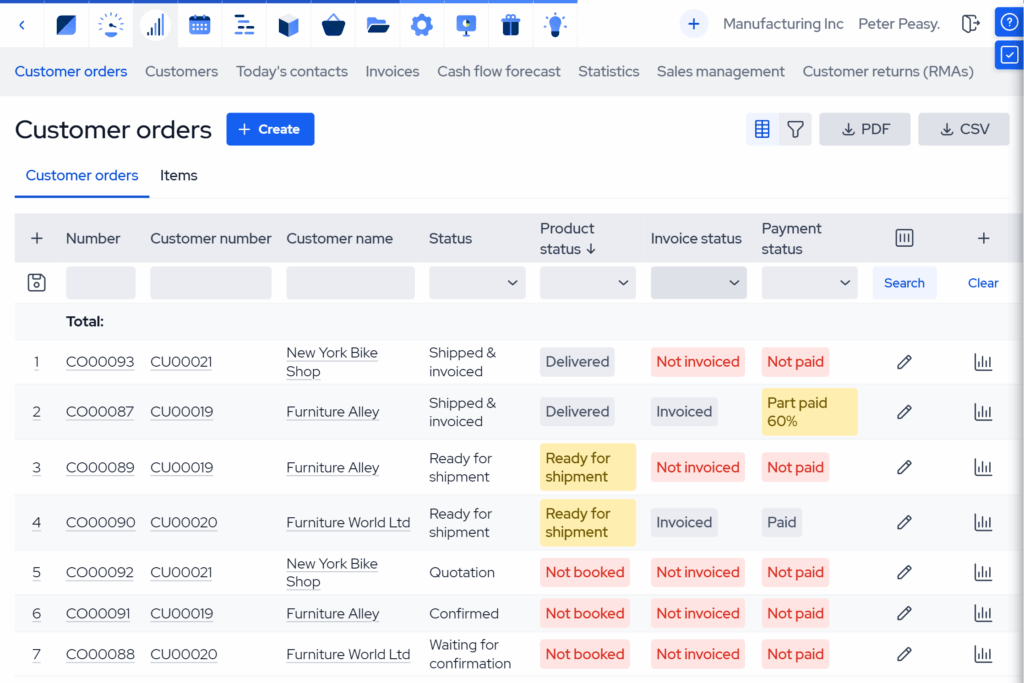
Manufacturing ERPs also have dashboards that let you track order status as orders move through production. The software will show you the status of parts, production, invoices, and payments, and will immediately recognize if you need parts or materials. This makes delays, shortages, and bottlenecks visible before they create problems, and reduces inefficiencies with production.
Picking, packing, and shipping
ERPs also come with inventory management features, which link customer orders directly to inventory. This lets you easily create pick lists based on real-time stock.
Shop floor workers pick items from your warehouse according to generated lists, then mark items as picked using a manufacturing execution system. When items are marked as “picked” the items are removed from stock, the order is considered shipped, and inventory is automatically updated.
Analysis and optimization
Finally, ERP software offers manufacturing analytics to help you analyze and improve your order management process. Because all order, inventory, and production data is stored in one system, decision-making can be based on accurate, real-time data, rather than assumptions.
Through analytics, you can track how quickly quotes and orders turn into delivered products, or compare on-time versus delayed orders to identify delivery issues. If you’re experiencing issues with production, you can view production to identify bottlenecks at specific workstations or operations. You can also use cash flow forecasting to project weekly cash flow based on expected order income and purchase expenses.

Key takeaways
- Proper order validation and commitment are critical. Over-promising usually happens when businesses commit to orders without a clear view of inventory, production capacity, or lead times. Strong order validation and commitment processes, as well as inventory visibility, lead to on-time deliveries. This ensures customer satisfaction and prevents costly rescheduling.
- Order management looks different depending on the business model. Manufacturers must tie orders to materials, production capacity, and scheduling. E-commerce companies must prioritize a fast order fulfillment process, automation, and returns. Distributors and wholesalers face challenges with inventory allocation and customer-specific pricing.
- Over-promising, constant rescheduling, and reliance on manual workarounds are signs that orders aren’t connected to inventory, production capacity, and lead times. A centralized system helps teams commit confidently and operate predictably.
- Modern ERP systems act as effective order management software by serving as a single, centralized source of truth for all order-related data. Orders, inventory, production, and purchasing are all managed within one system, reducing errors and eliminating manual handoffs between departments.
Frequently asked questions (FAQ)
Order management is about managing the entire lifecycle of an order. This covers everything from order entry and availability checks to planning, coordination, and tracking. Order fulfillment is just one part of the order management process. It consists of picking, packing, shipping, and handling returns.
Order management is not the same for e-commerce and manufacturing companies. With e-commerce, products are usually ready to ship, so there’s no need to tie order management with production planning. But for manufacturers, product availability is not always guaranteed. They have to consider whether they have the materials and capacity to fulfil an order, then actually make the product.
Order management usually breaks down when the volume and complexity of orders increase, leading to more delivery dates and inventory movements to keep track of. Without a system to tie everything together, teams lose visibility into what’s available and what’s already been committed. This leads to over-promising delivery dates, constant rescheduling, and unmet customer expectations.
You may also like: Best Order Management Software for Small Businesses
Get manufacturing know-how delivered to your inbox!